
Life Discipline Tracker
Track your day across 23 life areas with 963 ready-made items and your own, get a weighted daily score with streaks, levels and badges, and keep every entry in your browser where nobody else can read it
Guide reviewed 7 October 2026 by Milan Salvi. How we write and correct guides.
Open Life Discipline Tracker →Step-by-step help guide and questions and answers for this tool.
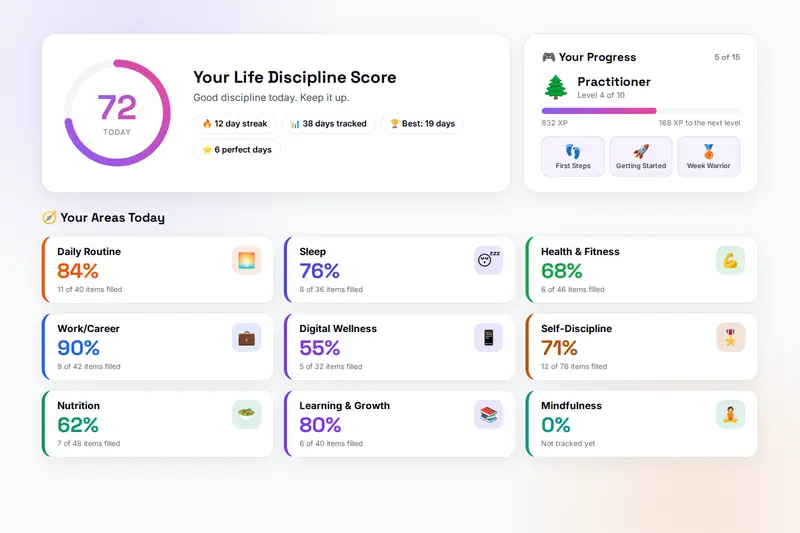
Table of Contents
Overview
The Life Discipline Tracker is a daily habit tracker that runs entirely in your browser and comes filled in. Instead of a blank list to invent habits for, it offers 23 life areas with 963 ready-made items: the morning and evening routine, sleep timing and quality, exercise and body care, meals and water, hygiene, your partner, dating, children and family, friends, work, money, reading and study, goals, mood, mindfulness, faith, screen time, the state of your home, hobbies and rest, how you spent your time, and the self-discipline behind all of it. Each item is a yes/no button, a number with a target, a rating from one to five stars or a time of day, weighted by how much it matters, and you answer only the ones that fit your life.
Every answer is kept at once and feeds a weighted score for the area and for the day, with sleep, self-discipline and the relationship areas counting more than hydration or housework. Saving an entry awards XP, once a day and more for a better score and a longer streak, which carries you through ten levels from Beginner to Legend; fifteen badges mark streaks of a week to a year, perfect weeks and months, thirty early mornings, thirty days of exercise, reading, meditation or screen limits in a row, a strong month of finances, and coming back after a gap. History shows a heatmap of the month and the last seven tracked days; Insights shows weekly averages, your strongest and weakest areas, which areas rise and fall with the rest of your day, your best weekdays and your streak records.
Optional areas can be switched off, a Custom area holds items of your own, and a backup file carries everything to another computer. There is no account and no server: what you record about your sleep, your mood, your money and your relationships lives in your browser's storage on your own device, and the only copy that leaves it is the backup you export yourself.
Key Features
23 Areas, 963 Items
From "Made bed" and "Hours of sleep" to "Phone-free meals" and "Kept promise to self", each weighted critical, high, medium or low. Answer the ones that fit; skip the rest.
Four Kinds of Item
A yes button, a number against a target (less-is-better for screen time and snoozes), one to five stars, or a time of day scored by its distance from the target.
A Weighted Daily Score
The area score averages the items you answered by their weight; the daily score averages the areas you tracked by theirs. Silence never counts against you.
Streaks, XP and Ten Levels
Consecutive tracked days, a run that ended yesterday still counting, perfect-day streaks at 80% or more, XP once a day with a streak bonus, and levels from Beginner to Legend.
Fifteen Badges
Streaks of 7, 30, 100 and 365 days, a perfect week and month, early mornings, exercise, reading, meditation and screen-limit runs, a month of good finances, and Bounce Back.
Heatmap and Insights
A month heatmap, the last seven days, weekly averages per area, strongest and weakest areas, which areas move with your day after fourteen days, and your best weekdays.
Your Own Items
A Custom area for items the catalogue lacks, with pin, reorder, duplicate, edit and delete, scored and weighted like the rest.
Optional Areas and Backups
Partner, dating, parenting, family and spiritual are off until you need them. Export a backup file, import it elsewhere, or reset everything.
How to Use
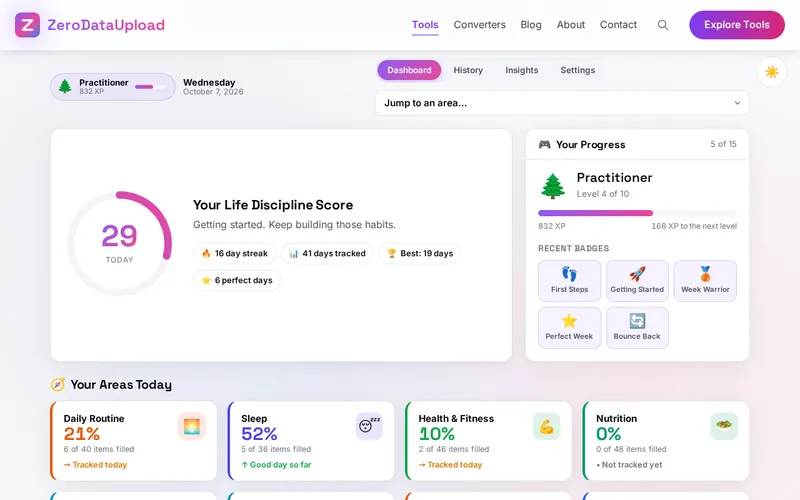
- Choose your areas - Under Settings switch off the areas that do not apply; the optional ones (partner, dating, parenting, family, spiritual) start off.
- Fill in what you did - Click an area card, answer the items that matter with a yes button, a number, stars or a time, and skip the rest. Every change is kept at once.
- Save the entry - Save entry awards today's XP, checks the badges and updates your level; then move to the next area with the arrows or the jump list.
- Add your own items - The Custom area takes a name, a type, an importance and a hint; pin, reorder, duplicate, edit or delete them from the buttons beneath.
- Read the history and insights - The heatmap shows the month, Insights the weekly averages, the strongest and weakest areas, what moves your day and your best weekdays.
- Back up now and then - Export backup under Settings writes everything to one file; Import restores it; Reset starts over.
How the Score Works
- Items - A yes scores 100 and a no 0; a rating of 1 to 5 scores 0 to 100 in steps of 25; a number scores its share of the target, or for less-is-better items 100 at or under the target and falling beyond; a time scores 100 within five minutes of the target, 90 within fifteen, 70 within thirty, 50 within an hour, 25 within two and 0 beyond.
- Weights - Critical counts three times, high twice, medium once, low half; info items are never scored. The area score is the weighted average of the items you answered.
- Areas - Sleep, self-discipline, partner, dating and parenting weigh 1.5 in the daily score; emotional wellness 1.3; health and work 1.2; hydration, hygiene, home and recreation 0.8; the rest 1.
- XP - 10 a day, plus 5, 10 or 20 for a score of 50, 70 or 90 or more, plus one per streak day up to 30, awarded once a day when you save; badges add their own.
- Streaks - Consecutive tracked days in your time zone, with yesterday's run counting until today is tracked; perfect-day streaks need 80% or more.
A score is a mirror, not a judge. It is only as honest as the answers, a low day is information, and the point of a streak is to come back tomorrow, which is what the Bounce Back badge rewards.
Frequently Asked Questions
The questions people ask most about Life Discipline Tracker are answered on the tool page, just below the tool. The full list of 32 questions, from storage and privacy to troubleshooting, is in the Life Discipline Tracker FAQ, and the help guide walks through every feature step by step.
Privacy & Security
A habit diary records sleep, mood, money, relationships and faith, which is as personal as data gets. The Life Discipline Tracker has no upload step and no server-side storage: every entry, your custom items, XP and badges live in your browser's storage on your own device, and the only copy that ever leaves it is the backup file you export yourself.
The tool asks for no permissions and loads nothing from outside the site. Like every page on ZeroDataUpload, the tool page shows ads through Google AdSense and uses Google Analytics; the Privacy Policy and Cookie Policy explain what those services collect and how the cookie banner controls them. Your entries are never part of it.
Ready to try the Life Discipline Tracker? It's free, private, and runs entirely in your browser.
Open Life Discipline Tracker →Related

Last Updated: October 7, 2026