
MindSharp
Six quick brain training games for memory, patterns, mental math, words, shapes and attention, each timed and levelled, with a daily session, day streaks, skill levels and badges, and scores that never leave your browser
Guide reviewed 7 October 2026 by Milan Salvi. How we write and correct guides.
Open MindSharp →Step-by-step help guide and questions and answers for this tool.
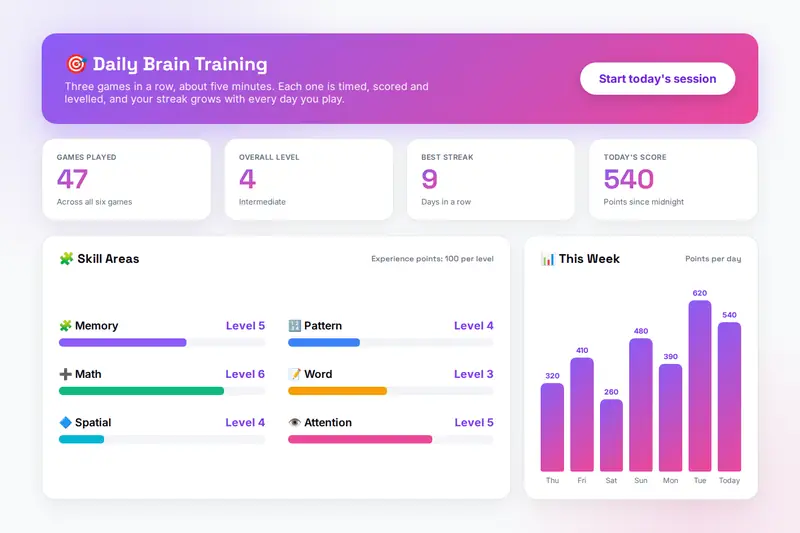
Table of Contents
Overview
MindSharp is a set of six quick brain training games that run entirely in your browser. Memory Sequence asks you to repeat a sequence of cells that light up on a grid; Pattern Recognition to find the next number in a sequence; Mental Math to add, subtract and multiply against the clock; Word Finding to unscramble a word; Spatial Reasoning to pick the copy of a shape that matches a rotated target; and Attention Focus to find every copy of a symbol hidden among look-alikes. Each game runs for a minute by default, scores ten points per correct answer times the level, and in adaptive mode climbs a level every five correct answers, so it stays just above what you find easy.
The daily session plays three of the games in a row, about five minutes in all, and the streak in the toolbar grows with every day you play. The score of each game goes into that skill's experience points, every hundred points is a level, and the dashboard shows the six skill bars, your overall level, your best streak and today's score with a chart of the points scored on each of the last seven days. Progress keeps your personal bests and the last ten games, fifteen badges mark the milestones, and Settings holds the sound switch, the difficulty, the time per game and the export, import and reset of your progress.
The page is honest about what the games do: practice makes you better at the tasks you practise, and some of that carries to similar tasks, but the research does not support claims of a higher IQ or protection against decline, and MindSharp makes none. There is no account, no leaderboard and no server. Your levels, streaks, badges and the record of your last fifty games live in your browser's storage on your own device, and the only copy that leaves it is the file you export yourself.
Key Features
Six Different Games
Memory, pattern, mental math, word, spatial and attention, each with its own rules and its own level, so a session mixes different demands.
Daily and Custom Sessions
Three random games in a row for the daily session, or three drawn from the skills you tick for a custom one; single games from the Games tab.
Adaptive Difficulty
Each game starts at that skill's level and rises every five correct answers; or fix it at Easy, Medium or Hard.
Timed Rounds
Thirty seconds to two minutes per game, with the timer turning amber at twenty seconds and red at ten.
Levels, Bests and Streaks
Experience points per skill, an overall level, the best score in each game, a day streak that grows with daily play, and today's score.
A Week at a Glance
A chart of the points scored on each of the last seven days, on the dashboard and on the Progress tab, with the last ten games listed.
Fifteen Badges
For the first game, five, ten, twenty-five and fifty games, three- and seven-day streaks, level five in each skill, level three in all six and a 500-point game.
Export, Import and Reset
Download your progress as a file, read it back on another computer, or wipe it and start again, all without an account.
How to Use
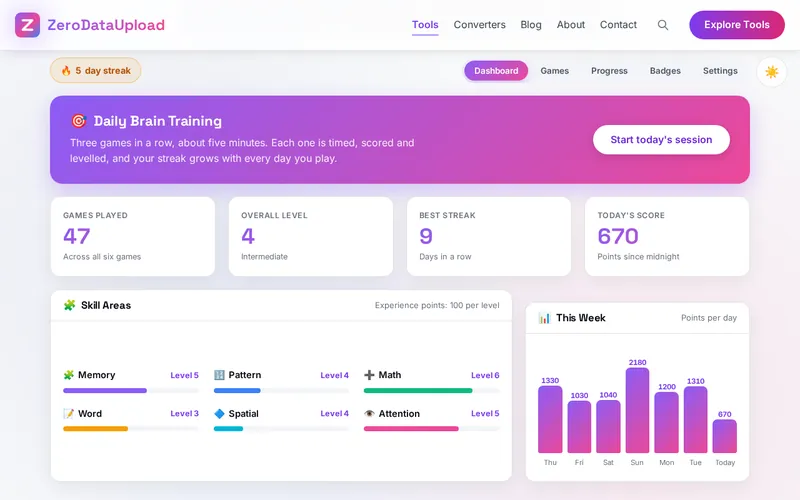
- Start today's session - The button on the dashboard plays three random games one after another, with a countdown before each and a result window between them.
- Or pick one game - The Games tab lists the six games with your best score on each; tick skills and start a custom session, or click a game to play it alone.
- Beat the clock - Each game runs for the time set in Settings. Correct answers score ten points times the level; in adaptive mode the level rises every five correct answers.
- Watch the levels climb - Scores become experience points, every hundred is a level, and the skill bars, overall level and seven-day chart follow.
- Keep the streak - Finish at least one game a day. Badges unlock for games played, streaks and levels; the Badges tab shows them all.
- Back up or start over - Export on the Progress tab, Import and Reset under Settings, where the sound, difficulty and timer also live.
The Six Games
- Memory Sequence - Cells light up one after another; tap them back in the same order. Three by three with four steps at first, five by five with nine steps at the top levels.
- Pattern Recognition - Four numbers and a missing fifth, following a constant step, a constant multiplier or the sum of the previous two. Four choices, all close to the answer.
- Mental Math - Addition and subtraction to twenty at the start, multiplication and numbers to fifty from level three, to a hundred from level five. Type the answer and press Enter.
- Word Finding - Unscramble the letters of an everyday word: three letters at first, five from level three, six to nine from level five.
- Spatial Reasoning - A shape turned by a quarter, a half or three quarters; pick the one of four copies at exactly the same angle.
- Attention Focus - Find every copy of the target symbol in a grid of look-alikes, four by four at first and seven by seven at the top levels. Wrong taps count against your accuracy.
Keep adaptive difficulty on so each game sits just above what you find easy, play mixed sessions rather than one favourite, and judge yourself by the seven-day chart rather than a single game, because scores swing with tiredness and the time of day.
Frequently Asked Questions
The questions people ask most about MindSharp are answered on the tool page, just below the tool. The full list of 31 questions, from storage and privacy to troubleshooting, is in the MindSharp FAQ, and the help guide walks through every feature step by step.
Privacy & Security
MindSharp has no upload step and no server-side storage: the games run in your browser, your levels, streaks, badges and recent games live in its storage on your own device, and the only copy that ever leaves it is the file you export yourself.
The tool asks for no permissions and loads nothing from outside the site. Like every page on ZeroDataUpload, the tool page shows ads through Google AdSense and uses Google Analytics; the Privacy Policy and Cookie Policy explain what those services collect and how the cookie banner controls them. Your scores are never part of it.
Ready to try MindSharp? It's free, private, and runs entirely in your browser.
Open MindSharp →Related

Last Updated: October 7, 2026