
Asset Tracker
Keep an inventory of what you own, watch its value with three depreciation methods and get warned before a warranty runs out, all in your browser
Guide reviewed 6 October 2026 by Milan Salvi. How we write and correct guides.
Open Asset Tracker →Step-by-step help guide and questions and answers for this tool.
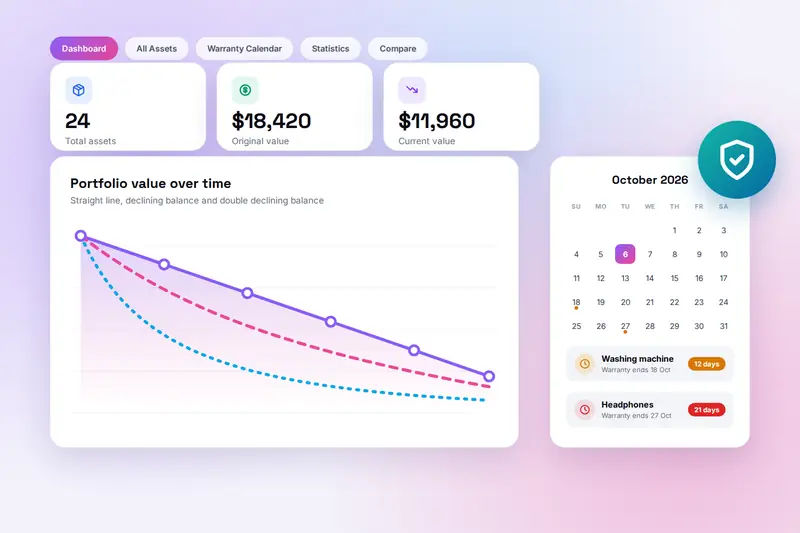
Table of Contents
Overview
Asset Tracker is a free inventory tool that runs entirely in your browser. You give each item you own a name, a category, the date you bought it and what you paid, and optionally a photo, notes, an expected lifespan and the warranty dates. From those details the tool works out what the item is worth today, adds everything up on a dashboard, and tells you which warranties end in the next thirty days.
It was built for the jobs a spreadsheet does badly: keeping a home inventory that an insurer will accept after a burglary or a flood, knowing whether a repair is still covered before you pay for it, deciding which of two ageing laptops to replace first, and having the serial number, the receipt and the fault history on one page when you call a support line. Workshops, studios and small offices use it for the same reasons with their tools and machines.
There is no account and no server. The records are stored in your browser on your own device, photos included, and an Export button writes them all into one file that you can keep with your backups or import on another computer. Because nothing is uploaded, the list of what you own and what it is worth is seen by nobody but you.
Key Features
Complete Asset Records
Name, category, purchase date and price, expected lifespan, salvage value, warranty start and end, notes and a photo (under 5 MB) for every item, in eight categories from electronics to jewellery.
Three Depreciation Methods
Straight line, declining balance and double declining balance, chosen per asset with a default in Settings. The value is worked out to the day and never falls below the salvage value.
Warranty Alerts
Assets move into the dashboard's alert list 30, 14 and 7 days before their warranty ends, and stay there once it has expired. Each reminder can be switched off.
Warranty Calendar
A month view with a dot on every expiry date, orange for upcoming and red for expired, and a list of the next ten expirations with the days left.
Dashboard and Statistics
Totals for original value, current value and depreciation; a ring chart of assets by category, bars of value by category and a twelve-month chart of the portfolio's value.
Issue Log
A dated list of faults and repairs on each asset, so the history is already written when you claim, sell or decide to replace it.
Compare Two Assets
Price, current value, depreciation, lifespan, warranty status and issue count side by side, to settle which item to replace or sell first.
Export and Import
One file holds every asset, photo, issue and setting. Keep it as a backup or import it on another device. Search, filters, sorting, bulk delete and a choice of currency complete the tool.
How to Use
- Add an asset - Click Add Asset (or press Ctrl+N). Enter a name, pick a category, and type the purchase date and price. These four fields are required; everything else can wait.
- Describe its life - Set the expected lifespan in years, the salvage value it will still have at the end, and the depreciation method. Straight line suits furniture and appliances; declining balance suits electronics.
- Enter the warranty dates - Copy the start and end dates from the receipt or the manufacturer's registration. The end date drives the alerts and the calendar. Put the model and serial number in the notes and attach a photo of the item or the receipt.
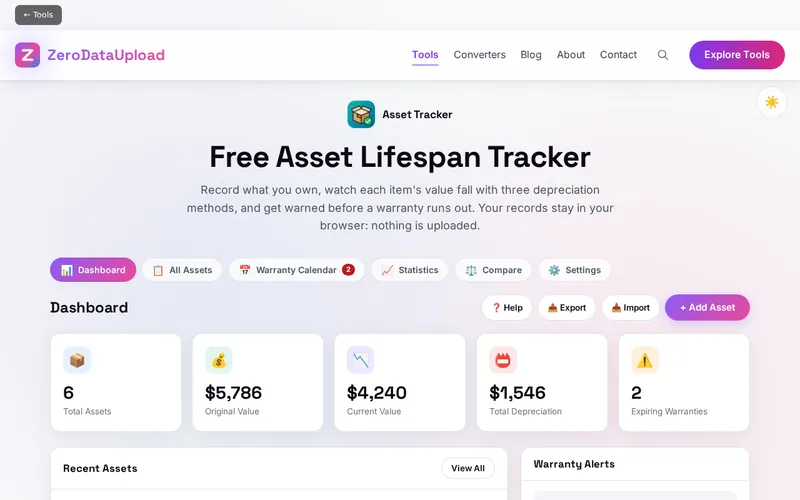
- Read the dashboard - The tiles add up how many assets you have, what you paid, what they are worth today and how much value has gone. Recent Assets and Warranty Alerts link to each item's detail page.
- Work with the list - All Assets shows every item as a card. Search by name or notes, filter by category or warranty status, sort by date, name, value or expiry, and tick several cards to delete them together.
- Check the calendar, statistics and comparison - The Warranty Calendar marks every expiry date and lists the next ten. Statistics breaks the collection down by category and plots its value over the last twelve months. Compare puts two assets side by side.
- Back up with Export - The records live in this browser only. Click Export to save them as a file, keep it with your other backups, and use Import to restore it or to move everything to another device.
Choosing a Depreciation Method
Depreciation is the fall in an item's value over the years you own it. The tool offers the three methods accountants use, and the right one depends on how the item loses value:
- Straight line - The same amount is lost every year: (price minus salvage value) divided by the lifespan. A 1,000 sofa with a 10-year life and no salvage value is worth 500 after five years. The usual choice for furniture, appliances, tools and anything that wears evenly.
- Declining balance - A fixed share of the remaining value is lost each year, so the biggest drop comes first. The rate is one divided by the lifespan: a 5-year item loses 20 percent of what it is still worth every year. Suits phones, laptops and cameras, whose resale value falls fastest when new.
- Double declining balance - The same at twice the rate: 40 percent a year for a 5-year item, so a 1,000 laptop is worth 600 after one year, 360 after two and 216 after three. Suits items that are outdated long before they stop working.
Whatever the method, the result is an estimate from the numbers you entered. The second-hand market, the condition of the item and the demand for it decide the real price, so treat the figure as a guide for insurance and replacement planning rather than as a valuation. The calculation uses the exact number of days since the purchase date, which is why the current value changes a little every day; the chart on the asset's detail page plots whole years for readability.
Frequently Asked Questions
Privacy & Security
A list of what you own, what it cost and where it is kept is sensitive information. Asset Tracker has no upload step and no server-side storage: every record and photo is written to your browser's storage on your own device, and the only copy that ever leaves it is the export file you choose to save.
The tool keeps your assets, your settings and your theme choice in the browser, and nothing else. Like every page on ZeroDataUpload, the tool page shows ads through Google AdSense and uses Google Analytics; the Privacy Policy and Cookie Policy explain what those services collect and how the cookie banner controls them. Your records are never part of it.
Ready to try Asset Tracker? It's free, private, and runs entirely in your browser.
Open Asset Tracker →Related

Last Updated: October 6, 2026