CurrencyX
30 currencies with live ECB rates, historical charts, conversion history & CSV export
Guide reviewed 2 October 2026 by Milan Salvi. How we write and correct guides.
Open CurrencyX →
Table of Contents
Overview
CurrencyX is a privacy-first currency converter and rate tracker that supports 30 fiat currencies with country flag emojis, powered by live exchange rates from the European Central Bank (ECB) via the Frankfurter API. It features three dedicated tabs -- Converter, Rate Tracker, and History -- each designed to give you comprehensive insight into global currency markets without ever compromising your privacy.
The Converter tab provides instant currency conversion with 6-decimal precision, a swap button for quick pair reversal, 12 quick pair buttons for the most popular currency combinations, and a multi-currency overview table that shows your amount converted to all 29 other currencies simultaneously. The Rate Tracker tab draws historical exchange rate charts with a gradient fill and a time axis, supporting four time periods (7 days, 30 days, 90 days, and 1 year) along with six statistical metrics including annualized volatility. The History tab records up to 200 conversions in localStorage with full CSV export and drag-drop CSV import capabilities.
Exchange rates are fetched from the Frankfurter API (api.frankfurter.dev), which is backed by the European Central Bank and updated daily at 16:00 CET on business days. CurrencyX auto-refreshes rates every 5 minutes while the page is open, maintains an in-memory cache per base currency to minimize API calls, and provides graceful offline fallback to cached rates with a visual status indicator. Aside from this anonymous public API call to fetch rates, all processing -- including amount calculations, chart rendering, history management, and CSV generation -- happens entirely in your browser. No amounts, no authentication tokens, and no conversion details are ever transmitted.
Key Features
30 World Currencies
USD, EUR, GBP, JPY, INR, CNY and 24 more fiat currencies, each with its country flag emoji for instant visual recognition. All rates are sourced from the European Central Bank, one of the most trusted rate providers in the world.
Live ECB Exchange Rates
Rates are updated daily at 16:00 CET via the Frankfurter API, backed by ECB reference data. CurrencyX auto-refreshes every 5 minutes while the page is open. In-memory caching per base currency reduces redundant API calls, and an offline fallback uses cached rates when connectivity is lost.
Historical Rate Charts
A gradient-filled line chart with a time axis. Choose from four time periods -- 7 days, 30 days, 90 days, or 1 year -- with the X-axis dynamically adjusting its unit (day, week, or month) based on your selection.
Rate Statistics
Six statistical metrics displayed alongside the chart: Current Rate, Period High, Period Low, Average Rate, Annualized Volatility (calculated as the square root of the variance of daily returns multiplied by 252, then multiplied by 100), and Percentage Change with green for positive and red for negative movements.
Multi-Currency Overview
Below the main conversion result, a scrollable table displays your entered amount converted to all 29 other supported currencies simultaneously. This overview updates in real time whenever you change the amount or base currency, giving you a complete snapshot of global rates at a glance.
Conversion History
Every conversion is automatically saved to localStorage (up to 200 records, oldest removed when full). Export your complete history as a CSV file named currencyx-history.csv with columns for Date, From, To, Amount, Result, and Rate. Import CSV files via drag-and-drop with a preview before committing, and clear all history with a double-click confirmation.
12 Quick Pairs
One-click buttons for the 12 most popular currency pairs: USD/EUR, USD/GBP, USD/JPY, EUR/GBP, USD/INR, USD/CAD, EUR/JPY, GBP/EUR, USD/CNY, USD/AUD, USD/CHF, and EUR/CHF. Clicking a quick pair button instantly sets the From and To currencies, triggering an immediate conversion with the current amount.
Smart Number Formatting
Exchange rates are displayed with 6-decimal precision for accuracy. Conversion results use 2 to 4 decimal places depending on the currency. Very small rates (below 1) show up to 8 decimal places to maintain precision. All numbers use locale-aware comma formatting for readability across different regional number conventions.
The Three Tabs
Tab 1: Converter
The Converter tab is the primary interface for currency conversion. At the top, you will find two currency selectors -- From and To -- each displaying all 30 currencies with their country flag emojis. Between the selectors is a swap button (⇔) that instantly reverses the currency pair. Below the selectors is the amount input field, which triggers conversion automatically with a 600-millisecond debounce to prevent excessive API calls while you type.
The conversion result is displayed prominently with the exchange rate shown at 6-decimal precision. You can download any individual conversion result as a .txt file for your records. Below the result area, 12 quick pair buttons provide one-click access to the most common currency combinations: USD/EUR, USD/GBP, USD/JPY, EUR/GBP, USD/INR, USD/CAD, EUR/JPY, GBP/EUR, USD/CNY, USD/AUD, USD/CHF, and EUR/CHF.
Scrolling further down reveals the multi-currency overview table, which simultaneously shows your entered amount converted to all 29 other currencies. Each row displays the currency code, country flag, and the converted amount -- giving you a comprehensive view of what your money is worth across the globe in a single glance.
Tab 2: Rate Tracker
The Rate Tracker tab provides historical exchange rate visualization and statistical analysis. The centerpiece is a line chart with a gradient fill (the area below the line is filled with a semi-transparent gradient that fades from the line color to transparent). Its time axis automatically adjusts its unit display -- showing individual days for 7D and 30D periods, weeks for 90D, and months for 1Y.
Four period selection buttons let you choose your analysis window: 7D (seven days), 30D (thirty days), 90D (ninety days), and 1Y (one year). Historical data for the chosen period is fetched from the Frankfurter API, and the chart updates dynamically when you change the period or currency pair.
Below the chart, six statistical metrics provide quantitative insights into the rate movement over your selected period:
- Current Rate -- The latest exchange rate for the selected pair.
- Period High -- The highest rate observed during the selected time window.
- Period Low -- The lowest rate observed during the selected time window.
- Average -- The arithmetic mean of all daily rates in the period.
- Volatility -- The annualized standard deviation of daily returns, calculated as
√(variance × 252) × 100. A higher volatility percentage indicates a more fluctuating currency pair. The factor 252 represents the approximate number of trading days in a year, which annualizes the daily variance. - Change % -- The percentage change from the first rate to the last rate in the period, displayed in green when positive and red when negative.
Tab 3: History
The History tab maintains a log of up to 200 past conversions, stored in your browser's localStorage. When the 200-record limit is reached, the oldest conversions are automatically removed to make room for new ones. Each history record displays the country flag, currency pair (e.g., USD → EUR), the original amount and converted result, the date and time of the conversion, and the exchange rate used.
The CSV export button generates a file named currencyx-history.csv containing six columns: Date, From, To, Amount, Result, and Rate. This file is compatible with any spreadsheet application including Microsoft Excel, Google Sheets, and LibreOffice Calc. For CSV import, you can either click the import button to select a file or drag and drop a CSV file directly onto the import area. A preview of the imported data is shown before you confirm the import, allowing you to verify the contents before they are merged into your existing history.
To clear all history records, you must double-click the Clear All button. This double-click confirmation prevents accidental deletion -- a single click displays a warning prompt, and only a second click within the confirmation window actually deletes the data.
Supported Currencies
CurrencyX supports 30 fiat currencies, all sourced from the European Central Bank reference rates. No cryptocurrencies are included -- this is strictly a fiat currency converter. The complete list:
- USD 🇺🇸 United States Dollar
- EUR 🇪🇺 Euro
- GBP 🇬🇧 British Pound Sterling
- JPY 🇯🇵 Japanese Yen
- AUD 🇦🇺 Australian Dollar
- CAD 🇨🇦 Canadian Dollar
- CHF 🇨🇭 Swiss Franc
- CNY 🇨🇳 Chinese Yuan
- SEK 🇸🇪 Swedish Krona
- NZD 🇳🇿 New Zealand Dollar
- MXN 🇲🇽 Mexican Peso
- SGD 🇸🇬 Singapore Dollar
- HKD 🇭🇰 Hong Kong Dollar
- NOK 🇳🇴 Norwegian Krone
- KRW 🇰🇷 South Korean Won
- TRY 🇹🇷 Turkish Lira
- INR 🇮🇳 Indian Rupee
- BRL 🇧🇷 Brazilian Real
- ZAR 🇿🇦 South African Rand
- DKK 🇩🇰 Danish Krone
- PLN 🇵🇱 Polish Zloty
- THB 🇹🇭 Thai Baht
- IDR 🇮🇩 Indonesian Rupiah
- HUF 🇭🇺 Hungarian Forint
- CZK 🇨🇿 Czech Koruna
- ILS 🇮🇱 Israeli New Shekel
- PHP 🇵🇭 Philippine Peso
- MYR 🇲🇾 Malaysian Ringgit
- RON 🇷🇴 Romanian Leu
- ISK 🇮🇸 Icelandic Krona
Exchange Rate API
CurrencyX uses the Frankfurter API (api.frankfurter.dev) as its sole data source. This is a free, open-source API backed by the European Central Bank (ECB), which publishes reference exchange rates daily at 16:00 CET on business days (Monday through Friday, excluding ECB holidays). The API requires no authentication, no API keys, and collects no user data -- making it ideal for a privacy-first application.
CurrencyX asks the service for three things only: the latest rates for your chosen base currency (for the Converter tab and the multi-currency overview), the history of one currency pair over the selected period (for the Rate Tracker charts and statistics), and the list of supported currencies with their full names (checked when the tool starts).
CurrencyX maintains an in-memory cache of rates keyed by base currency. When you request a conversion for a base currency that has already been fetched during the current session, the cached rates are used immediately without making another API call. The cache is refreshed automatically every 5 minutes to keep rates current. If the API is unreachable -- due to network issues, server downtime, or being offline -- CurrencyX falls back to the most recently cached rates and displays the last successful update timestamp so you know how current the data is.
Technical Details
CurrencyX runs entirely in your browser, with no server-side processing of your amounts. Here is how its chart, calculations and displays work:
- Rate Chart -- The Rate Tracker chart is a line chart drawn in your browser with a gradient fill, transitioning from a semi-transparent line color at the top to fully transparent at the bottom. Its time axis is labelled in days for the 7D and 30D periods, in weeks for 90D and in months for 1Y.
- Volatility Calculation -- Annualized volatility is computed from the daily returns (percentage change between consecutive closing rates). The variance of these daily returns is calculated, multiplied by 252 (approximate trading days per year), then the square root is taken and multiplied by 100 to express the result as a percentage. The formula is:
volatility = √(variance × 252) × 100. Higher volatility indicates greater price fluctuation and currency pair instability. - Typing Delay -- The conversion waits until you pause typing for about half a second. Each new keystroke restarts the wait, so CurrencyX does not fetch rates or recalculate for every character while you are still typing.
- Status Bar System -- A persistent status bar at the bottom of the interface displays connection health using an animated dot indicator with three states: green (●) means successfully connected and rates are current, yellow (●) means rates are being loaded or refreshed, and red (●) means an error occurred or the app is offline. Alongside the dot, the status bar shows the ECB reference date and the local time of the last successful update.
- Smart Number Formatting -- Exchange rates display 6 decimal places for precision. Conversion results use 2 decimal places for major currencies (USD, EUR, GBP) and up to 4 for currencies with smaller unit values. When a rate is very small (less than 1), up to 8 decimal places are shown to preserve meaningful digits. All displayed numbers use locale-aware formatting with appropriate comma or period separators based on the browser's locale settings.
- What Is Saved on Your Device -- CurrencyX keeps four things in your browser's storage: your dark or light mode choice, the list of currencies (so it opens faster next time), the last currency pair and period you chose in the Rate Tracker, and up to 200 conversion history records.
- Auto-Refresh -- Every 5 minutes, while the page is open, CurrencyX silently refreshes the rates in the background. If the refresh succeeds, the cached rates and status bar are updated. If it fails, the existing cache remains in use and the status dot turns red to indicate the issue.
How to Use
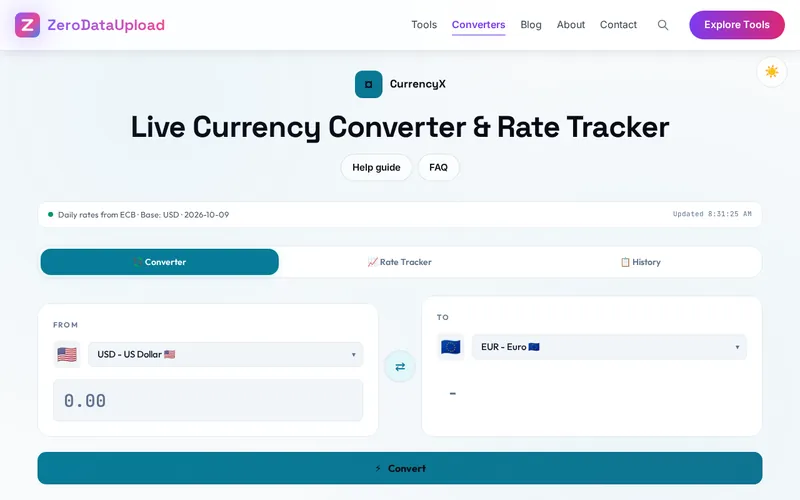
- Open CurrencyX -- Navigate to the tool in your browser. No installation, no account creation, no sign-up required. Your local currency is automatically detected from your browser settings and pre-selected as the "From" currency on the Converter tab.
- Select Your Target Currency -- Use the "To" currency dropdown to choose your target currency from the list of 30 supported fiat currencies. Each currency is displayed with its three-letter ISO code and country flag emoji for easy identification. You can also click any of the 12 quick pair buttons (USD/EUR, USD/GBP, USD/JPY, EUR/GBP, USD/INR, USD/CAD, EUR/JPY, GBP/EUR, USD/CNY, USD/AUD, USD/CHF, EUR/CHF) to instantly set both the From and To currencies.
- Enter an Amount -- Type your amount into the input field. Conversion happens automatically with a 600-millisecond debounce -- just stop typing and the result appears. You can also use the swap button (⇔) between the currency selectors to reverse the conversion direction without re-entering the amount.
- View the Conversion Result -- The exchange rate is displayed at 6-decimal precision, and the converted amount appears below with smart formatting (2-4 decimals depending on the currency). Scroll down to see the multi-currency overview table showing your amount converted to all 29 other currencies simultaneously.
- Analyze Historical Trends -- Switch to the Rate Tracker tab to see a line chart of historical exchange rates for your selected pair. Choose from four time periods: 7D (one week), 30D (one month), 90D (three months), or 1Y (one year). Review the six statistics below the chart -- Current Rate, Period High, Period Low, Average, Volatility, and Change % -- to understand the rate's recent behavior.
- Review Your Conversion History -- Switch to the History tab to see all your past conversions (up to 200 records). Each entry shows the currency pair with flags, the amounts, the date and time, and the rate used. Click the CSV export button to download your complete history as
currencyx-history.csv, or use drag-and-drop CSV import to restore history from a previous session. - Download or Share Results -- On the Converter tab, use the download button to save individual conversion results as a
.txtfile. The file includes the currency pair, exchange rate, input amount, and converted result for your records.
Frequently Asked Questions
api.frankfurter.dev), which sources its data directly from the European Central Bank (ECB). The ECB publishes reference exchange rates for major world currencies every business day at 16:00 CET (Central European Time). These are the same reference rates used by financial institutions, central banks, and government agencies across Europe. Weekend and holiday rates reflect the last published business-day rates.currencyx-history.csv with six columns: Date, From, To, Amount, Result, and Rate. This file opens in any spreadsheet application (Excel, Google Sheets, LibreOffice Calc, Numbers). For importing, you can either click the import button to select a CSV file from your device or drag and drop a CSV file directly onto the import area. CurrencyX shows a preview of the imported data before committing, so you can verify the contents. This makes it easy to transfer your history between devices or restore it after clearing browser data.Privacy & Security
CurrencyX fetches anonymous exchange rates from the public Frankfurter API (backed by the European Central Bank) -- the request carries none of your amounts and needs no account or key. Your conversion history is stored exclusively in your browser's localStorage and is never transmitted. The only network request is the public rate API -- your amounts, currencies, and calculations never leave your device. There are no user accounts, and the converter's own code sets no cookies and never sends your amounts anywhere; like every page on ZeroDataUpload, this page carries Google Analytics and Google AdSense, as the Privacy Policy explains. The Frankfurter API is a public, open-source service that does not log individual requests or track users. You can verify this yourself: open your browser's developer tools Network tab and observe that the converter's own requests go only to api.frankfurter.dev, with no personal data in any request parameters.
Ready to convert currencies with complete privacy? CurrencyX is free, fast, and runs entirely in your browser.
Open CurrencyX →Related

Last Updated: March 26, 2026