
StickyBoard
A kanban board with colour-coded sticky notes: boards for your projects, columns you name and reorder, notes with descriptions and due dates, drag and drop, search and an archive, with every board kept in your browser where nobody else can read it
Guide reviewed 7 October 2026 by Milan Salvi. How we write and correct guides.
Open StickyBoard →Step-by-step help guide and questions and answers for this tool.
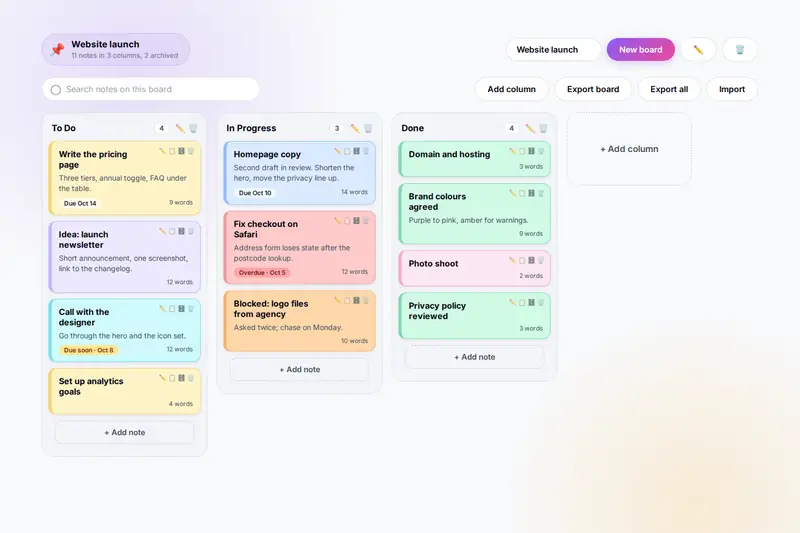
Table of Contents
Overview
StickyBoard is a kanban board that runs entirely in your browser. You create a board for a project, a week or a course, and it opens with three columns, To Do, In Progress and Done, which you can rename, reorder or replace with the stages your own work goes through. Into the columns go sticky notes: a title, an optional description of up to 2,000 characters, an optional due date and one of eight colours. As work moves along you drag the notes from column to column with the mouse, or move them from the edit window on a phone, and the counts in the column headers follow.
A search box hides every note that does not match what you type. Notes can be duplicated, archived to a list under the board and restored from it, or deleted after a confirmation. Due dates turn amber two days out and red when missed. One board or all of your boards export to a file that imports on any other computer, which is both the backup and the way to hand a board to someone else. Keyboard shortcuts open a new note, board or column, jump to the search box and export the board.
Nothing you write is uploaded: every board lives in your browser's storage on your own device, and the only copy that leaves it is the file you export yourself. There is no account, no server and no sync, which also means no live collaboration; for that you would need a hosted tool.
Key Features
Any Number of Boards
One board per project, each with its own columns and archive, switched from the toolbar, renamed or deleted in a click.
Columns That Match Your Flow
Three to start, as many as you need after that; rename them, drag them into order, delete them with their notes after a confirmation.
Colour-Coded Sticky Notes
A title, a description, a due date and eight colours, with the word count on the card and the due date marked amber or red when near or past.
Drag and Drop, or Pick a Column
Drag notes between and within columns with the mouse; on a touch screen or with the keyboard, pick the column in the edit window.
Search, Duplicate, Archive
Filter the board as you type, copy a note with one click, and park finished or paused notes in an archive that can restore them.
Export and Import
One board or all boards to a file; import adds boards without touching the ones already there, and reads the earlier version's files too.
Keyboard Shortcuts
N for a note, B for a board, C for a column, / for the search box, E to export and Esc to close any window.
Works on a Phone
Columns scroll sideways and snap one at a time, the note buttons are always visible, and both themes keep the colours readable.
How to Use
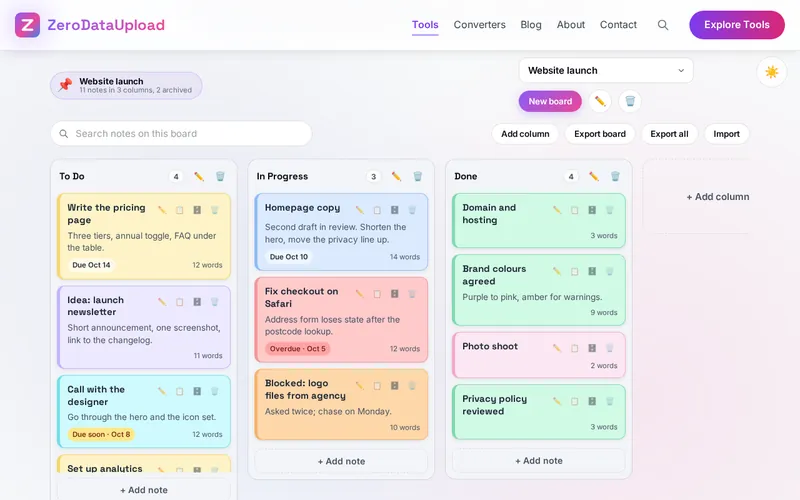
- Create a board - New board, a name, Create board. It opens with To Do, In Progress and Done.
- Shape the columns - Add column adds one at the end; the pencil renames, the bin deletes, and dragging a header reorders.
- Add sticky notes - "+ Add note" at the foot of a column: title, description, due date, colour.
- Move notes along - Drag with the mouse, or open the note with Edit and pick the column on a touch screen.
- Search, duplicate, archive - The search box filters the board; the note buttons edit, duplicate, archive or delete.
- Export and import - Export board or Export all under the search box; Import reads the file on any computer.
Kanban in Short
- Columns are stages - To Do, In Progress and Done suit most work; writers use Idea, Drafting, Review, Published; a team of one might use Backlog, This Week, Doing, Blocked, Done.
- Limit the work in progress - Keep few notes in the middle columns. Pick a limit, three is a good start, and finish something before starting the next.
- Review weekly - Archive what is done, delete what no longer matters, date what has slipped, and move stuck notes to a Blocked column with a line saying why.
- Colours are yours - A common scheme: yellow for ordinary tasks, red for urgent, green for approved, purple for ideas, cyan for meetings.
Frequently Asked Questions
The questions people ask most about StickyBoard are answered on the tool page, just below the tool. The full list of 25 questions, from storage and privacy to troubleshooting, is in the StickyBoard FAQ, and the help guide walks through every feature step by step.
Privacy & Security
A task board says what you are working on, for whom and by when. StickyBoard has no upload step, no account and no server-side storage: every board, column and note lives in your browser's storage on your own device, and the only copy that ever leaves it is the file you export yourself.
The tool asks for no permissions and loads nothing from outside the site. Like every page on ZeroDataUpload, the tool page shows ads through Google AdSense and uses Google Analytics; the Privacy Policy and Cookie Policy explain what those services collect and how the cookie banner controls them. Your notes are never part of it.
Ready to try StickyBoard? It's free, private, and runs entirely in your browser.
Open StickyBoard →Related

Last Updated: October 7, 2026