
Employee ID Card Generator: Free ID Card Maker
Print-ready ID cards with a photo, a QR code and a barcode, front and back, for one person or the whole team, made in your browser
Guide reviewed 10 November 2026 by Milan Salvi. How we write and correct guides.
Open the ID Card Generator →Step-by-step help guide and questions and answers for this tool.
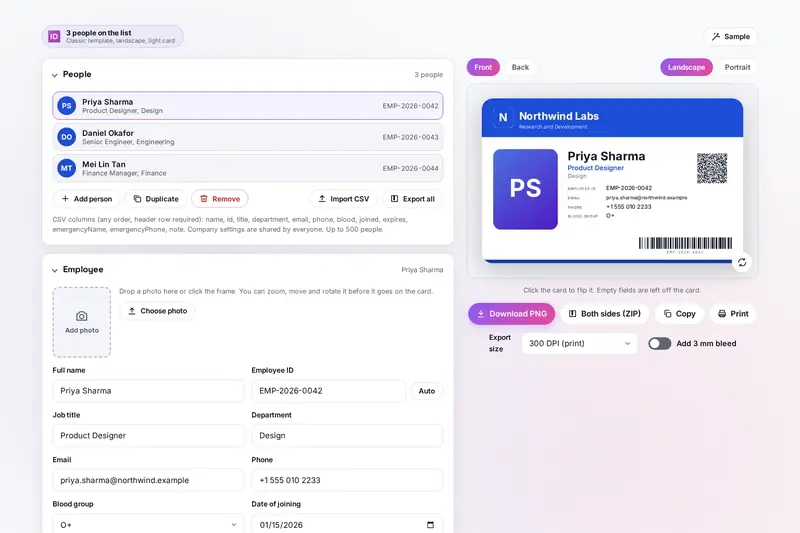
Table of Contents
Overview
Most small organisations need identity cards now and then: a new joiner at the office, a batch of staff passes for a factory, cards for a school or an event. Design software takes time to learn, and online card makers want the photos and names of your people on their servers. This tool makes the cards on your own device: fill in the company once, add the people, choose a design, and download or print.
Every card is drawn at the size of a bank card, 85.6 by 54 mm, so the preview, the PNG files and the print sheet are the same. The front carries the company, the photo, the name, job title and details and a barcode of the ID; the back carries a QR code, your own text, the emergency contact, dates, a signature line and the return address. A whole team can come from a spreadsheet saved as CSV.
For other documents the site has CertificateMaker for certificates (also from a CSV list), Biodata Maker for a marriage biodata with a photo, and QR Generator for QR codes on their own. This tool is for identity cards.
Key Features
The Real Card Size
85.6 by 54 mm, landscape or portrait, at 150, 300 or 600 DPI, with an optional 3 mm bleed.
Six Designs
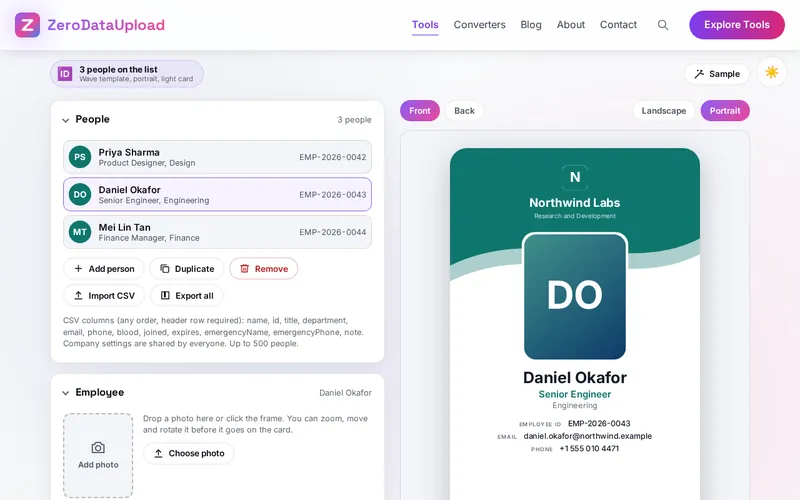
Classic, Panel, Minimal, Bold, Gradient and Wave, in any accent colour, light or dark.
Front and Back
A back side with the QR code, your text, the emergency contact, dates and the return address.
Photo Cropper
Zoom, move and rotate the photo inside a frame of the card's photo shape before it goes on.
QR Code and Barcode
A contact card, the ID or your own link as a QR code, and the ID as a Code 128 barcode.
A Whole Team
Up to 500 people from a CSV file, with automatic IDs and validity dates.
Download and Print
PNG files, a ZIP for one person or everyone, and print sheets at the real size with cutting lines.
Kept on Your Device
Saved in your browser between visits, photos included, with project files to move it.
How to Use
- Add your company - Name, tagline, website, phone, address, the text for the back, and the logo.
- Add the people - Name, ID, job title, department, contact details, blood group, dates and a photo, one by one or from a CSV file.
- Choose the design - A template, an accent colour, a light or dark card, the font, the photo shape, landscape or portrait.
- Set the codes - What the QR code holds, whether the ID becomes a barcode, the ID pattern for Auto and the validity period.
- Check both sides - Click the card or Front and Back to flip it; empty fields are left off.
- Download or print - One side as PNG, both sides or everyone as a ZIP, or Print for a sheet at the real size.
How the Card Is Made
- Size and resolution - The card is the ID-1 size of ISO/IEC 7810 (CR80 to card printers), 85.6 by 54 mm. At 300 DPI that is 1,011 by 638 pixels; at 600 DPI twice as many each way. The PNG files say their resolution, so other programs print them at card size, and the bleed carries the background 3 mm past each edge for a print shop.
- The QR code - Made to the QR standard on the page: a vCard 3.0 contact card, the ID, or your own text with each person's ID, name and email filled in (written as web addresses need inside a link). The error correction is as strong as the size allows, the quiet zone is four squares, and the code is always dark on white, each square a whole number of pixels.
- The barcode - Code 128 of the ID, which holds the characters of an English keyboard, with its quiet zone of ten bar widths and every bar on whole pixels. On a dark card it sits in a white box. The tool says when an ID cannot be a barcode, and when bars or QR squares come out very small for their text.
- Readable text - Text on the coloured band is dark or white, whichever gives the higher contrast by the formula of the web accessibility guidelines.
- A list from a spreadsheet - The CSV import takes the separator from the header row (comma, semicolon or tab), understands common column names, reads dates day first in many spellings and leaves dates that do not exist empty.
- Checked before publishing - We compared the tool with references written separately from these rules, with the test values made first: 129,005 cases in 14 groups, including 6,021 written dates and 4,000 validity dates against an independent date library, every day from 1899 to 2101, 2,506 barcodes and 687 QR codes read back by independent readers (with Hindi, Gujarati, Russian and Chinese names), ZIP files, the PNG resolution, 1,507 saved projects made to break the tool, 502 CSV files and the text colour on 5,013 accent colours. Then the QR code and barcode of every template, landscape and portrait, were read back from cards downloaded at 300 and 600 DPI.
Frequently Asked Questions
The questions people ask most are answered on the tool page, just below the tool. The full list of 37 questions, from the card size and photos to QR codes, barcodes, CSV files and printing, is on the ID card maker's FAQ page, and the help guide walks through every part of it.
Privacy & Security
ID cards carry names, photos, phone numbers and blood groups: personal details that should not travel to a stranger's server. This tool has no upload step, no account and no server-side storage: everything happens in your browser, and the list, photos and logo are kept only in this browser on this device, so they are there next time. Start over, under the tool's Project section, removes them.
The QR codes and barcodes are made on the page, and a link you put in a QR code is only written into it, never opened. The tool loads nothing from outside the site, and the page title never changes with what you type. Like every page on ZeroDataUpload, the tool page shows ads through Google AdSense and counts visits with Google Analytics; the Privacy Policy explains both, and the details you add are never part of them. The tool is made for an organisation's own cards and has no layouts of government documents.
Ready to make your cards? It's free, private, and runs entirely in your browser.
Open the ID Card Generator →Related

Last Updated: November 3, 2026