
QR Generator
Make QR codes for links, Wi-Fi, contact cards, WhatsApp, events, UPI payments and more, style them with your own shapes, colours, logo and frame, and save them as PNG, SVG, JPG, WebP or a print-ready PDF, one at a time or hundreds in a ZIP, with codes that never expire and nothing you type leaving your browser
Guide reviewed 3 November 2026 by Milan Salvi. How we write and correct guides.
Open QR Generator →Step-by-step help guide and questions and answers for this tool.
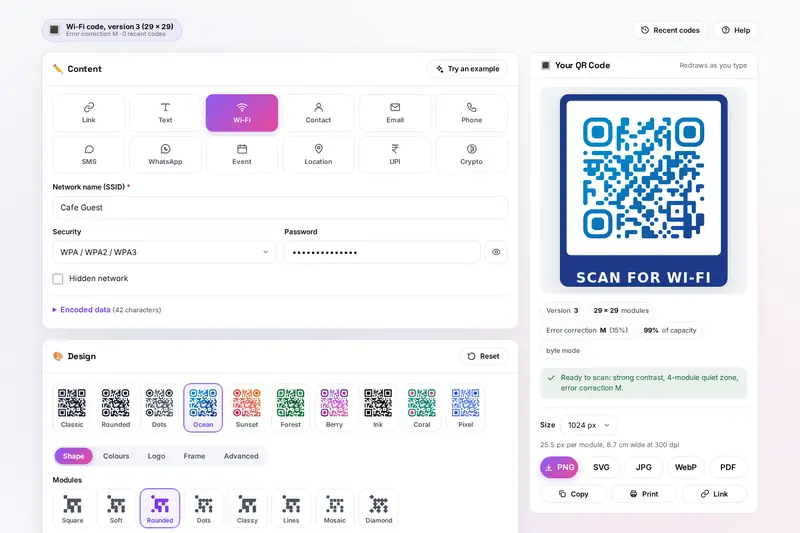
Table of Contents
Overview
QR Generator is a QR code maker that runs entirely in your browser. Pick what the code should hold, from a web address or a block of text to a Wi-Fi network, a contact card, an email, a phone call, a text message, a WhatsApp chat, a calendar event, a place on the map, a UPI payment or a crypto address, and fill in the fields. The code redraws as you type, beside the form on a computer and above it on a phone, with its version, its size, its error correction level and how full it is. Each kind writes its content in the format phones expect, so a Wi-Fi code joins the network and a contact code saves the contact, and the exact text inside the code is shown underneath.
The Design card turns the plain black square into something that looks like yours: ten ready styles, eight module shapes, five eye frames and four eye centres, one colour or a gradient, separate colours for the corner squares, a transparent background, a logo in the middle and a frame with a label such as SCAN ME. Notes under the code warn when a choice makes it harder to scan and fix the simple problems in one click. The code downloads as PNG, SVG, JPG, WebP or a print-ready PDF from 256 to 4096 pixels, copies straight into a document, shares from a phone or prints on its own, and a batch turns a list or a CSV file into up to 500 codes in one ZIP.
The codes are static: what you type is inside the code itself, not behind a short link on someone's server, so they never expire and nobody counts the scans. Nothing is uploaded. There is no account and no server.
Key Features
Twelve Kinds of Code
Links with optional campaign tags, text, Wi-Fi, contact cards, email, phone, SMS, WhatsApp, calendar events, map locations, UPI payments and crypto addresses.
Live Preview and Checks
The code redraws on every key, with its version, size and capacity, and each field is checked as you type, from Wi-Fi passwords to coordinates.
Styles and Shapes
Ten ready styles, eight module shapes, five eye frames and four eye centres, each checked by scanning the downloaded file.
Colours and Gradients
Any foreground and background, linear or radial gradients, separate colours for the corner squares and a transparent background.
Logo and Frame
A logo in the middle with a backdrop, error correction raised to H by itself, and a frame with your label, colours, font and corners.
Advice While You Design
Notes on contrast, inverted colours, the quiet zone, logo size, density and export size, with one-click fixes for the simple ones.
Every File You Need
PNG, SVG, JPG, WebP and a 300 dpi PDF up to 4096 pixels, plus copy, share, print and a link that reopens the same code.
Hundreds at Once
Paste a list or import a CSV file and download up to 500 codes in one ZIP, as PNG or SVG, numbered and named.
How to Use
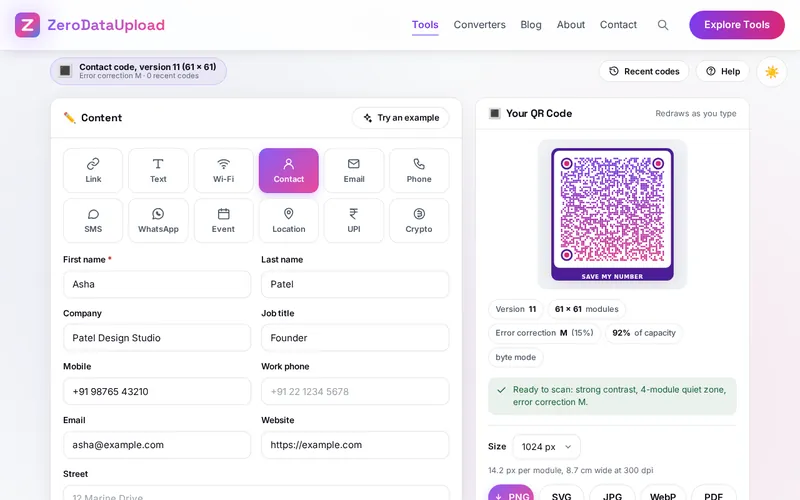
- Pick what the code holds - Choose one of the twelve kinds at the top of the Content card. Each shows only the fields it needs; Try an example fills them in.
- Fill in the fields - The code appears as soon as the content is valid, and a mistake is pointed out under its field. Encoded data shows exactly what goes into the code.
- Choose a style - Start from a ready style or set the shapes, the corner squares and the colours yourself on the Design card. Read the notes under the code as you go.
- Add a logo and a frame - Drop a logo on the Logo tab; error correction goes up to H by itself. The Frame tab adds a label above or below the code, or a border.
- Download it - Pick a size and press PNG, SVG, JPG, WebP or PDF, or copy, share or print the code. It is added to Recent codes so you can bring it back.
- Make many at once - For tables, desks or products, type one entry per line in the Batch card or import a CSV file, and download them all in one ZIP.
Making Codes That Scan
- Contrast - Keep the modules clearly darker than the background, at least 4 to 1. Many scanner apps cannot read light modules on a dark background at all, so for a dark design put a dark code on a light frame.
- Quiet zone - Leave an empty margin of 4 modules around the code. A code printed right up to a coloured edge or a line of text is often missed.
- Error correction - Levels L, M, Q and H rebuild about 7, 15, 25 and 30% of a damaged code. Use H with a logo, and keep the logo under about a quarter of the code's width.
- Size and density - The more you put in a code, the more modules it has and the larger it must be printed. Print at least 2 cm wide, about a tenth of the scanning distance for posters, and use a short address for long links.
- Test it - Before printing many, scan the printed code with two different phones, in the light where it will hang.
Frequently Asked Questions
The questions people ask most about QR Generator are answered on the tool page, just below the tool. The full list of 31 questions, from codes that never expire to UPI codes, logos, printing and batches, is in the QR Generator FAQ, and the help guide walks through every card and tab step by step.
Privacy & Security
A Wi-Fi code holds the network password, a contact code your phone number and a UPI code your payment ID. Many QR sites send that content to their server, and their "dynamic" codes send every scan there too. QR Generator has no upload step, no account and no server-side storage: every code is drawn in your browser, the last code and the recent codes live in your browser's storage, and the only copies that leave it are the files you download, copy or share yourself.
The tool asks for no permissions and loads nothing from outside the site. A link copied with Link holds what you typed in the part of the address after the # sign, which browsers do not send to servers, and the page removes it from the address before the ad and analytics scripts start; still, share such a link only with people who may see its content. Like every page on ZeroDataUpload, the tool page shows ads through Google AdSense and uses Google Analytics; the Privacy Policy and Cookie Policy explain what those services collect and how the cookie banner controls them. What you type is never part of it.
Ready to try QR Generator? It's free, private, and runs entirely in your browser.
Open QR Generator →Related

Last Updated: November 3, 2026