
Biodata Maker
Make a marriage biodata on a real, print-exact page, in English, Hindi, Marathi or Gujarati, with ten designs, Rashi and Nakshatra worked out from the birth time, a photo you frame yourself and a check before you share, then download it as a PDF, a JPG for WhatsApp, a PNG or a Word file, with nothing you type leaving your browser
Guide reviewed 3 November 2026 by Milan Salvi. How we write and correct guides.
Open Biodata Maker →Step-by-step help guide and questions and answers for this tool.
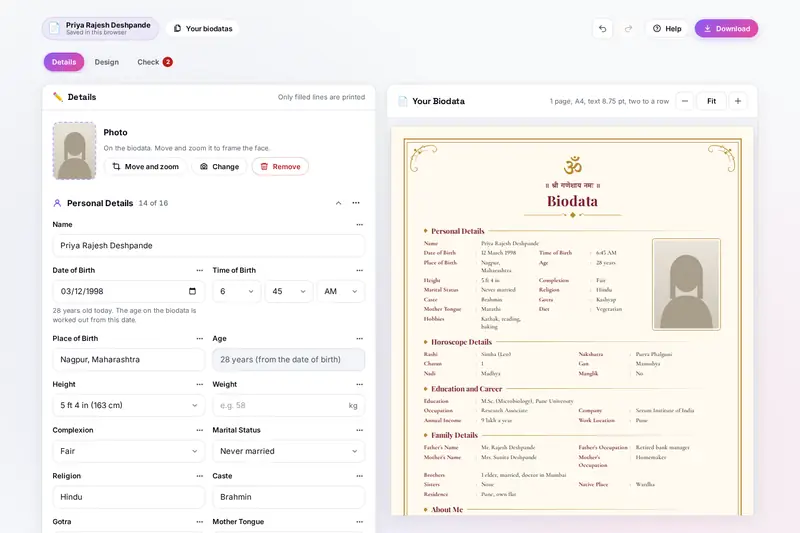
Table of Contents
Overview
Biodata Maker makes a marriage biodata in your browser. You fill in the details section by section, Personal Details, Horoscope Details, Education and Career, Family Details, About Me, Partner Preferences and Contact Details, and the real page beside the form changes with every key you press. Only filled lines are printed, so anything you prefer not to share simply stays empty, and each line can be renamed, moved or left off. Optional lines such as Blood Group, Sub-caste, Kuldevta, Devak and Maternal Uncle wait under Add a line, next to lines and whole sections of your own.
The biodata can be written in English, Hindi, Marathi or Gujarati: every heading and label, the title, the date of birth, the time of birth, the height and the choices you pick come out in that language, with English or local digits. With the date and time of birth filled in, Work out finds the Rashi, the Nakshatra and its charan, the gan and the nadi from the Moon's place at that moment, with the Lahiri ayanamsa that Indian panchangs use, and it warns you when the birth time is close to a change of charan. Ten designs, from a gold Royal frame and a Kasavu border to a Modern side panel and a black-and-white Classic table, come with their own colour sets, symbols and blessings for the top of the page, photo shapes and fonts, and the text size is set so the biodata fills exactly one page.
Before you share it, Check lists what is missing or looks wrong. Then download a PDF for printing, a PDF file, a JPG for WhatsApp, a PNG, an editable Word document or the details as a WhatsApp message. Nothing is uploaded. There is no account and no server.
Key Features
A Print-Exact Page
The page is laid out in millimetres on A4 or US Letter, so the print, the PDF and the pictures match what you see beside the form.
Four Languages
English, Hindi, Marathi and Gujarati for every heading, label, date, time, height and choice, with Devanagari or Gujarati digits if you like.
Rashi and Nakshatra
Worked out from the date, time and time zone of birth, with the charan, gan and nadi, and a warning near a change of charan.
Ten Designs
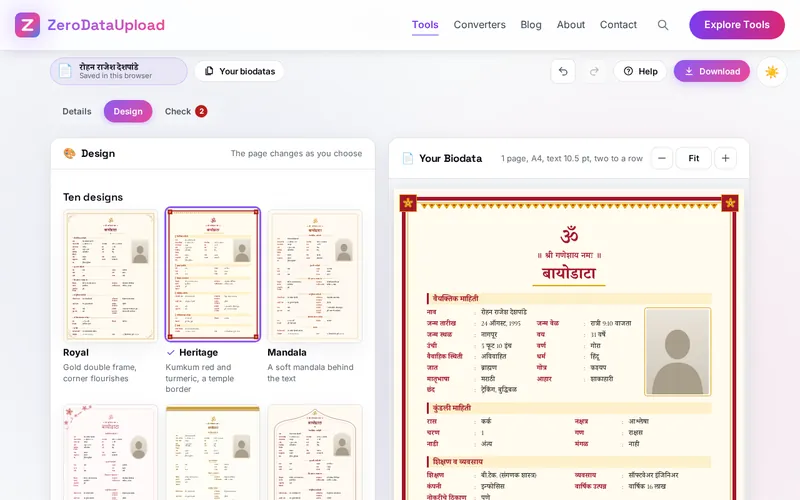
Royal, Heritage, Mandala, Floral, Kasavu, Arch, Elegant, Modern, Classic table and Minimal, each with its own colour sets and fonts.
Symbols and Blessings
Om, Shri, Swastik, Kalash, Ik Onkar, Cross, Crescent, Dharma wheel and more, or your own picture, with a matching line at the top.
A Photo You Frame
Drag and zoom the photo until the face sits right. Only the framed picture is kept, without the camera's hidden details.
Checked Before Sharing
Missing details, wrong mobile digits, an age under the legal age, a Rashi that does not match the Nakshatra and a blurred photo.
Every Format
PDF for printing, PDF file, JPG, PNG, Word document, WhatsApp text and a backup file, with no author or program name inside.
How to Use
- Say who it is for - Choose a bride or a groom and the language of the biodata. See it filled with an example shows a finished one first.
- Fill in the details - Go section by section. Only filled lines are printed; each line's menu renames, moves or leaves it off, and Add a line brings back optional lines.
- Add and frame the photo - Choose a clear, recent photo, then drag and zoom it until the face sits in the upper half of the frame.
- Work out Rashi and Nakshatra - In Horoscope Details, choose the time zone of the birth and press Work out. If the family's kundli says otherwise, keep the kundli.
- Pick a design - Choose one of the ten designs, a colour set, the symbol and line at the top, the title and the photo shape under Design.
- Check and download - Fix what Check lists, then download a PDF, a JPG, a PNG, a Word file or a WhatsApp message, or share it from a phone.
Writing a Good Biodata
- Keep it to one page - Families read many biodatas. One full page with a clear photo is read; a second page often is not. Check tells you when the text gets small.
- Lead with the essentials - Name, date of birth with the age, height, education and occupation first, then the family, then the horoscope details and the contact.
- A recent, clear photo - Daylight, the face in the upper half, the shoulders in the frame, taken with the phone's camera rather than saved from a chat.
- About Me in a few lines - Three or four honest sentences about the person, the family's values and what you hope for say more than a long paragraph.
- Share details step by step - Many families give only the area and city at first and the full address, income and second number after the first conversation.
Frequently Asked Questions
The questions people ask most about Biodata Maker are answered on the tool page, just below the tool. The full list of 36 questions, from what to put in a biodata to languages, Rashi and Nakshatra, designs, photos and downloads, is in the Biodata Maker FAQ, and the help guide walks through every part of the tool step by step.
Privacy & Security
A biodata holds a photo, the date, time and place of birth, a mobile number, an address and the names of parents and relatives. Biodata Maker has no upload step, no account and no server-side storage: the page is put together in your browser, your biodatas live in your browser's storage until you delete them, and the only copies that leave it are the files you download or share yourself.
The tool asks for no permissions and loads nothing from outside the site. The files it makes carry no author, program name or camera details from the photo, and the page title never changes to show the name you type. Like every page on ZeroDataUpload, the tool page shows ads through Google AdSense and uses Google Analytics; the Privacy Policy and Cookie Policy explain what those services collect and how the cookie banner controls them. What you type is never part of it.
Ready to try Biodata Maker? It's free, private, and runs entirely in your browser.
Open Biodata Maker →Related

Last Updated: November 3, 2026