
AgeCalc
Work out an exact age in years, months and days, counted live to the second, count down to the next birthday, see the milestones ahead and one ring for every year lived, and use 14 date tools from date differences to age limits for exam forms, with every date of birth kept in your browser where nobody else can see it
Guide reviewed 3 November 2026 by Milan Salvi. How we write and correct guides.
Open AgeCalc →Step-by-step help guide and questions and answers for this tool.
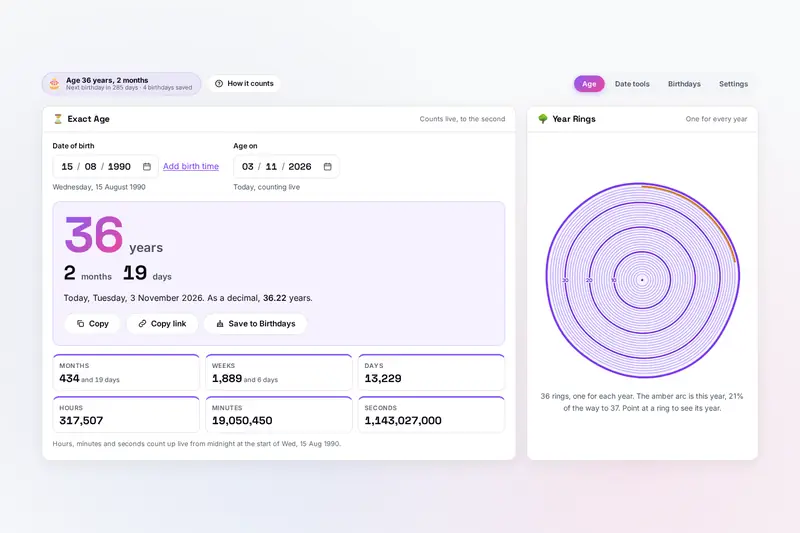
Table of Contents
Overview
AgeCalc is an age calculator that runs entirely in your browser. Type a date of birth and it shows the age in years, months and days, the way people say it, with the age as a decimal and the totals in months, weeks, days, hours, minutes and seconds; the last three count up while you watch. Set another date under Age on to see how old someone was on a day in the past or will be on one in the future. Below the figure, a live countdown runs to the next birthday, a list of milestones shows the round numbers ahead (10,000 days, 1,000 weeks, a billion seconds, the tenth birthday on Mars), and a card of facts gives the weekday of the birth, the week number, the star sign, the Chinese zodiac, the birthstone and the generation. Beside it, the Year Rings card draws one ring for every year lived, like a tree trunk.
Fourteen date tools share the same date boxes: the difference between two dates with working days and days off, adding or subtracting years, months, weeks, days or hours, a number of days from today, the weekday of any date, the age on a date, the date of reaching an age with a retirement date, an age limit check for exam and job forms, the age gap between two people, ages on the other planets, dog and cat years, life in numbers, the Chinese zodiac and star sign, life expectancy drawn as life in weeks, and a world clock. A Birthdays tab keeps the family's birthdays, sorted by whose comes next, and saves them all to one calendar file for your phone.
Nothing is uploaded: the dates of birth you type, the saved birthdays and your settings stay in your browser's storage under the tool's own name, and the only copies that leave it are the calendar and backup files you download yourself. There is no account and no server.
Key Features
Exact Age, Live
Years, months and days counted on the calendar, the decimal age, and hours, minutes and seconds counting up from midnight or from a birth time.
Age on Any Date
The age on a day in the past or the future, with every card below following it, and Today to return to the live count.
Next Birthday and Milestones
A live countdown, the half birthday, and round numbers of days, weeks, months, hours, minutes and seconds ahead, each with a calendar file.
Year Rings
One ring for every year lived, a darker one every ten years, the current year as an amber arc, and the dates of any year on hover, tap or the arrow keys.
Date Maths
The time between two dates with working days and days off, adding or subtracting any amount, days from today and the weekday of any date from year 1 to 9999.
Age Limits and Retirement
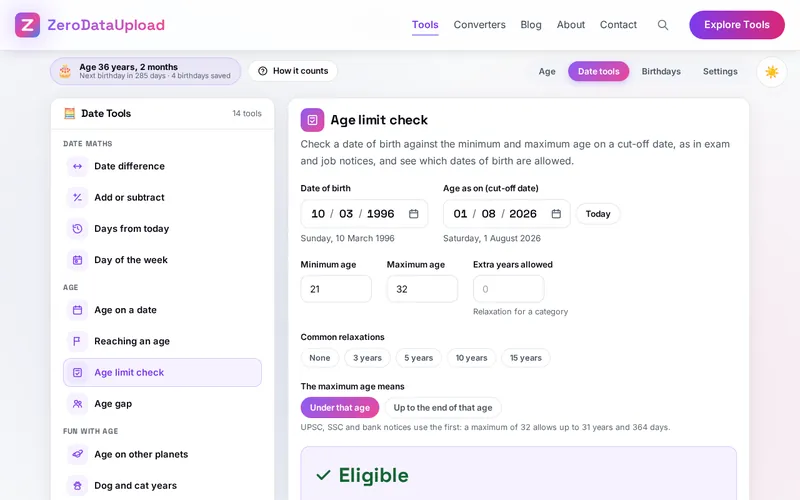
A check against the minimum and maximum age on a cut-off date with relaxation years and the allowed dates of birth, and the date of reaching any age.
Fun With Age
Ages on the planets, dog and cat years, life in numbers with exact counts and marked estimates, the Chinese zodiac and the star sign.
Family Birthdays
Names and birthdays with or without the year, sorted by whose comes next, one calendar file for all of them, and a backup file.
How to Use
- Type the date of birth - Three boxes for the day, the month and the year, in the order you choose in Settings; paste a whole date such as 15 Aug 1990 if you like. The line under the boxes spells the date out, so you can check it was read the right way round.
- Read the age - The years, months and days, the decimal age and the totals appear at once; hours, minutes and seconds count up live. Add a birth time for exact seconds, or change Age on for another day.
- Look further down - Next Birthday counts down to the second; Milestones lists the round numbers ahead with calendar buttons; Born On gives the facts of the day; the weekday bars show which day the birthdays fell on.
- Open a date tool - Date tools has 14 calculators in four groups. Each remembers what you typed, and More With This Date of Birth opens them with your date already filled in.
- Check a form - For an exam or job notice, open Age limit check, type the cut-off date, the minimum and maximum age and any extra years, and compare the allowed dates of birth with the notice.
- Keep the family's birthdays - Add names on the Birthdays tab, then Add all to calendar for one file your phone's calendar can import. Settings saves a backup file.
How Ages and Dates Are Counted
- Calendar months - The age is the number of whole calendar months from the date of birth, split into years and months, plus the days since the last month was complete. Born on 15 August 1990, on 3 November 2026 a person is 36 years, 2 months and 19 days old. Born on the 31st, a month is complete on the last day of a shorter month.
- 29 February - In other years the birthday falls on 28 February, or on 1 March if you choose it in Settings, as the law does in some countries such as the United Kingdom.
- Date differences - From one date to another the end date is not counted unless you tick it, so Monday to the next Monday is 7 days. Working days follow the weekend you choose and skip the days off you list. For public holidays, deadlines and leave planning, the site's WORKDAYS is the business days calculator; AgeCalc covers everyday date sums.
- Age limits - A notice for 21 to 32 years as on 1 August 2026 usually means at least 21 and under 32 on that day, which allows dates of birth from 2 August 1994 to 1 August 2005. The tool prints that range and lets you switch the reading when a notice counts the last year in.
- Retirement - Under the Indian central government rule, an employee retires on the last day of the month in which the retirement age is reached; someone born on the first of a month retires on the last day of the month before. Official notices and employers' own rules always decide.
Frequently Asked Questions
The questions people ask most about AgeCalc are answered on the tool page, just below the tool. The full list of 35 questions, from counting rules to backups and troubleshooting, is in the AgeCalc FAQ, and the help guide walks through every tab and tool step by step.
Privacy & Security
A date of birth is one of the details used to check who you are. AgeCalc has no upload step, no account and no server-side storage: every age is worked out in your browser, the dates and the saved birthdays live in your browser's storage, and the only copies that leave it are the calendar and backup files you download yourself. You can also tell it not to remember your own date of birth at all.
The tool asks for no permissions and loads nothing from outside the site. A link copied with Copy link contains the date of birth in the address, so share it only where you are happy for that date to be seen. Like every page on ZeroDataUpload, the tool page shows ads through Google AdSense and uses Google Analytics; the Privacy Policy and Cookie Policy explain what those services collect and how the cookie banner controls them. Your dates are never part of it.
Ready to try AgeCalc? It's free, private, and runs entirely in your browser.
Open AgeCalc →Related

Last Updated: November 3, 2026