
WORKDAYS
Count the working days between two dates, move by business days to a deadline or a start date, total several ranges and plan your leave, with public holidays for ten countries computed for any year, your own holidays, half days and any work week, and every date kept in your browser where nobody else can see it
Guide reviewed 7 October 2026 by Milan Salvi. How we write and correct guides.
Open WORKDAYS →Step-by-step help guide and questions and answers for this tool.
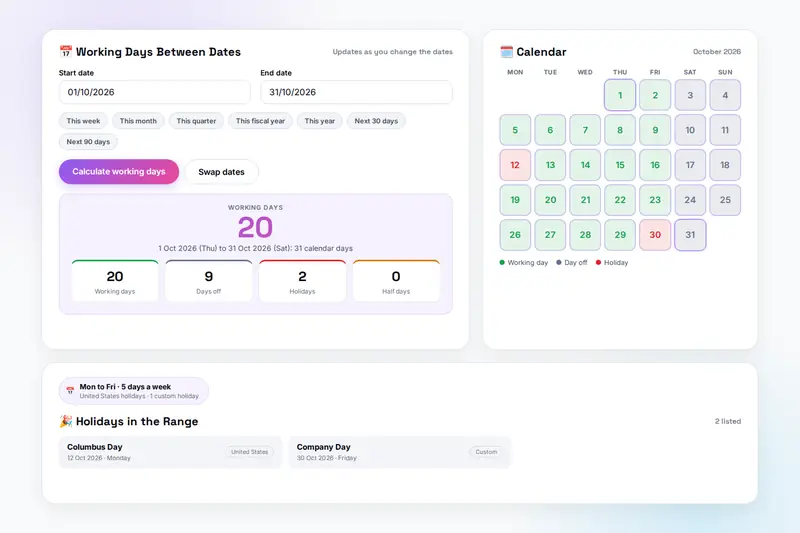
Table of Contents
Overview
WORKDAYS is a business days calculator that runs entirely in your browser. Set your work week and your country once, and six calculators follow them: the working days between two dates, with a calendar that colours every day and a breakdown of days off, holidays and half days; a date a number of business days ahead or back; a deadline from a start date, and the latest date you can start to meet a deadline; several date ranges totalled at once; and the leave days a holiday period costs you, with the weekends and public holidays inside it shown as days saved.
The public holidays of ten countries (the United States, the United Kingdom, India, Canada, Australia, Germany, France, Japan, Singapore and the United Arab Emirates) are computed by rule for any year, including each country's substitute days when a holiday lands on a weekend; the holidays that follow a lunar calendar are listed for 2025 to 2027. Add your company's own holidays and half days, set any work week from Monday to Friday to Sunday to Thursday, and save a configuration per office. Every result goes into a history that exports as CSV, and one backup file carries everything to another browser.
Nothing is uploaded: your dates, holidays and history stay in your browser's storage under the tool's own name, and the only copies that leave it are the files you download yourself. There is no account and no server.
Key Features
Days Between Dates
Working days, days off, holidays and half days between any two dates, with a breakdown table and presets for this week, month, quarter, fiscal year or year.
Colour-Coded Calendar
Every day of the month coloured as working, off, holiday or half day, the selected range marked, holiday names on hover, and dates picked by clicking.
Add or Subtract Business Days
The date a number of business days ahead or back, with the days off and holidays that were skipped.
Deadline and Start Date
A deadline from a start date with eight common presets, and the latest start date for a deadline, each the exact reverse of the other.
Batch and Leave
Up to fifty labelled ranges totalled at once and exported as CSV, and the leave days a holiday costs with the free days it contains.
Holidays for Any Year
Ten countries computed by rule, with observed and substitute days; lunar holidays listed for 2025 to 2027; custom holidays and half days for everything else.
Any Work Week
Monday to Friday, Monday to Saturday, Sunday to Thursday, a half Saturday, or each weekday set to full, half or off.
History, Configurations, Backup
The last fifty calculations with CSV export and printing, named configurations per office, and one backup file for everything.
How to Use
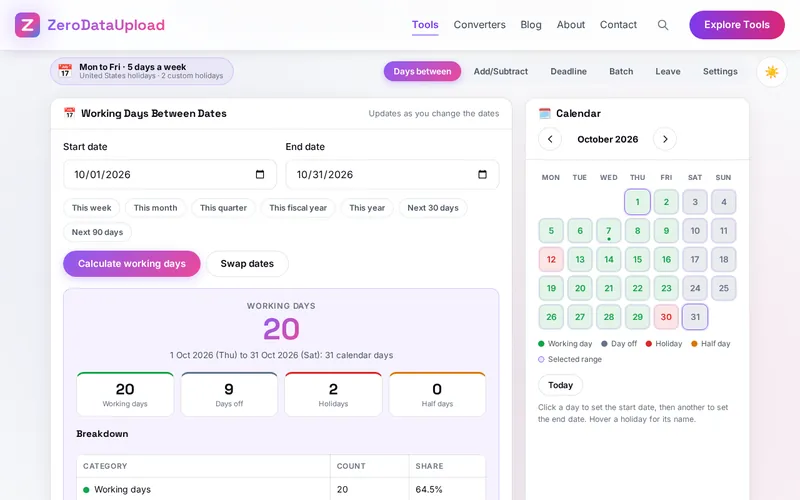
- Set the rules once - In Settings, choose your country, pick the work week and add the holidays only your company takes. The status pill shows what is in force.
- Count the days between dates - Pick a start and an end date or a preset; the working days, the tiles, the breakdown, the calendar and the holidays in the range update as you change a date.
- Move by business days - Add/Subtract for "10 business days from today", Deadline for a project with its presets, and the reverse calculation for the latest start date.
- Total several ranges - Batch takes up to fifty labelled ranges, totals them and downloads the table as CSV.
- Plan your leave - Leave gives the days to book for a period away and lists the holidays inside it; move the dates a day and compare.
- Keep and reuse - Every result is in the history; save a configuration per office; export one backup file.
Working Days, Deadlines and Leave
- Between dates - Both the start and the end date are counted unless you turn one off in Settings; "clear days" in a contract means both off. Days off in your week, holidays on working days and half days are counted separately.
- Moving by business days - The start day is never counted: one business day after a Friday is the next Monday, or the Tuesday if that Monday is a holiday. Deadlines and the reverse calculation use the same rule, so they agree.
- Substitute days - The United States observes Saturday holidays on the Friday before and Sunday holidays on the Monday after; the United Kingdom, Canada and Australia give the next weekday; Japan substitutes Sundays and adds a citizens' holiday between two holidays; Singapore moves Sunday holidays to Monday; Germany, France, India and the United Arab Emirates move nothing.
- Leave - A period away is counted with both ends included; the working days in it are the leave to book, and the weekends and public holidays inside cost nothing.
Frequently Asked Questions
The questions people ask most about WORKDAYS are answered on the tool page, just below the tool. The full list of 25 questions, from storage and privacy to troubleshooting, is in the WORKDAYS FAQ, and the help guide walks through every feature step by step.
Privacy & Security
Court filing dates, a notice period, a plant's shutdown weeks, a colleague's leave: WORKDAYS has no upload step, no account and no server-side storage. The settings and the history live in your browser's storage, and the only copies that leave it are the CSV and backup files you download yourself.
The tool asks for no permissions and loads nothing from outside the site. Like every page on ZeroDataUpload, the tool page shows ads through Google AdSense and uses Google Analytics; the Privacy Policy and Cookie Policy explain what those services collect and how the cookie banner controls them. Your dates and settings are never part of it.
Ready to try WORKDAYS? It's free, private, and runs entirely in your browser.
Open WORKDAYS →Related

Last Updated: October 7, 2026