
Epoch Converter Pro
Unix timestamp converter with 9 advanced time utilities
Guide reviewed 2 October 2026 by Milan Salvi. How we write and correct guides.
Open Epoch Converter Pro →Step-by-step help guide and questions and answers for this tool.
Table of Contents
Overview
Epoch Converter Pro is a free Unix timestamp converter that runs entirely in your browser. It is built for developers reading API responses, administrators going through log files and anyone who needs to turn a Unix timestamp into a readable date or back.
The tool supports bidirectional conversion between epoch timestamps and dates with automatic format detection. It can distinguish between timestamps in seconds (10 digits), milliseconds (13 digits), microseconds (16 digits), and nanoseconds (more than 16 digits) without any manual configuration. Simply paste your timestamp and get instant results in multiple formats including local time, UTC time, and ISO 8601.
Beyond basic conversion, Epoch Converter Pro includes 9 advanced tools for time-related calculations: multi-timezone comparison, duration calculator, countdown timer, working days calculator, age calculator, timestamp difference calculator, code snippet generator for 6 programming languages, cron expression converter, and ISO 8601 duration parser. All processing happens locally on your device, ensuring complete data privacy.
Key Features
Bidirectional Conversion
Convert epoch to date and date to epoch with auto-detection of timestamp units. Supports seconds, milliseconds, microseconds, and nanoseconds formats automatically.
9 Advanced Time Tools
Multi-timezone comparison, duration calculator, countdown timer, age calculator, working days calculator, timestamp diff, code generator, cron converter, and ISO 8601 parser.
Multi-Timezone Comparison
View any timestamp across 8 major timezones simultaneously including UTC, EST, PST, GMT, CET, IST, and JST. Perfect for scheduling international meetings.
Batch Processing
Convert multiple timestamps at once with drag-and-drop file import. Export results in CSV, JSON, or Excel format for integration into your workflow.
Code Snippet Generator
Generate ready-to-use timestamp conversion code in 6 programming languages: JavaScript, Python, Java, PHP, Go, and Ruby. One-click copy to clipboard.
History & Shareable URLs
Stores your last 100 conversions with search and filtering. Generate shareable URLs that auto-load specific conversions for easy collaboration.
Keyboard Shortcuts
Three keyboard shortcuts: Ctrl+K jumps to the epoch input, Ctrl+/ lists the shortcuts and Escape closes any open window.
Accessibility Settings
Font size from 80% to 150%, a reduced motion option, and spoken updates for screen readers, all remembered in your browser.
How to Use
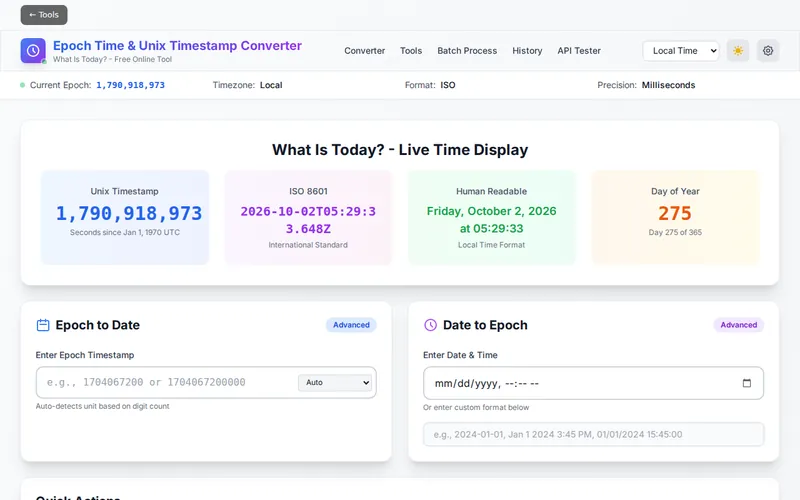
- Open the tool - Visit the Epoch Converter Pro website. No installation, account, or setup is required. The tool loads instantly in your browser.
- Convert Epoch to Date - Enter any Unix timestamp in the Epoch Timestamp input field (e.g., 1709482800). Click Convert and see results in local time, UTC, ISO 8601, and both seconds and milliseconds formats.
- Convert Date to Epoch - Enter a human-readable date in any supported format (ISO 8601, US, European, or natural language like "March 3, 2024"). Click Convert to see the corresponding Unix timestamp.
- Use Quick Actions - Click preset buttons for common timepoints: Now, Today Start, Today End, Yesterday, Tomorrow, Week Start, Month Start, or Year Start for instant conversions.
- Explore Advanced Tools - Navigate to the Tools section to access multi-timezone comparison, duration calculator, countdown timer, working days calculator, age calculator, timestamp diff, code generator, cron converter, or ISO 8601 parser.
- Batch Process Multiple Timestamps - Switch to the Batch section to convert multiple timestamps at once. Enter one per line or drag and drop TXT, CSV, or JSON files. Export results in your preferred format.
- Review Your History - Access the History section to search through your last 100 conversions, filter by type, and copy any previous result with one click.
Frequently Asked Questions
Privacy & Security
All timestamp conversions in Epoch Converter Pro happen entirely in your browser using pure client-side JavaScript. Your timestamps are never uploaded to any server, never transmitted over the internet, and never stored anywhere outside your own device. There are no backend API calls, no analytics tracking individual conversions, and no cookies that record your conversions.
Conversion history is stored exclusively in your browser's localStorage and can be cleared at any time using the "Clear History" button. Settings and theme preferences are also stored locally. When you close the browser tab, no trace of your activity remains on any external server.
Epoch Converter Pro is built with the GDPR, CCPA and DPDPA privacy principles in mind: your timestamps and files never leave your device. The service is supported by Google AdSense advertising, which keeps every feature free with no premium tiers or hidden costs.
Ready to try Epoch Converter Pro? It's free, private, and runs entirely in your browser.
Open Epoch Converter Pro →Related

Last Updated: February 28, 2026