
FERTILE
Track your periods, temperature, cervical mucus, ovulation tests and symptoms, see your fertile window and ovulation estimate on a calendar, chart your temperatures and work out a due date, with every entry kept in your browser where nobody else can read it
Guide reviewed 7 October 2026 by Milan Salvi. How we write and correct guides.
Open FERTILE →Step-by-step help guide and questions and answers for this tool.
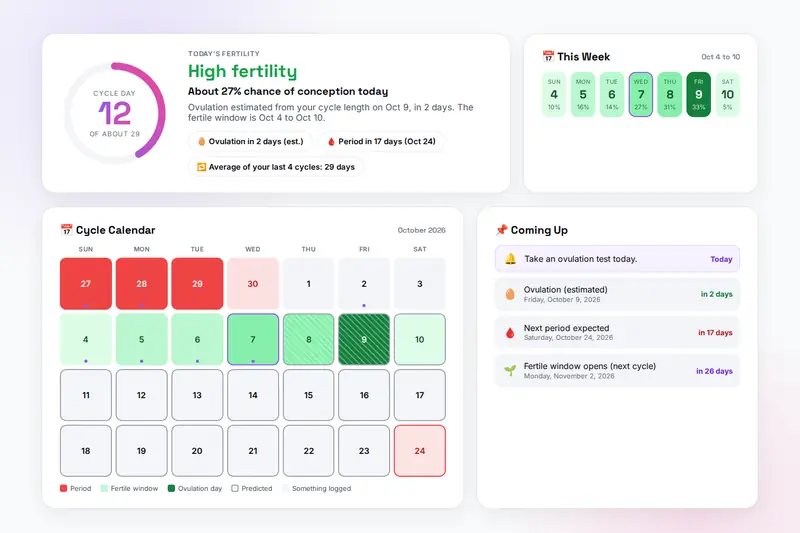
Table of Contents
Overview
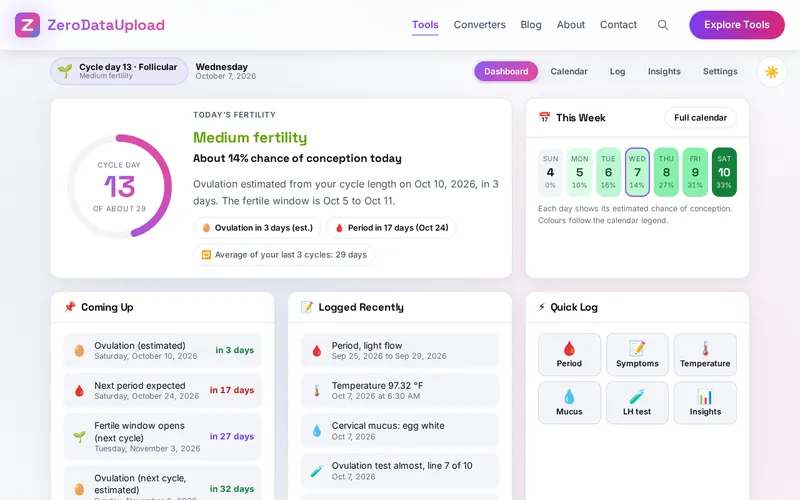
FERTILE is a menstrual cycle and fertility tracker that runs entirely in your browser. You log the first day of each period, and if you want, your morning temperature, cervical mucus, ovulation test results and symptoms. From that the tool shows today's cycle day and phase, your fertile window and the estimated chance of conception, a month calendar with period, fertile and ovulation days, and the date your next period is expected. Once two periods are logged it learns your cycle length from your own history instead of assuming 28 days, and once a cycle has a positive ovulation test or a confirmed temperature shift it uses that instead of arithmetic.
Insights shows your average cycle, variation, period length and regularity, a temperature chart for any cycle with the coverline and the detected shift by the three-over-six rule that fertility awareness methods teach, a bar chart of cycle lengths, a cycle-by-cycle table with how each ovulation was known, and a due date calculator. Settings holds reminders, a PIN lock for the screens, a read-only calendar link for your partner, export as CSV or as a backup file, import and a reset.
Nothing you log is uploaded: periods, temperatures, tests and symptoms stay in your browser's storage on your own device, and the only copies that leave it are the file you export or the link you choose to send. FERTILE is a tracking and information tool, not a medical device and not a contraceptive; its dates are estimates, and a doctor is the person to ask about anything that worries you.
Key Features
Cycle Length From Your History
The setting until two periods are logged, then the average of your last six cycles, with the dashboard saying which is in use.
Fertile Window and Chance
Five days before ovulation to one day after, each day with its estimated chance of conception from published day-specific averages.
A Real Temperature Chart
Readings by cycle day in °F or °C, a coverline by the three-over-six rule, the shift days marked and the ovulation date it implies.
Confirmed Ovulation
A temperature shift or the first positive ovulation test replaces the calendar estimate for that cycle; the table shows how each one was known.
One Calendar for Everything
Period, fertile and ovulation days, predictions with a dashed edge, dots for logged days, and a day card with everything logged and buttons to add more.
Statistics and Due Date
Average cycle, variation, period length, regularity, a cycle-by-cycle table with luteal lengths, and a due date calculator by Naegele's rule.
Reminders and a PIN Lock
Reminders on the dashboard and, if allowed, as a browser notification when you open the tool; a four-digit PIN stored only as a hash hides the screens.
Partner Link and Backups
A read-only calendar link that carries only the dates you tick, a CSV for a doctor, a backup file that restores everything, and a print of the report.
How to Use
- Log your last period - Under Log, enter the first day, the last day if it is over and the flow. The dashboard, calendar and predictions need only that date.
- Set your cycle length - Under Settings, enter your usual cycle length and luteal phase, pick °F or °C and the first day of the week. After two periods the tool uses your own average.
- Add the signs you track - Log your morning temperature, cervical mucus, ovulation tests and symptoms as you go. A positive test or a temperature shift replaces the estimate for that cycle.
- Read the calendar - Red for period days, greens for the fertile window, deep green for ovulation, dashed edges for predictions; click a day to see and add to its log.
- Check the insights - The statistics, the temperature chart with its coverline, the cycle length chart, the cycle-by-cycle table and the due date calculator; Print report prints them.
- Protect and back up - Reminders, a PIN lock, a partner link, export as CSV or backup, import and Clear all data are under Settings.
How the Predictions Work
- Calendar estimate - Ovulation at cycle length minus luteal phase days after the last period started; the fertile window five days before to one day after; the next period one cycle length after the last. With two or more periods the cycle length is the average of your last six, ignoring cycles under 15 or over 60 days.
- Temperature shift - When three readings in a row are at least 0.2 °F (0.1 °C) above the highest of the six before them, the coverline is drawn and ovulation is placed on the day before the first high reading.
- Positive test - Without a shift, the first positive ovulation test of a cycle places ovulation on the following day. Temperature takes precedence over a test, and both over the estimate.
- Chance of conception - 10% five days before ovulation, 16%, 14%, 27% and 31% on the following days, 33% on the day and 5% the day after: averages from Wilcox, Weinberg and Baird (New England Journal of Medicine, 1995), not personal odds. That study found no pregnancies after the day of ovulation, so the 5% the day after only allows for error in the ovulation estimate.
- Statistics - Average cycle and variation from the gaps between your periods, average period from their lengths, regularity from how far each cycle strays from the mean.
Every date is an estimate until one of your own signs confirms it, and even then it says nothing about the next cycle. Irregular cycles, recent hormonal contraception, breastfeeding and conditions such as PCOS make calendar estimates unreliable. FERTILE is not a contraceptive and not a substitute for a doctor.
Frequently Asked Questions
The questions people ask most about FERTILE are answered on the tool page, just below the tool. The full list of 36 questions, from storage and privacy to troubleshooting, is in the FERTILE FAQ, and the help guide walks through every feature step by step.
Privacy & Security
Period dates, temperatures, test results and symptoms are among the most private things a person records. FERTILE has no upload step, no account and no server-side storage: everything lives in your browser's storage on your own device. The only copies that ever leave it are the CSV or backup file you export yourself and the partner link you choose to send, which carries only the dates you tick.
The tool asks for no permissions except, if you want reminders, the browser's permission to show notifications, and it loads nothing from outside the site. Like every page on ZeroDataUpload, the tool page shows ads through Google AdSense and uses Google Analytics; the Privacy Policy and Cookie Policy explain what those services collect and how the cookie banner controls them. Your entries are never part of it. FERTILE is not a medical device and not medical advice; see the site's disclaimer.
Sources and Who Wrote This
FERTILE and this guide were written by Milan Salvi, a software developer, not a doctor or a fertility specialist, from published medical sources. No medical professional has reviewed them. The day-specific chances of conception come from Wilcox AJ, Weinberg CR and Baird DD, "Timing of sexual intercourse in relation to ovulation", New England Journal of Medicine 1995; 333: 1517-1521, a study of 221 women trying to conceive. The fertile window, the ovulation estimate, the three-over-six temperature rule and Naegele's rule for the due date are the standard methods described in that literature and in fertility-awareness teaching. If you are trying to conceive or to avoid pregnancy, or if anything about your cycle worries you, ask a doctor.
Ready to try FERTILE? It's free, private, and runs entirely in your browser.
Open FERTILE →Related

Last Updated: October 7, 2026