
NoiseHaven: a White Noise Generator and Sleep Sound Mixer
Mix noise, rain, waves and 30 more sounds made live in your browser, place them around you, and let them fade as you fall asleep
Guide reviewed 12 November 2026 by Milan Salvi. How we write and correct guides.
Open NoiseHaven →Step-by-step help guide and questions and answers for this tool.
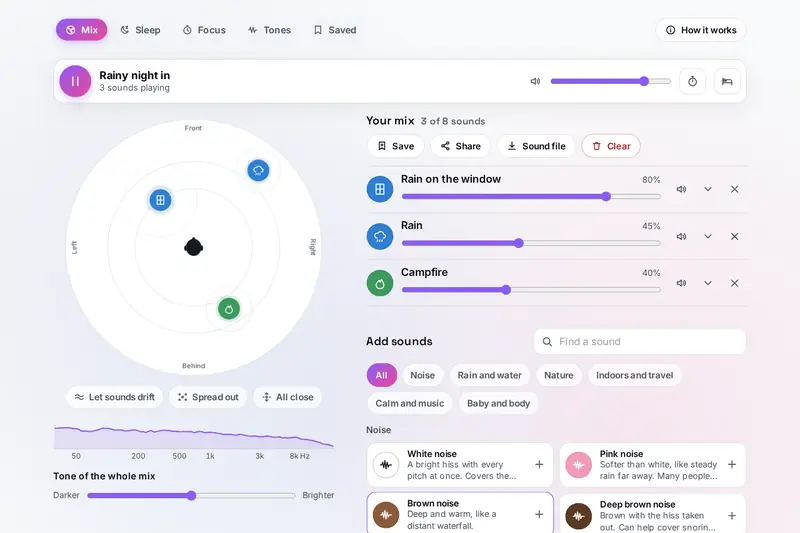
Table of Contents
Overview
Some people sleep best with a fan running, some work best in the hum of a cafe, and some just want the rain without the weather. NoiseHaven is a sound mixer for all of them: 35 sounds, from seven colours of noise to rain on a tent, a night train, birdsong and a tanpura, which you combine, set and place around you on a round stage.
None of the sounds is a recording. Each one is made live from a small model of the real thing (a raindrop, a bubble rising in a stream, a bird's song, a struck bowl) with a little chance in it, so nothing loops and an hour of rain never repeats itself. Around the mixer sit the things that make it useful at night and at work: a timer that fades the sound as you fall asleep, a gentle alarm, a dim bedside screen, focus rounds with breaks and a short breathing guide.
It all runs in your browser: what you play and save stays on your device.
Key Features
35 Live Sounds
Noise in seven colours, rain and water, nature, indoors and travel, calm music and soothing body sounds.
A Stage Around You
Drag each sound in front, behind, near or far; with headphones you hear it from that place.
Mixes of Eight
Up to eight sounds at once, each with its own volume, tone and controls, or twelve ready-made mixes.
A Fading Sleep Timer
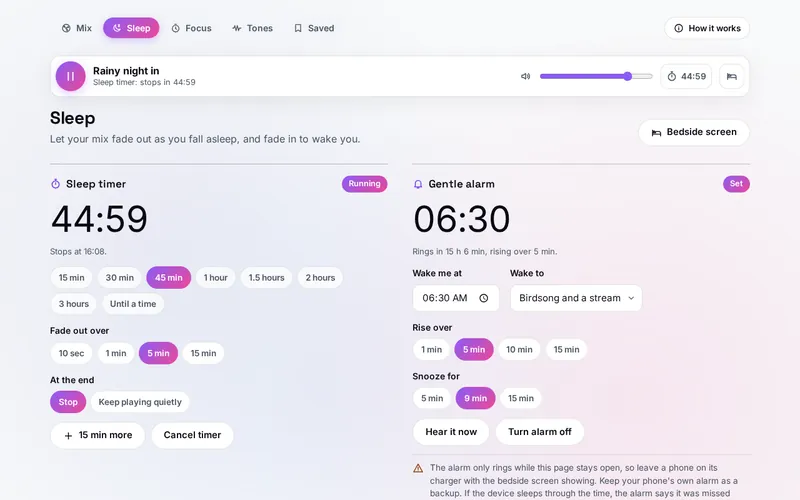
From 15 minutes to 3 hours or a time on the clock, fading out over up to 15 minutes.
A Gentle Alarm
Birdsong, bowls, chimes, waves, a tanpura or your mix, rising slowly from silence, with snooze.
Focus Rounds
Work and break rounds of your length, with your mix while you work and a week of focused minutes.
Beats and Tinnitus Sounds
Binaural, monaural and isochronic beats, and noise shaped around the pitch of your ringing.
Save, Share and Download
Saved mixes, a link that opens the same mix anywhere, and seamless WAV files for any music player.
How to Use
- Pick sounds - Tap sounds in the library, or a ready-made mix such as Rainy night in or Deep focus. Sound starts with your tap; start quietly.
- Set each one - Move its volume slider, and open the arrow on its row for its own controls: how hard the rain falls, how rough the sea is, the speed of the fan.
- Place them - Drag the dots on the stage around the head in the middle. Put on headphones to hear the places.
- Set the timer - On Sleep, choose how long and how slowly to fade, then Start timer. Open the bedside screen if you like.
- Set an alarm - Choose a time and what to wake to, then Set alarm, and leave the page open. Keep your phone's own alarm as a backup.
- Save it - Save the mix, share it as a link, or make a sound file that loops with no seam.
How the Sounds Are Made
- Noise - White noise is a stream of random numbers. Pink noise passes it through a set of filters so its energy falls by 3 decibels an octave; brown noise through a filter that falls by 6. Grey noise is pink noise shaped by the ear's sensitivity, so every pitch sounds about as loud; blue and violet noise rise with pitch instead.
- Rain and water - Rain is a wash of distant drops with hundreds of close drops each made as a short tick, patter or plink at a random place. A stream is hundreds of tiny bubbles a second, each ringing at the pitch its size gives it (the smaller the bubble, the higher the note).
- Nature, rooms and music - Birds sing songs of their own kind, a fire crackles and pops, train wheels clack over rail joints at the train's speed, and the tanpura's strings are built from their overtones, which bloom just after each pluck as on the real instrument.
- The stage - A sound to your left is louder in the left ear; further away it is quieter, duller and more echoey; behind you it loses a little brightness.
- Checked before publishing - We compared the tool with references made separately: 154,944 cases in 17 groups: the random numbers behind every sound, the eight noise generators sample by sample against separate programs (equal to the last digit), the slope of each colour of noise (pink -3.01, brown -5.97, blue +2.96 and violet +6.01 decibels an octave), 1,200 filters compared with the Audio EQ Cookbook, every sound at the edges of its settings, over 2,000 hostile settings, 36,000 stream bubbles against the pitch a bubble of their size rings at, the beats measured in their spectra, the tinnitus notch against its filters, the places on the stage, sound files read back by another program, 79,530 alarm and timer times in six time zones across every clock change of 2026, the focus rounds, the diary, and 3,000 saved states, 1,500 share links and 800 backups made to break the tool. The original version accepted a link that set a sound beyond its slider (rain about eight times louder than Downpour) or named a sound "constructor", let a damaged saved setting change every object on the page, left the half-octave notch only about 4.5 decibels deep, rang an alarm hours late after the device slept and counted focus time while a computer slept; that is fixed.
Sound, Sleep and What Is Known
Many people fall asleep more easily with a steady sound, mostly because it covers sudden ones: a door, a car, a neighbour. The research has not settled whether it improves sleep: a 2021 review of 38 studies rated the evidence very low (Riedy and others, Sleep Medicine Reviews). So NoiseHaven makes no promise about your sleep. It gives you the sounds, a sleep diary of how you rated each night, and the advice that matters most: keep it just loud enough, softer than a conversation, and lower still through headphones. For a baby, a study of infant sleep machines advised keeping the sound as far from the baby as you can, never in or on the cot, as quiet as works and for a short time (Hugh and others, Pediatrics 2014).
The Tones tab says plainly what is known too. Brainwave beats are two tones a few hertz apart; whether such a beat changes your brain rhythm is still argued, with 5 of 14 studies in a 2023 review finding that it did and 8 that it did not (Ingendoh and others, PLoS ONE). The tinnitus sounds follow research on music with the ringing's pitch taken out: a small trial found the ringing rated quieter after a year (Okamoto and others, PNAS 2010), a larger one found no clear change on its main measures (Stein and others, BMC Neurology 2016). Neither is a treatment, and the tool says when to see a doctor.
Two of NoiseHaven's parts overlap with tools elsewhere on the site, and each has its own job. Prana Breathing Exercises teaches fifteen breathing techniques in depth; NoiseHaven's short breathing guide is there to wind down with your mix, which swells and settles with your breath. The Clock has alarms, a countdown, a stopwatch and a world clock; NoiseHaven's alarm wakes you with its own sounds rising from silence, and its timer fades your mix out instead of ringing.
Frequently Asked Questions
The questions people ask most are answered on the tool page, just below the tool. The full list of 30 questions, from the colours of noise and the sound stage to the sleep timer, the alarm, focus rounds, brainwave beats, tinnitus sounds and saving, is on the NoiseHaven FAQ page, and every part of the tool is explained step by step in the help guide.
Privacy & Security
This tool has no upload step, no account and no server-side storage. Every sound is made by your browser on your device. Your mixes, settings, sleep diary and focus times are kept only in this browser, and a backup file is saved to your own device.
The tool asks no outside service for anything. A share link carries the mix in the link itself, and the tool page takes it out of the address before anything else on the page can read it. Like every page on ZeroDataUpload, the tool page shows ads through Google AdSense and counts visits with Google Analytics; the Privacy Policy explains both.
Ready for some rain? It's free, private, and runs entirely in your browser.
Open NoiseHaven →Related

Last Updated: November 3, 2026