
Prana Breathing Exercises: Guided Breathing in Your Browser
Fifteen techniques with their steps, reasons and sources, an orb, a wave or a breath sound to follow, your own pace, a breath test and your progress
Guide reviewed 10 November 2026 by Milan Salvi. How we write and correct guides.
Open Prana Breathing Exercises →Step-by-step help guide and questions and answers for this tool.
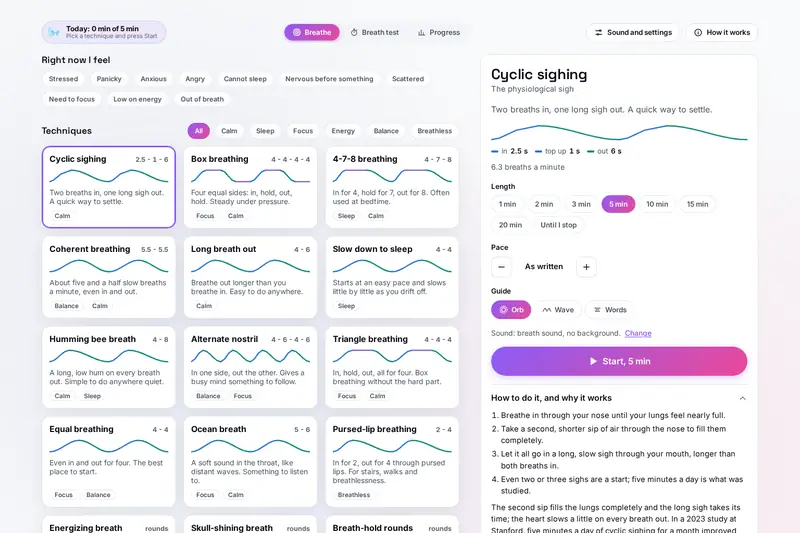
Table of Contents
Overview
Counting a breathing pattern in your head is harder than it sounds: by the third breath you have lost count, rushed the breath out or held a little too long. A guide that breathes with you takes that job away, so all that is left is to follow. Prana does this for fifteen techniques, from the gentle long breath out to box breathing, 4-7-8 breathing and the cyclic sigh studied at Stanford in 2023.
Every technique comes with its steps, the reason people use it and, where one exists, the source behind that reason; where there is no study, the tool says what many people find and nothing more. You can follow an orb that fills and empties with your lungs, a wave that shows the breaths to come, words only, or a breath sound with your eyes closed. Around the sessions sit a pace finder, a simple breath test, your own patterns and a record of what you have done.
It is a guide for breathing exercises, not a medical device. Breathing exercises can help you relax, but they do not replace care for a medical or mental health problem.
Key Features
Fifteen Techniques
Cyclic sighing, box, 4-7-8, coherent, humming bee, alternate nostril, pursed lips, breath-hold rounds and more.
Right Now I Feel
Ten everyday states, from stressed to out of breath, each leading to a technique and a length.
Orb, Wave or Words
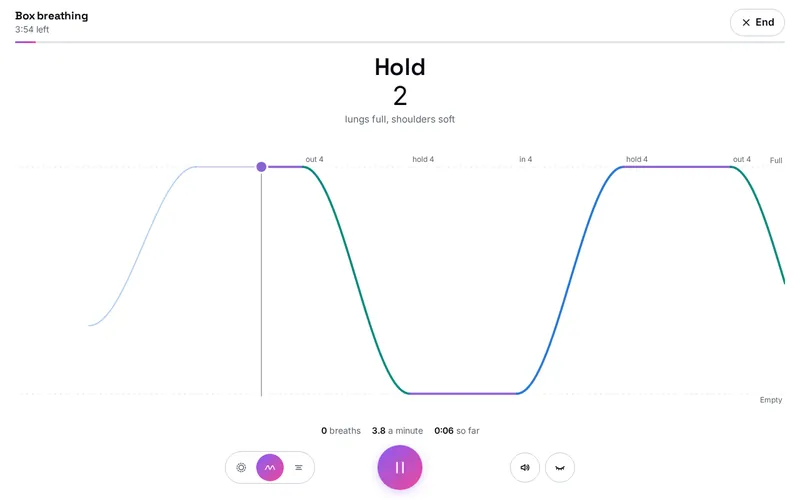
Three ways to follow each breath, with blue for breathing in, green for out and purple for holding.
Eyes Closed and Sound
A breath sound, soft tones or a singing bowl made on your device, with vibration and spoken steps.
Pace Finder
Five slow paces from 6.5 to 4.5 breaths a minute; the one you rate smoothest becomes Your pace.
Breath Test
A timed, comfortable hold after a normal breath out, compared only with your own earlier results.
Your Own Patterns
Holds, a top-up breath, alternate nostrils or a pace that slows down, shared as a link.
Progress on Your Device
Daily goal, days in a row, a 26-week calendar, what helps you, a spreadsheet, backup and a reminder.
How to Use
- Choose - Tap how you feel under Right now I feel, or pick one of the fifteen technique cards.
- Read the panel - How to do it, why it is used, its source, and a care note where it has a risk.
- Set it up - The length in minutes, breaths or rounds, the pace (faster or slower, same shape) and the guide.
- Press Start - Say how tense you feel if you like, then follow the orb, the wave, the words or the sound.
- Finish - Rate how you feel now, add a note, and see the session in Progress.
- Go further - Find your own pace, time a breath test now and then, or make and share a pattern of your own.
How the Tool Works It Out
- The timing - A session is a list of steps, each with its seconds. The tool works out where you are from your device's steady clock, not by counting screen frames, so each step starts on time over minutes, however busy the device is; paused time does not count.
- Length - A session in breaths runs exactly that many; a session in minutes ends at the end of the breath closest to the time, so it never stops halfway through a breath.
- Pace - Faster and Slower multiply every step by the same factor, from 0.6 to 2, rounded to a tenth of a second, so the ratio of the pattern stays as written. The breaths a minute are 60 times the breaths out in one cycle, divided by the cycle's seconds.
- Slowing patterns - Slow down to sleep, and your own patterns with Slow down as I go, move each step from its first to its last number in even steps over the first three quarters of the session, then stay there.
- Your pace - The pace finder asks how each of five paces felt, from 1 (hard work) to 5 (smooth and easy), and keeps the highest rated, the slower on a tie. Your pace breathes in for four tenths of each breath and out for six tenths.
- Calmer or not - Your tension before and after, from 1 to 5, is averaged per technique; a session counts as calmer when the after is lower than the before.
- Checked before publishing - We compared the tool with references written separately from these rules, with the test values made first: 81,797 cases in 13 groups, including every technique at every length and at ten paces, the start of every step over whole sessions with irregular screen frames and pauses (the same to a millionth of a second), open holds, the pace finder, the progress bar, the days in a row and the calendar in two time zones (one with summer time), your own patterns and share links in Hindi and emoji, 3,000 saved files made to break the tool, the spreadsheet and the calendar file. The original version's progress bar slid back at every step of a session counted in breaths and was full before the end; that is fixed.
Breathing Safely
Slow breathing without holds suits most people. Fast breathing and breath holds lower the carbon dioxide in your blood, which can bring dizziness, tingling or fainting, so the three techniques that use them carry a care note, and the tool shows it again before they start. Never practise them in or near water, while driving or standing up, and skip them if you are pregnant or have epilepsy, heart problems or high blood pressure, unless your doctor agrees. If you are short of breath at rest, or it is new or getting worse, get medical help.
Frequently Asked Questions
The questions people ask most are answered on the tool page, just below the tool. The full list of 35 questions, from choosing a technique and the sources behind it to sound, safety, the pace finder, the breath test and your data, is on the FAQ page, and the help guide walks through every part of the tool.
Privacy & Security
How tense you feel, what you write after a session and how often you practise are personal. This tool has no upload step, no account and no server-side storage: every sound is made in your browser, and your sessions, ratings, notes and patterns are kept only in this browser on this device. Delete everything, under Sound and settings, removes them.
Spoken steps use only a voice that runs on your device. A share link carries a pattern after the # sign, which browsers never send to a server, and the page takes it out of the address before anything else loads. The tool loads nothing from outside the site. Like every page on ZeroDataUpload, the tool page shows ads through Google AdSense and counts visits with Google Analytics; the Privacy Policy explains both, and what you do in the tool is never part of them.
Ready for a few slow breaths? It's free, private, and runs entirely in your browser.
Open Prana Breathing Exercises →Related

Last Updated: November 3, 2026