
Decision Maker: Weigh Your Options and Decide
A decision matrix that tells you how sure to be, pros and cons, two-at-a-time ranking, a gut check and a record to review, in your browser
Guide reviewed 10 November 2026 by Milan Salvi. How we write and correct guides.
Open the Decision Maker →Step-by-step help guide and questions and answers for this tool.
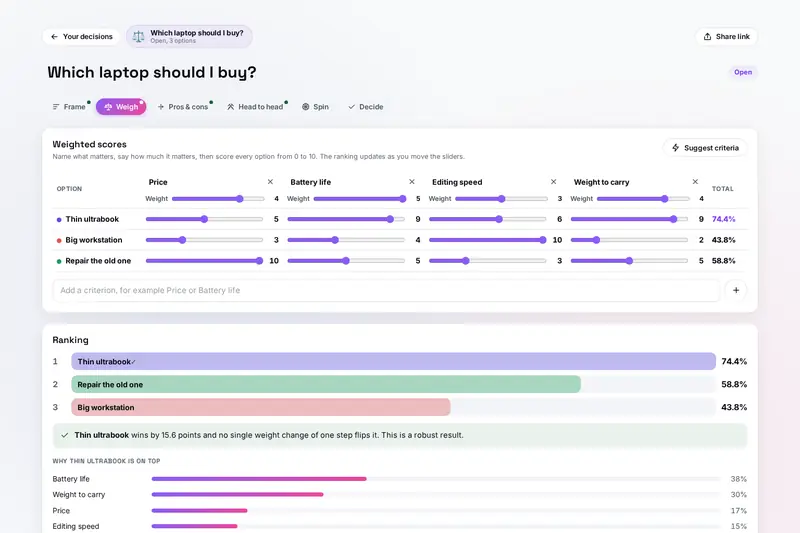
Table of Contents
Overview
Some choices go round in your head for days: which laptop, which job offer, which flat, whether to move at all. Writing the options down helps, but a plain list of pros and cons hides how much each argument matters, and a gut feeling is hard to trust when you cannot say where it comes from. This tool gives one decision several angles, then puts them side by side.
You frame the choice and list the options. Weigh scores them on the criteria that matter and says whether the result is robust or hangs on a single weight. Pros and cons count your arguments by how much they matter. Head to head makes you pick between two options at a time. A wheel or a coin, followed by a gut check, shows what you were hoping for. Decide shows what every tool says, you write why you chose, and later you rate how it went.
For a quick random pick from any list, the site has SpinForge, a wheel with bigger chances, teams and game modes, and Flip the Coin for heads or tails. The Decision Maker is for one decision you want to think through: its wheel spins only that decision's options, and your feelings about where it lands join the rest of the evidence.
Key Features
Advice to Start
Say what is at stake and how easy it is to undo, and the tool suggests which tab to begin with.
Weighted Decision Matrix
Up to 10 criteria weighted 1 to 5 and 12 options scored 0 to 10, ranked as you move the sliders.
Fragility Check
Says when one step on one weight would hand the win to another option, and names the criterion.
Pros and Cons
Each argument counts one to three dots, with a net score and a warning about deal breakers.
Head to Head
Two options at a time until every pair has met, with a warning when your picks go in a circle.
Wheel, Coin and Gut Check
Fair picks from secure random numbers, then a question about how you felt when it landed.
Decide and Review
One table of what every tool says, a pre-mortem, your choice and reasons, and a later star review.
Kept on Your Device
Every decision saved in your browser, with export, import, share links and a text summary.
How to Use
- Name the decision - Type what you are deciding and press Start, or try the example.
- Frame it - Why it matters, a date to decide by, how easy it is to undo, what is at stake, and two to twelve options.
- Weigh - Add criteria, weight them 1 to 5 and score every option 0 to 10; read the verdict under the ranking.
- List pros and cons - For each option, with one to three dots for how much each argument counts.
- Go head to head - Pick between two options at a time, by gut, until every pair has met.
- Spin or flip - Then say how you felt when it landed: relieved, nothing much or disappointed.
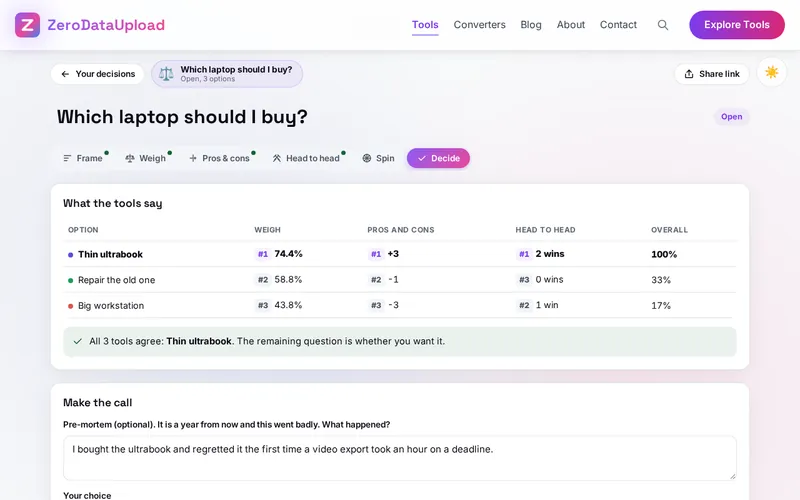
- Decide - Compare the tools in one table, write a pre-mortem, choose and say why; come back later to review.
How the Tool Works It Out
- The weighted total - Each option's score on a criterion is multiplied by the criterion's weight, and the products are added up. The total is shown as a share of the most an option could get (a 10 on everything), so 74.4% means three quarters of the best possible.
- Robust or fragile - For each criterion the tool tries the weight one step higher and lower, then two steps, and so on, and asks whether another option would then be strictly ahead. One step is enough: fragile, and the criterion is named. No one-step change and a lead of 10 points or more: robust. Otherwise moderate, with the smallest change that would hand over the lead.
- Pros and cons - The net is the dots of the pros minus the dots of the cons, so a single deal breaker can outweigh two minor advantages.
- Head to head - With n options there are n times (n minus 1) divided by 2 pairs, each played once; a win counts 1 and a tie half. The pairs come in a fair random order and the sides are random, so the left option has no advantage. Three picks that go in a circle are pointed out.
- The wheel and the coin - The pick is made first, from the browser's secure random numbers, every option equally likely; the wheel then turns five to seven times and stops inside the picked slice, and the page reads the winner from the slice under the pointer.
- The Decide table - In each tool you used, the first option gets full points and the last none, with shared ranks for ties; the overall share is the average over the tools.
- Checked before publishing - We compared the tool with references written separately from these rules, with the test values made first: 113,351 cases in 15 groups, including the totals and verdicts of 4,001 decisions (2,500 with options close together, where small changes matter), pros and cons, head to head wins and circles, the Decide table, the summary, 3,700 decisions and files made to break the tool, and share links in Hindi, Russian, Chinese and emoji. Fairness was tested by chi-square on 660,000 spins of wheels with 2 to 12 options (every one stopping inside its slice), a million coin flips and 360,000 head to head orders. The original version of the tool could call a result robust when one step on a weight changed the winner; that is fixed.
Frequently Asked Questions
The questions people ask most are answered on the tool page, just below the tool. The full list of 35 questions, from framing a choice and the scoring table to the gut check, share links and reviews, is on the Decision Maker's FAQ page, and the help guide walks through every part of it.
Privacy & Security
What you are deciding can be personal: a job, a move, money, a relationship. This tool has no upload step, no account and no server-side storage: everything happens in your browser, and your decisions are kept only in this browser on this device, so they are there next time. Delete all, under Your decisions, removes them.
A share link carries one decision after the # sign, which browsers never send to a server, and the page takes it out of the address before anything else loads. The tool loads nothing from outside the site. Like every page on ZeroDataUpload, the tool page shows ads through Google AdSense and counts visits with Google Analytics; the Privacy Policy explains both, and what you type is never part of them.
Ready to make up your mind? It's free, private, and runs entirely in your browser.
Open the Decision Maker →Related

Last Updated: November 3, 2026