
SpinForge: Free Spin the Wheel Random Picker
Names, food, prizes, chores or numbers on a wheel, picked fairly by your browser's secure random numbers, with game modes, teams and share links
Guide reviewed 10 November 2026 by Milan Salvi. How we write and correct guides.
Open SpinForge →Step-by-step help guide and questions and answers for this tool.
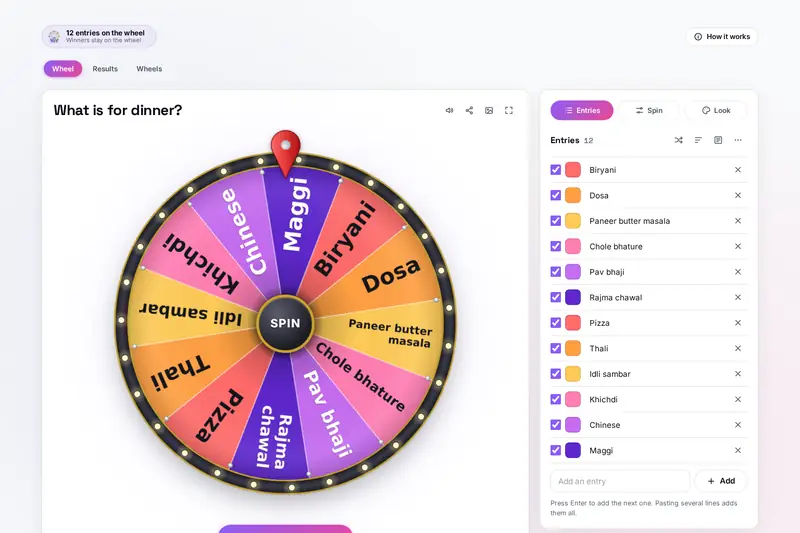
Table of Contents
Overview
A wheel is the friendliest way to settle a choice: everyone can see the names, everyone watches it turn, and nobody can say the person holding the pen chose. What matters is that the wheel is really fair. SpinForge picks the winner with the browser's secure random number generator, the one built for passwords and keys, and gives every entry exactly its share before the wheel even starts to turn.
Around that fair pick it has what classrooms, offices, families and events ask for: winners taken off so nobody goes twice, last one standing, a race to three wins, several picks in a row, bigger chances for some entries with slices that grow to match, teams dealt out evenly, wheels of numbers or letters, and a Results tab that lists every spin against the chance it had.
For fixed choices the site has two simpler tools: Multi Dice Roller for dice and Flip the Coin for heads or tails. SpinForge is for your own lists.
Key Features
A Fair Pick
The browser's secure random numbers choose the winner, each entry with exactly its share.
Four Game Modes
Winners stay, are taken off, are knocked out until one is left, or score points in a race.
Bigger Chances
Give an entry 2 to make it twice as likely; its slice grows so the wheel shows the real odds.
Spin Your Way
A button, the space bar, a click or a flick in either direction; press again to stop sooner.
Teams and Numbers
Deal names into even teams at random, or fill a wheel with numbers or the letters A to Z.
Every Result Kept
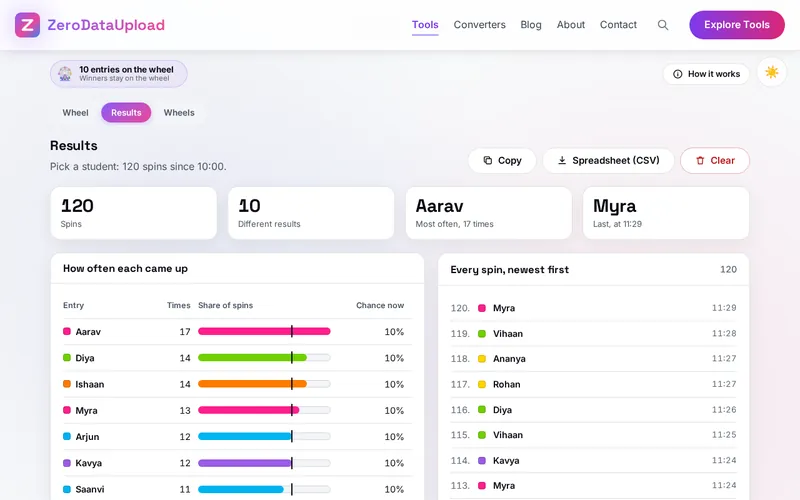
Each spin with its time, and how often each entry came up next to its chance.
Look and Sound
Twelve colour sets, a lit or gold rim, pictures, a mystery wheel, ticking pegs and a fanfare.
Wheels to Keep and Share
24 ready-made wheels, up to 300 of your own, and a link or QR code that carries the wheel.
How to Use
- Fill the wheel - Type an entry and press Enter for the next, paste a whole list, or start from one of the 24 ready-made wheels on the Wheels tab.
- Choose the game - Under Spin, the winner stays on the wheel, is taken off, is knocked out or scores a point; set spins in a row and the spin length.
- Spin it - Press Spin or Space, click the middle, or flick the wheel; press again to stop it sooner on the same winner.
- See the winner - The slice lights up and a pop-up shows the name with its chance, or a quieter line under the wheel.
- Make it yours - Under Look pick colours, the rim, the lettering and the middle; give an entry its own colour, a picture or a bigger chance.
- Keep and share - Results lists every spin; Wheels keeps your wheels; share a wheel as a link or QR code, or make a backup file.
How the Pick Is Made
- The winner first - When you spin, the browser's secure generator draws a number between 0 and 1 from 53 random bits. The slices are laid end to end as shares of 1, and the slice the number falls in wins. With equal entries each has 1 in the number of entries; with bigger chances, an entry's share is its number over the total of the numbers on the wheel.
- Then the stop - The wheel turns a whole number of times in the direction of the spin and stops at a random point inside the winner's slice, at least 1.5 degrees or 4% of the slice from each edge (very thin slices stop in their middle tenth), so it never stops on a line. The pointer reads the slice it stops on.
- The motion - A short push, then a long slowing down, like a real wheel with friction. A flick carries on at the speed it was let go and slows from there; "stop sooner" slows it faster to the same spot.
- Games - Taken off: the winner leaves the wheel until everyone is put back (or a new round starts by itself). Knocked out: the last entry left wins. A race: wins are counted from the start of the game, and the first to the number set wins.
- Teams - The names are shuffled with the same generator and dealt out in turn, so the sizes differ by at most one.
- Checked before publishing - We compared the tool with a reference written separately from these rules, with the test values made first: more than 9 million cases in 16 groups, including 7.6 million picks on 20 wheels (equal entries from 2 to 1,000 and bigger chances from 0.25 to 1,000) tested against their chances with a chi-square test, 20,000 wheels with up to 1,000 slices on which the wheel always stopped inside the picked slice (also after stopping sooner), 1.35 million entries of number lists, lists typed in many ways, teams, results, hostile saved wheels and links, spreadsheet cells, and share links in QR codes read by two independent readers.
Frequently Asked Questions
The questions people ask most are answered on the tool page, just below the tool. The full list of 37 questions, from fairness and game modes to bigger chances, teams, sounds, saved wheels and share links, is on the SpinForge FAQ page, and the help guide walks through every part of the wheel.
Privacy & Security
Class lists, staff names and prize lists are often private. SpinForge has no upload step, no account and no server-side storage: everything happens in your browser, and your wheels, pictures and results are kept only in this browser on this device, so they are there next time. Delete everything, on the tool's Wheels tab, removes them.
The tool loads nothing from outside the site, and the page title never changes with what you type. A shared link carries the wheel in the part after #, which browsers never send to a server, and the page removes it from the address as it opens. Reading the winner aloud uses only a voice that runs on your device. Like every page on ZeroDataUpload, the tool page shows ads through Google AdSense and counts visits with Google Analytics; the Privacy Policy explains both, and your entries are never part of them.
Ready to let the wheel decide? It's free, private, and runs entirely in your browser.
Open SpinForge →Related

Last Updated: November 3, 2026