
PayPulse: CTC to In-Hand Salary Calculator
Find out what your CTC really pays each month with both tax regimes, compare job offers, plan your notice period and set a freelance rate, worked out in your browser
Guide reviewed 9 November 2026 by Milan Salvi. How we write and correct guides.
Open PayPulse →Step-by-step help guide and questions and answers for this tool.
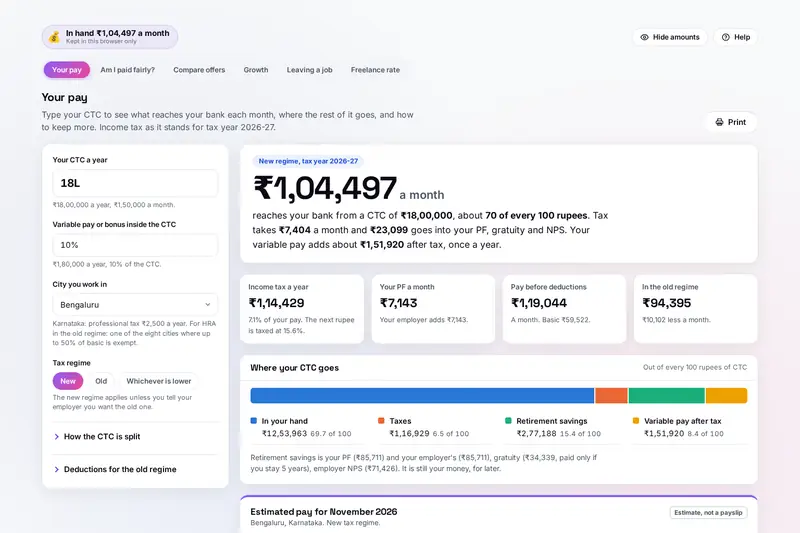
Table of Contents
Overview
An offer letter gives you a CTC, but your bank account sees something smaller. PayPulse closes the gap. Type the CTC once, with any variable pay and the city you work in, and it splits the CTC the way Indian employers do, takes off your PF, professional tax and income tax, and shows the pay that arrives each month, with an estimated payslip and where every rupee of the CTC goes.
Both tax regimes for tax year 2026-27 are worked out side by side, with the old regime's deductions if you add them, and ideas to keep more come with the tax each would save on your own pay. From the same CTC, PayPulse lines up salaries you know beside yours, compares up to three job offers on money, time and what matters to you, follows your pay along growth paths, plans a resignation that keeps your bonus, stock and gratuity, and works out what to charge as a freelancer.
Everything is worked out by your own browser. Your salary is never uploaded, there is no account, and your numbers stay in this browser on your device.
Key Features
CTC to Monthly Pay
The pay that reaches your bank, an estimated payslip and a bar of where every rupee of the CTC goes.
Both Tax Regimes
New and old regimes for tax year 2026-27 side by side, with rebate, marginal relief, surcharge and cess.
Ways to Keep More
Employer NPS, bills paid back, 80C, health insurance or the PF cap, each with its saving on your pay.
The CTC for an Amount
Type the monthly pay you want and see the smallest CTC that gives it with your split and city.
Salaries You Know
Offers, friends' pay and job-site figures lined up beside yours, before and after tax.
Offers on Equal Terms
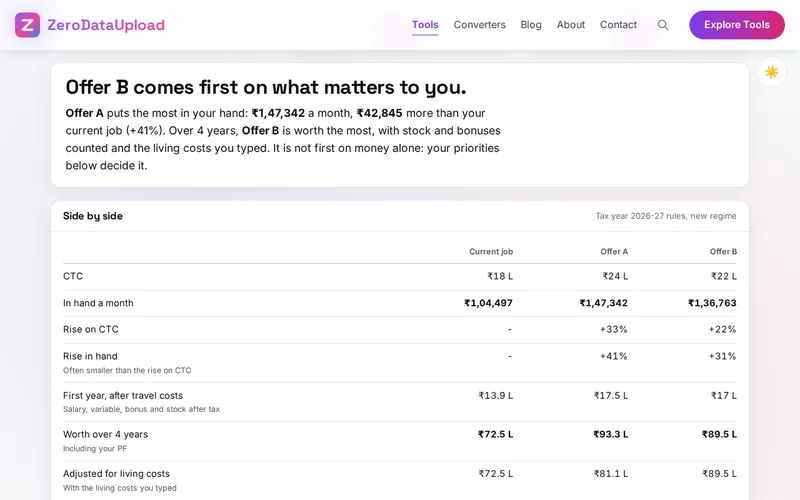
Up to three offers with stock, bonus, travel, living costs and your priorities, over one to four years.
Growth Paths
Staying, promotions or switching jobs over up to 30 years, in future or today's rupees, with savings built.
Leaving and Freelancing
Last day, notice buyout, gratuity and the final settlement, and a freelance rate after tax, fees and costs.
How to Use
- Type your CTC - Under Your pay, type the yearly CTC as 18L, 18 lakh or 1800000, the variable pay inside it and your city.
- Match your offer letter - Under How the CTC is split, set basic pay, HRA, PF, gratuity, employer NPS, insurance and bills paid back.
- Compare the regimes - Add rent, 80C, health insurance and home loan interest to see whether the old regime saves you tax.
- Read the ways to keep more - Each idea shows the tax it saves; discuss the ones you like with your employer.
- Compare salaries and offers - Add the salaries you know, or put offers beside your current job with stock, travel and living costs.
- Plan the move - Under Leaving a job, find the first safe day to resign and what your final settlement should be.
How the Figures Are Worked Out
- The CTC split - Gross pay is solved so that it, the employer's PF, the gratuity set aside (4.81% of wages) and employer NPS add up to the CTC less variable pay and insurance. Basic pay is 50% of monthly pay unless you change it; HRA is 50% of basic in Delhi, Mumbai, Kolkata, Chennai, Bengaluru, Hyderabad, Pune and Ahmedabad and 40% elsewhere.
- PF and the Labour Codes - 12% of wages from you and your employer, or capped at 12% of the EPF wage ceiling of 25,000 a month (since 17 September 2026). Since 21 November 2025 the Labour Codes count allowances above half of pay as wages, so PF and gratuity are worked out on at least half of your pay.
- Income tax - Tax year 2026-27 under the Income-tax Act, 2025: the new regime's slabs of 4 lakh with a 75,000 standard deduction and no tax up to 12 lakh of taxable income (with marginal relief), the old regime's slabs by age with its deductions, surcharge with marginal relief and a 4% cess. Employer NPS is deducted up to 14% of basic in the new regime and 10% in the old; employer PF and NPS above 7.5 lakh a year are taxed as pay.
- Professional tax - From the slabs of the state your city is in, such as 2,500 a year in Karnataka and Maharashtra and none in Delhi or Haryana.
- Leaving a job - Gratuity is 15 days of wages for each completed year (a part year above six months counts), due after 5 years or one year on a fixed-term contract and tax-free up to 20 lakh for most private employees; leave paid out is tax-free up to 10 months of basic and 25 lakh; the final settlement is due within two working days under the Code on Wages.
- Checked before publishing - We compared the tool with a reference written separately from these rules: 4,000 incomes taxed in both regimes, professional tax in every city, 1,500 CTCs split and taxed, 1,200 resignations, 408 freelance rates, 200 offers and 100 growth paths. PayPulse is a calculator for planning, not tax advice; your payslip and tax return are the final word.
Frequently Asked Questions
The questions people ask most are answered on the tool page, just below the tool. The full list of 44 questions, from how a CTC becomes monthly pay and which tax rules apply to offers, gratuity, freelance rates and your data, is in the PayPulse FAQ, and the help guide walks through every part of the tool step by step.
Privacy & Security
Your pay, your offers and your plans to leave are among the most private numbers you have. PayPulse has no upload step, no account and no server-side storage: everything is worked out by your browser, and your numbers are kept in your browser's storage until you choose Delete everything.
The tool loads nothing from outside the site, and no salary figures come with it: the salaries you compare are the ones you type. The Hide amounts button blurs every number when someone can see your screen. Like every page on ZeroDataUpload, the tool page shows ads through Google AdSense and uses Google Analytics; the Privacy Policy and Cookie Policy explain what those services collect and how the cookie banner controls them. Your figures are never part of it.
Ready to see what your CTC really pays? It's free, private, and runs entirely in your browser.
Open PayPulse →Related

Last Updated: November 3, 2026