
NetWorth Pro
A private balance sheet for everything you own and owe, in lakh and crore or millions, with health checks, monthly snapshots, a projection, your financial freedom number and debt payoff plans, worked out in your browser
Guide reviewed 9 November 2026 by Milan Salvi. How we write and correct guides.
Open NetWorth Pro →Step-by-step help guide and questions and answers for this tool.
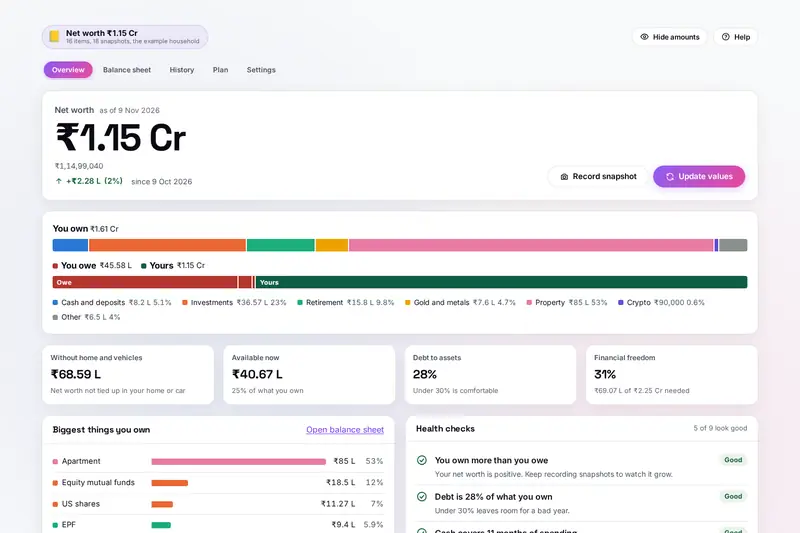
Table of Contents
Overview
NetWorth Pro puts everything you own and everything you owe on one page and turns it into one number: your net worth, what would be left if you sold everything and paid every debt. List your bank balances, deposits, mutual funds, shares, EPF, PPF and NPS, gold, property and vehicles, then your home loan, car loan and cards. Amounts can be typed the way you say them, such as 12.5L, 1.2 cr or 50k, and each item can be in one of 15 currencies.
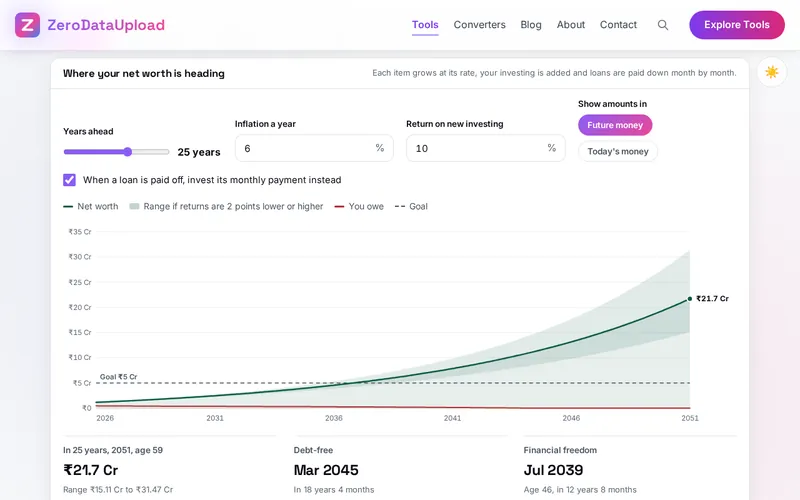
The overview shows your net worth with a bar of what you own against what you owe, how much you could use quickly, and health checks such as emergency cover and debt to assets. Record a snapshot each month and History draws your trend and shows which items moved it. Plan projects your net worth up to 40 years ahead, works out the amount at which work becomes a choice, compares ways out of debt and shows what a goal needs each month.
Every figure is worked out by your own browser. There is no account and no upload; your figures stay in this browser on your device, with a backup file you can export whenever you like.
Key Features
Lakh and Crore Built In
Type 12.5 lakh, 1.2 cr, 50k or a sum; rupees are grouped 12,50,000 and other currencies 1,250,000.
Fifteen Currencies
A dollar brokerage account next to a rupee savings account, totalled at exchange rates you can change.
Health Checks
Debt to assets, emergency cover, costly debt, loan payments, investing and what is available now, at a glance.
Monthly Snapshots
A trend line, the change over any period and the items that moved your net worth between two dates.
A 40-Year Projection
Month by month and item by item, with a range for returns two points lower and higher, in future or today's money.
Financial Freedom Number
Your spending divided by a safe withdrawal rate, the month you could reach it, and Coast freedom.
Debt Payoff Side by Side
As scheduled, highest interest first and smallest balance first, with the month each debt is cleared and the interest.
A Household on One Page
Items that belong to one person or are joint, each person's net worth, backups, spreadsheets and a printable statement.
How to Use
- List what you own - On the Balance sheet, add bank balances, deposits, funds, shares, retirement accounts, gold, property and vehicles. Rough figures are fine.
- Add what you owe - Add each loan and card with its interest rate and monthly payment, so the plans know when it will be paid off.
- Read the overview - Your net worth, the balance bar, what is available now and the health checks, each marked good, fair or needs work.
- Record a snapshot each month - Update values takes today's balances and records the month; History shows the trend and what changed.
- Plan ahead - Give your income, spending and investing under About you, then look at the projection, financial freedom, debt payoff and a goal.
- Keep a backup - Settings exports a backup file, spreadsheets of your items and history, and a one-page statement to print.
How the Figures Are Worked Out
- Net worth - Everything you own minus everything you owe, each item converted to your main currency at your exchange rates. The starting rates are the European Central Bank's reference rates of 6 November 2026; the tool fetches nothing, so type today's rate for accurate totals.
- The projection - Each thing you own grows by the monthly share of its yearly rate and gets its monthly addition; other investing goes into a new pot at the return you choose; each loan is charged a twelfth of its yearly rate and paid down by its monthly payment. The growth rates are rough guesses per kind, such as 11% for funds and shares, that you can change; they are not promises.
- Financial freedom - Twelve months of spending divided by the safe withdrawal rate: 25 times a year of spending at the common 4% rule of thumb, more at the 3 to 3.5% many planners use for retirements longer than 30 years.
- Debt payoff - Every minimum is paid, any extra goes to one debt at a time, and each cleared payment moves to the next: highest interest first (the avalanche) or smallest balance first (the snowball).
- Comparisons by age - The rule of thumb from The Millionaire Next Door (age times yearly income, divided by ten) and the median net worth of US families by age from the US Federal Reserve's Survey of Consumer Finances 2025, published in October 2026.
- Checked before publishing - We compared the tool with a reference written separately from the standard formulas: more than 11,000 typed amounts, the projection against compound growth and the loan formula, debt payoff, the freedom number and every health check. NetWorth Pro is a calculator for reference, not financial advice.
Frequently Asked Questions
The questions people ask most about NetWorth Pro are answered on the tool page, just below the tool. The full list of 44 questions, from listing what you own and typing lakh and crore to health checks, snapshots, the projection, financial freedom, debt payoff, currencies and your data, is in the NetWorth Pro FAQ, and the help guide walks through every part of the tool step by step.
Privacy & Security
A balance sheet is as private as it gets. NetWorth Pro has no upload step, no account and no server-side storage: every figure is worked out in your browser and kept in your browser's storage until you choose Delete everything.
The tool loads nothing from outside the site, not even exchange rates, and the Hide amounts button blurs every number when someone is looking over your shoulder. Like every page on ZeroDataUpload, the tool page shows ads through Google AdSense and uses Google Analytics; the Privacy Policy and Cookie Policy explain what those services collect and how the cookie banner controls them. Your figures are never part of it.
Ready to try NetWorth Pro? It's free, private, and runs entirely in your browser.
Open NetWorth Pro →Related

Last Updated: November 3, 2026