
Payslip Studio
Make salary slips for one employee or the whole team, with EPF at the 25,000 wage ceiling, ESI, professional tax by state and income tax (TDS) for tax year 2026-27 worked out for you, then download PDFs with an optional password, a salary register, a bank transfer sheet and the PF ECR file, with nothing you type leaving your browser
Guide reviewed 3 November 2026 by Milan Salvi. How we write and correct guides.
Open Payslip Studio →Step-by-step help guide and questions and answers for this tool.
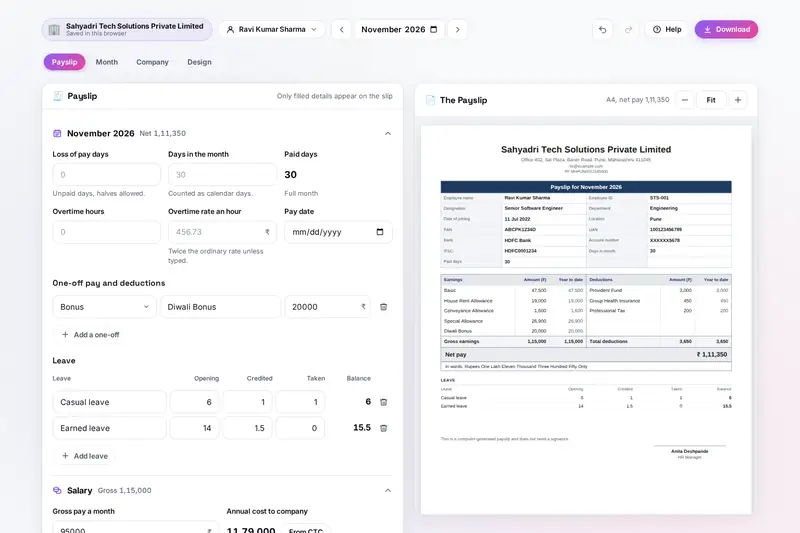
Table of Contents
Overview
Payslip Studio makes salary slips in your browser. You set up the company once, with its address, registration numbers, logo, signature and stamp, and each employee once, with the PAN, UAN, bank account and a salary structure: basic as a share of the gross pay, HRA as a share of basic, allowances, and a special allowance that takes the rest. Every month you pick the month, type the days of loss of pay, the overtime hours or a bonus if there is any, and the payslip beside the form changes as you type.
The statutory deductions are worked out for you, each with a line that says how: EPF on wages up to the ceiling of the month, which rises from 15,000 to 25,000 on 17 September 2026, with the employer's pension and PF shares; ESI when the month's pay is up to 21,000; professional tax by the work state, with the February amount and the half-yearly states; and income tax for tax year 2026-27 in the new or the old regime, spread over the months left. Leave balances and loan balances carry from month to month, and year-to-date totals come from the saved months.
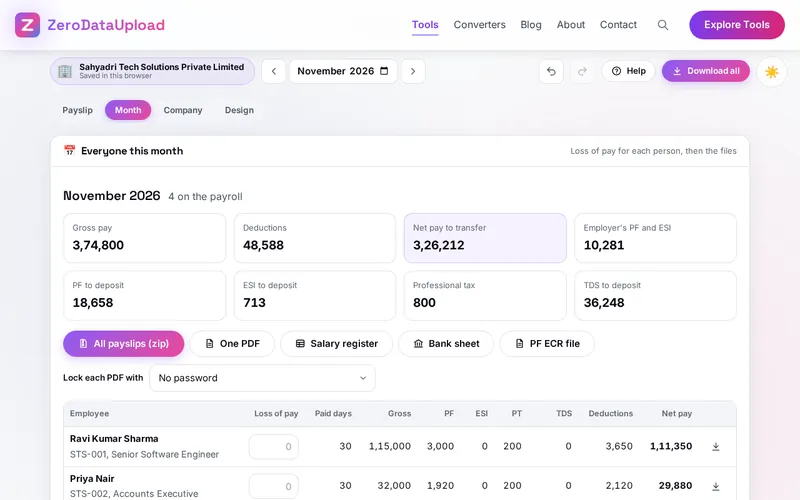
For the whole team, the Month view puts everyone's pay in one table and downloads every payslip as a zip or one PDF, the salary register, a bank transfer sheet and the PF ECR file for the EPFO portal. Nothing is uploaded. There is no account and no server.
Key Features
Salary Structures
Amounts, a share of gross pay or of basic, or the rest of gross pay; lines paid only in some months; gross pay worked out from the annual CTC.
EPF at the New Ceiling
12% on wages up to 15,000, then 25,000 from 17 September 2026, with September split; pension until 58; the Labour Codes rule on allowances.
ESI and Professional Tax
ESI with its contribution periods, rounded up to the rupee; professional tax for every state that charges it, each rule editable.
Income Tax for 2026-27
The year's tax in the new or the old regime, with HRA in eight cities, 80C, 80D and the earlier employer's pay, spread over the months left.
Loss of Pay and One-offs
Unpaid days on calendar days, 30 or 26 days, joining and leaving in the month, overtime at twice the ordinary rate, bonus and arrears.
Six Designs
Classic, Modern, Minimal, Statement, Letterhead and Compact, in any colour, on A4, US Letter or half an A4 sheet, with your logo and signature.
PDFs That Lock
Real-text PDFs of about 40 KB, optionally locked with AES-256 by the employee's PAN or date of birth; JPG and PNG pictures for WhatsApp.
Files for the Month
A zip of payslips, one PDF, the salary register and the bank sheet in Excel, and the PF ECR file, with no author or program name inside.
How to Use
- Set up the company - Name, address, state, registration numbers, logo, signature and stamp, under Company. Try an example company shows a team of four first.
- Add the employees - One by one, or imported from an Excel or CSV sheet, with the PAN, UAN, bank account, work state and gross pay.
- Shape the salary - Basic, HRA, allowances and the special allowance, as amounts or shares; From CTC sets the gross pay from the annual cost to company.
- Fill in the month - Loss of pay, overtime, bonus, arrears, leave taken and loan instalments. PF, ESI, professional tax and TDS follow.
- Pick a design - One of six designs, the colour, the paper and what the payslip shows, such as year-to-date totals and the employer's cost.
- Check and download - Fix what the notes point out, then download the PDF, a locked PDF or a picture, or everyone's payslips and the month's files from the Month view.
The Rules Behind the Figures
- EPF - 12% of PF wages (basic, DA and retaining allowance) from the employee and the employer, on wages up to the ceiling: 15,000 until 16 September 2026 and 25,000 from 17 September 2026 under notification S.O. 5109(E), with September 2026 worked out in two parts for a single ECR. Of the employer's share, 8.33% goes to the pension scheme until 58.
- Labour Codes - Since 21 November 2025, allowances above half of the pay count as wages, so PF is worked out on half of the pay when basic and DA are less than that.
- ESI - 0.75% from the employee and 3.25% from the employer when the month's pay is up to 21,000 (25,000 for a person with a disability), rounded up to the next rupee, and continued to the end of the contribution period.
- Income tax - Tax year 2026-27 under the Income-tax Act, 2025, with the rates Budget 2026 left unchanged: in the new regime no tax up to 12 lakh of taxable income after the 75,000 standard deduction; in the old regime, the HRA exemption up to half of basic and DA in eight cities under the Income-tax Rules, 2026.
- Checked by us - Before publishing, we compared the tool's tax, professional tax, PF and ESI against our own calculation from the published rules for thousands of cases and whole tax years. The figures are still for reference: check unusual cases with your accountant, and keep the professional tax rules up to date for your state.
Frequently Asked Questions
The questions people ask most about Payslip Studio are answered on the tool page, just below the tool. The full list of 41 questions, from setting up a salary structure to loss of pay, PF, ESI, professional tax, income tax, designs and the monthly files, is in the Payslip Studio FAQ, and the help guide walks through every part of the tool step by step.
Privacy & Security
A payslip holds a salary, a PAN, a UAN and a bank account number. Payslip Studio has no upload step, no account and no server-side storage: the payslips and files are made in your browser, your companies and employees live in your browser's storage until you delete them, and the only copies that leave it are the files you download or share yourself.
The tool asks for no permissions and loads nothing from outside the site. The files it makes carry no author, program name or date of their own, and the page title never changes to show a name you type. Like every page on ZeroDataUpload, the tool page shows ads through Google AdSense and uses Google Analytics; the Privacy Policy and Cookie Policy explain what those services collect and how the cookie banner controls them. What you type is never part of it.
Ready to try Payslip Studio? It's free, private, and runs entirely in your browser.
Open Payslip Studio →Related

Last Updated: November 3, 2026