
Where Did My Salary Go?
See where your take-home pay goes each month: type what you spent or open your bank statement, find the money that slipped away and plan next month's budget, worked out in your browser
Guide reviewed 9 November 2026 by Milan Salvi. How we write and correct guides.
Open Where Did My Salary Go? →Step-by-step help guide and questions and answers for this tool.
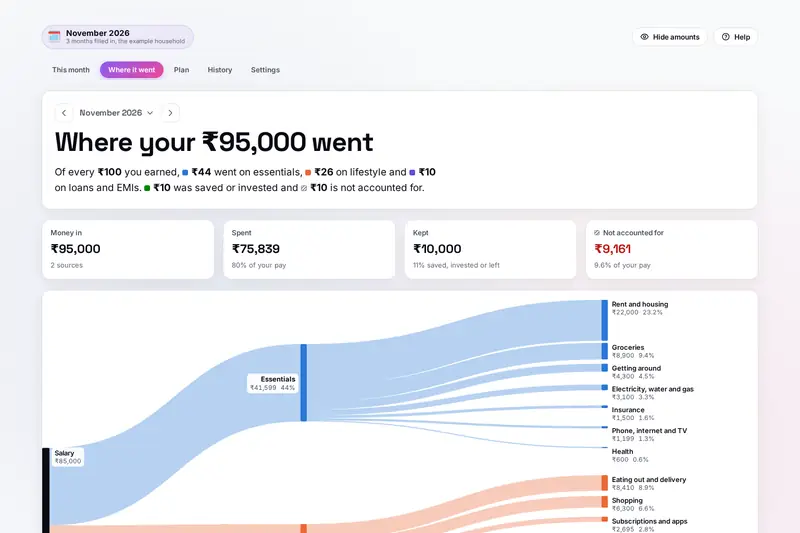
Table of Contents
Overview
Where Did My Salary Go? answers the question in its name for one month at a time. Type your take-home pay and what you spent in each category, or open the statement your bank gives you as a CSV or Excel file, and the tool shows your pay flowing into essentials, lifestyle, loans, fees and savings, and on into every category. The money you cannot account for is shown apart, so the small payments nobody writes down finally have a number.
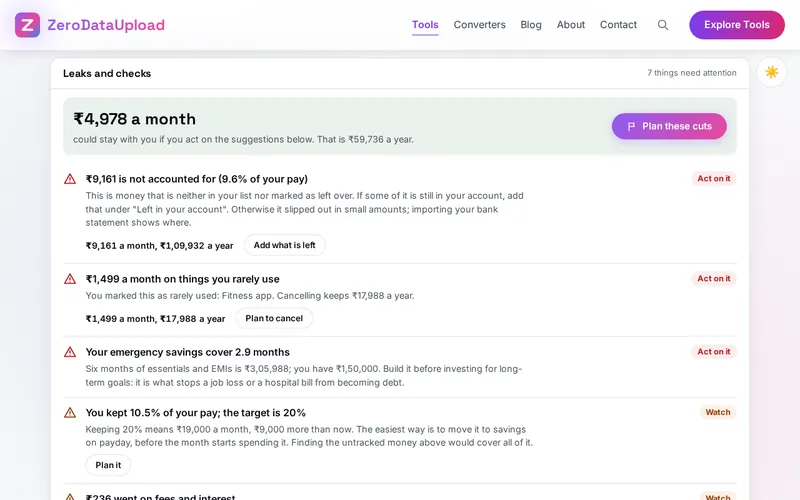
Checks then look for fees and card interest, subscriptions you rarely use, small daily spends, eating out and costs that crept up on your earlier months, and compare your month with the 50/30/20 split. A plan of cuts shows what you would keep and what it grows to, and one click makes it next month's budget. Every month stays in a history, so you can see your usual month and what changed.
Everything is worked out by your own browser. A statement you open is never uploaded, there is no account, and your months stay in this browser on your device.
Key Features
A Worksheet for the Month
Take-home pay, other money in and 34 categories in five groups, typed as 12k, 1.2L or 450 + 300, a week, a day or a year.
Bank Statements Without Uploading
CSV, Excel or a pasted table from Indian and other banks, read in your browser and sorted by the shop's name.
The Flow of Your Pay
Your salary drawn flowing into every group and category, with what is left and what is not accounted for.
Leak Checks
Fees, card interest, rarely used subscriptions, daily spends, eating out and costs that crept up, with yearly costs.
Needs, Wants and Savings
Your month against 50/30/20, 60/20/20, 70/20/10 or a split of your own.
Spending in Hours of Work
Every category shown as the hours you worked to pay for it, from your pay and your working week.
A Plan That Becomes a Budget
Sliders, the checks' suggestions or "find me" an amount, what it grows to, and next month's budget from it.
Every Month in a History
Columns for each month, your usual month, your best month and what changed between any two.
How to Use
- Type your take-home pay - Under This month, start with what reached your bank after tax and deductions, then any other money in.
- Fill in where it went - Type each category, or list items such as every subscription. Amounts can be 12k, 1.2L, a sum, a day or a year.
- Or import your statement - Open the CSV or Excel file from your bank, check the sorting and add it to the month.
- See where it went - The report shows the flow of your pay, every category and the money not accounted for.
- Read the checks - Each leak comes with what it costs a year and a button to plan it away.
- Plan next month - Choose cuts, see what you would keep, and make it next month's budget.
How the Figures Are Worked Out
- Monthly shares - An amount paid a week counts 52 / 12 times, a day 365 / 12, a workday 261 / 12, a quarter a third and a year a twelfth, so a daily coffee and a yearly premium sit beside monthly bills.
- Not accounted for - Your pay minus everything listed as spent, saved or left in the account; if more went out than came in, the difference is shown as coming from savings or credit.
- The checks - Common rules of thumb, such as the 50/30/20 split, housing under 30% of take-home pay, loan payments under 30 to 40% and six months of essentials as emergency savings. Card interest usually runs at 36 to 45% a year, and a study of Indian restaurants found food apps priced about 10% above the menu on average, more than 30% at one in five. The usual shares can be changed in Settings.
- Bank statements - Columns found from the heading row, Indian, international and European number styles, day-first or month-first dates, card statements where lines marked Cr stay money in, and card bill payments and transfers between your own accounts left out so nothing is counted twice.
- Checked before publishing - We compared the tool with a reference written separately from these rules: thousands of typed amounts, 1,500 months of sums and checks, the growth formula, and 360 statements in ten bank layouts as CSV and Excel. Where Did My Salary Go? is a calculator for reference, not financial advice.
Frequently Asked Questions
The questions people ask most are answered on the tool page, just below the tool. The full list of 37 questions, from filling in a month and reading bank statements to the checks, the plan, budgets and your data, is in the Where Did My Salary Go? FAQ, and the help guide walks through every part of the tool step by step.
Privacy & Security
A bank statement shows where you shop, whom you pay and what you earn. Where Did My Salary Go? has no upload step, no account and no server-side storage: the file is read by your browser, and your months are kept in your browser's storage until you choose Delete everything.
The tool loads nothing from outside the site and never asks for access to your bank: you open the file you downloaded yourself. The Hide amounts button blurs every number when someone can see your screen. Like every page on ZeroDataUpload, the tool page shows ads through Google AdSense and uses Google Analytics; the Privacy Policy and Cookie Policy explain what those services collect and how the cookie banner controls them. Your figures are never part of it.
Ready to find out where your salary goes? It's free, private, and runs entirely in your browser.
Open Where Did My Salary Go? →Related

Last Updated: November 3, 2026