
Clock: Alarms, Timer, Stopwatch and World Clock in Your Browser
A big clock with a full screen view, alarms that ring in this tab and say when they were missed, a countdown timer, a stopwatch with lap times and a world clock for any city
Guide reviewed 10 November 2026 by Milan Salvi. How we write and correct guides.
Open Clock →Step-by-step help guide and questions and answers for this tool.
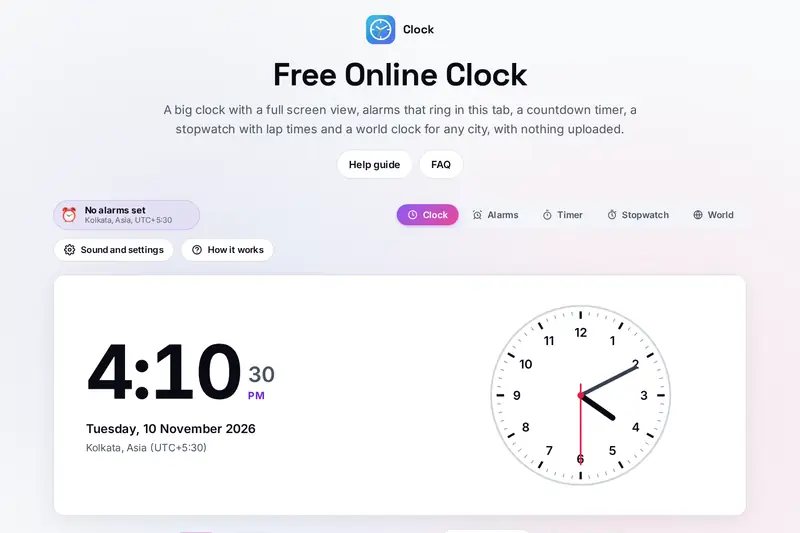
Table of Contents
Overview
Most of us reach for a clock, a timer or a stopwatch many times a day: a pot on the stove, a call with someone in another country, a round at the gym, a reminder to leave for the station. On a computer, the quickest place for all of them is often a browser tab that is already open. Clock puts five such tools in one tab: a big digital and analogue clock with a full screen view, alarms, a countdown timer, a stopwatch with lap times and a world clock.
The part a web page finds hardest is ringing at the right moment. Browsers slow down tabs you are not looking at, and a closed tab or a sleeping laptop cannot ring at all. Clock is built around that: every alarm is checked against the clock rather than by counting ticks, a tab out of sight gets one extra wake-up for the next alarm, and an alarm that could not ring because the page was closed is marked as missed instead of being skipped without a word.
The time in every city comes from the time zone rules built into your browser, so summer time is followed on the right dates, and the few zones that were renamed, such as Kolkata (once Calcutta), show their current names.
Key Features
A Clock for the Wall
The time with seconds, the date and your zone, an analogue clock in six faces and a full screen view.
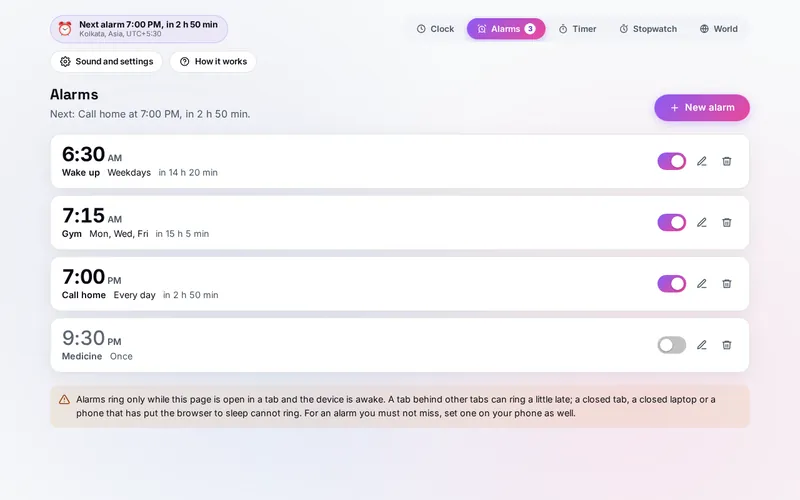
Alarms with Labels
A time, a label, the days it repeats or once, and five sounds made in your browser.
Snooze and Dismiss
A window over the page with Snooze 5 min and Dismiss; alarms due together ring together.
Missed Alarms Shown
An alarm that could not ring while the page was closed is marked Missed at its time.
Countdown Timer
Hours, minutes and seconds or a preset, a ring that empties, the time it ends and one more minute.
Stopwatch and Laps
Hundredths of a second, lap and total times, the fastest and slowest lap marked.
World Clock
Any city or zone, its date, the difference from your time and whether it is tomorrow there.
Keys and Notifications
1 to 5, Space, L, R and F while you use it, and a message from other tabs if you allow it.
How to Use
- Open the page - The Clock tab shows the time, the date and your time zone; pick 12 or 24 hours and a clock face.
- Set an alarm - On the Alarms tab press New alarm, choose the time, a label, the days and a sound, then Save alarm.
- Keep the tab open - Click the page once so it may make sound, and leave it open; turn on notifications to hear about it from other tabs.
- Count down - On the Timer tab set the time or tap a preset; the ring empties and the line under it says when it ends.
- Time laps - On the Stopwatch tab press Start and Lap; each lap shows its own time and the total.
- Add cities - On the World tab type a city or a zone; each card shows the time there and how far it is from yours.
How the Tool Works It Out
- When an alarm rings next - For each alarm the tool finds its time on the next allowed day in your device's time zone. A time inside the hour the clocks skip in spring falls as many minutes later as they jumped; a time inside the hour repeated in autumn is the first of the two. The weekday is that of the calendar date.
- Ringing on time - Four times a second, and once more when a hidden tab is woken for the next alarm, the tool asks which alarms became due since they were last set or rang. Found up to ten minutes late, an alarm rings and says how late; found later, it is marked missed. An alarm saved for the minute it is now waits for its next day.
- The timer - Starting it fixes the moment it ends, so it keeps counting through a reload or a closed page; the time left is shown rounded up to the second, and the ring is the part still to run.
- The stopwatch - It keeps the moment it started and the time counted before, so a reload carries on; each lap's time is its total minus the total at the lap before.
- Cities - The time, date and offset of each city come from your browser's time zone rules every second; the difference is the city's offset minus yours, and the day is compared by calendar date, so the zones furthest apart can be two days apart.
- Checked before publishing - We compared the tool with references written separately from these rules, with the test values made first: 595,789 cases in 13 groups, including every time format, when each alarm rings next over a year in eight time zones with the hour skipped and the hour repeated, alarms checked at steady, slowed, irregular and sleepy moments and after the page was closed, the timer and the stopwatch through random presses, every time zone the browser knows against the tz database around each change, 41,800 city cards, the renamed zones, the city search and 3,600 saved files and backups made to break the tool. The original version never rang an alarm set in the hour the clocks skip, missed any alarm whose minute passed without a check, rang an alarm saved for the minute it was at once, called a city two days behind yesterday and, in Chrome, could not find Kolkata; that is fixed.
When a Web Page Can Ring
An alarm in a browser rings only while its page is open in a tab and the device is awake. Browsers also keep a page silent until you have clicked, tapped or pressed a key on it since it opened, so after a reload the tool asks you to click it once. A tab behind other tabs is woken less often, which can make it ring a little late; the ringing window then says how late. For an alarm you must not miss, set one on your phone as well, and use this page for the many smaller reminders of a working day.
The Time Zone Converter and the Epoch Converter on this site overlap two parts of Clock: the first converts a time you type between zones and plans meetings, where the World tab here shows the time now in the cities you pick; the second counts down to a date and turns timestamps into dates, where the Timer here is a kitchen-style countdown that rings.
Frequently Asked Questions
The questions people ask most are answered on the tool page, just below the tool. The full list of 35 questions, from when alarms can ring and missed alarms to summer time, the timer, the stopwatch, the world clock, notifications and your data, is on the FAQ page, and the help guide walks through every part of the tool.
Privacy & Security
An alarm's label can say a lot about your day: a medicine, a meeting, a person to call. This tool has no upload step, no account and no server-side storage: every sound is made in your browser, and your alarms, labels, cities and settings are kept only in this browser on this device. Delete everything, under Sound and settings, removes them.
Every city's time comes from your browser's own time zone rules, so the tool asks no outside service for the time. Notifications, if you turn them on, are shown by your own browser. The tab's title shows a running timer or stopwatch, never an alarm's label. Like every page on ZeroDataUpload, the tool page shows ads through Google AdSense and counts visits with Google Analytics; the Privacy Policy explains both, and what you do in the tool is never part of them.
Need an alarm, a timer or the time in Tokyo? It's free, private, and runs entirely in your browser.
Open Clock →Related

Last Updated: November 3, 2026