
Dancing Clock: a Talking Alarm Clock with a Character
Tico keeps real time, follows your pointer, walks, dances, changes mood, says the time aloud with your device's own voice and rings an alarm every day
Guide reviewed 10 November 2026 by Milan Salvi. How we write and correct guides.
Open Dancing Clock →Step-by-step help guide and questions and answers for this tool.
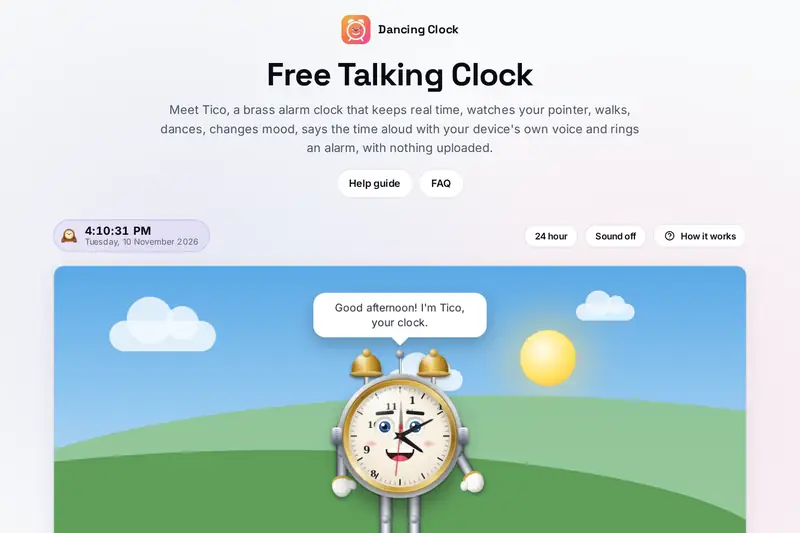
Table of Contents
Overview
A clock on a screen is usually just numbers. Dancing Clock gives the time a face: Tico, a brass alarm clock with two bells, gloves and boots, whose hands keep the time of your device while its eyes follow your pointer around the page. Tico blinks, waves, walks from one edge of its stage to the other, dances three moves to a beat, changes between five moods and, with the sound on, tells you the time in words with a voice of your own device.
Behind Tico, the sky turns from dawn to day, dusk and night with the hours, and every hour Tico chimes and says the hour. It also has one alarm: pick a time and it rings every day, with a snooze of five minutes. The alarm is checked against the clock several times a second and from an extra timer when the tab is in the background, and when it could not ring because the page was closed, Tico says so instead of staying quiet.
It is meant as a clock with some company on your desk, a talking clock that says the time when you ask, and a small daily alarm. For several alarms, timers and a stopwatch, the Clock tool on this site is the better choice.
Key Features
A Clock with a Face
Real hands on a brass dial, eyes that follow your pointer or finger, blinking and waving.
Says the Time Aloud
Tell time puts the hour into words, with a voice that runs on your own device.
Walk and Dance
A stroll from edge to edge, and three dance moves that change every four seconds to a beat.
Five Moods
Happy, Surprised, Sad, Angry and Sleepy change the face, the lines and the voice.
A Daily Alarm
One time that rings every day, with Stop, Esc or a poke, and Snooze 5 min.
Missed Alarms Told
Late in a hidden tab it says how late; after a closed page it says it could not ring.
Hourly Chime and Sky
A tune and the strokes of the hour, and a sky from dawn to night with the clock's hours.
Keys and Reduced Motion
A key for every button, Tico poked with Enter, and a still Tico when you ask for less motion.
How to Use
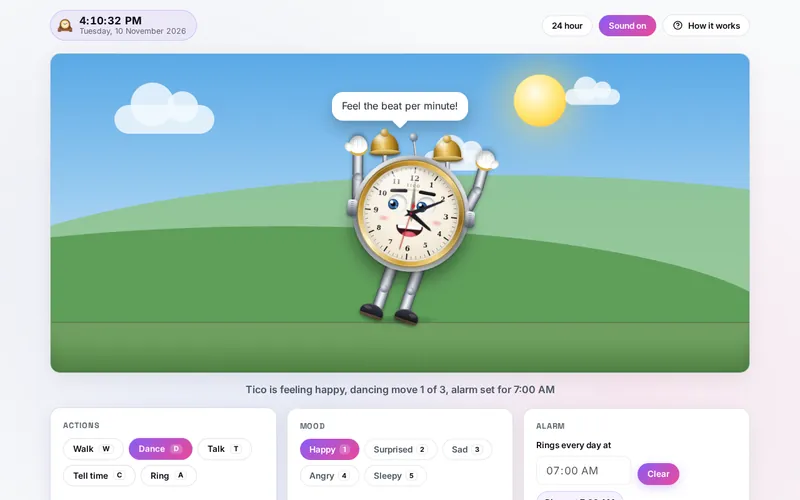
- Open the page - Tico greets you for the time of day; the digital clock and the date sit above the stage.
- Turn the sound on - Press Sound (or S) to hear the ticking, the chime and Tico's voice; pick a voice in the list if your device has several.
- Play - Poke Tico, or press Walk, Dance, Talk, Tell time or Ring; a lit button stops what it started.
- Pick a mood - Happy, Surprised, Sad, Angry or Sleepy, with the buttons or the keys 1 to 5.
- Set the alarm - Pick a time under Alarm and press Set; it rings every day until you press Clear.
- Keep the tab open - Click the page once so it may make sound, and leave it open while you rely on the alarm.
How the Tool Works It Out
- The time - The hands and the digital clock show your device's clock: the hour hand moves half a degree a minute, the minute hand a tenth of a degree a second, and the second hand jumps each second with a small bounce (or simply jumps with reduced motion).
- The time in words - Tell time says exactly, a quarter past, half past or a quarter to, or the minutes, with the part of the day: at night before 5:00, in the morning until noon, in the afternoon until 17:00, in the evening until 21:00. Noon and midnight are said as such.
- The sky - Dawn from 5:00, day from 7:00, dusk from 17:30 and night from 20:30; the Sun crosses the sky from 6:00 to 19:00 and the Moon from 19:00 to 6:00. It is a picture of the hours, not your real sunrise.
- The alarm - Four times a second, and from one extra timer when the tab is hidden, the tool asks whether the alarm's time has come round since it was set or last rang. Found up to ten minutes late, it rings and Tico says how late; found later, it was missed and Tico says so. A time inside the hour the clocks skip in spring rings as many minutes later as they jumped; inside the repeated hour in autumn it rings once.
- Moods and actions - Every button runs one rule: walking stops a dance, dancing stops a walk and makes Tico happy, the bell stops both, a poke's surprise lasts 1.3 seconds and then Tico goes back to the mood it had, and a mood you pick is kept for at least 90 seconds before Tico may change it by itself.
- Tico's size - Tico is drawn at the size that fits the stage, with room above for the speech bubble, which keeps its full size and stays inside the stage when Tico walks to an edge.
- Checked before publishing - We compared the tool with references written separately from these rules, with the test values made first: 3,431,584 cases in 13 groups, including the digital clock, the hands and the time in words for every minute of the day, the sky for every minute, the alarm over 2026 in eight time zones with the hour skipped and the hour repeated, checked at steady, irregular and throttled moments, in a hidden tab and after the device slept, the snooze in view, hidden, cleared and after a reload, walking on 215 stage sizes, the speech bubble's place, 5,000 lists of voices, 5,600 saved settings and old keys, 2,500 long random runs of Tico's moods and actions and 1,376 fixed scenarios. The original version never rang in a tab out of sight or at a time the clocks skip, said nothing about an alarm missed while the device slept, kept a snooze after the alarm was cleared and lost it on a reload, used online voices, stopped loading on some saved values, stayed surprised after a ring that began during a poke, offered Snooze on a test ring and, after one poke, left Tico's body still for good; that is fixed.
Voices, Sound and Ringing in a Browser
Browsers can read text aloud with the voices of the operating system. Some of those voices run on the device; others, often labelled online or natural, send the text to a speech service and play back what comes back. Tico speaks only with the first kind, so its words never leave your device. On a computer or phone without a voice of its own, the words appear in the speech bubble only; many systems let you add voices in their language or speech settings.
Browsers also keep a page silent until you have clicked, tapped or pressed a key on it since it opened, and they run a tab that is out of sight less often to save power. That is why the page asks for one click after it opens when an alarm is set, and why a tab in the background can ring a little late. A closed tab, a laptop with its lid shut or a phone that has put the browser to sleep cannot ring at all: for an alarm you must not miss, set one on your phone as well.
The Clock tool on this site overlaps the alarm: it is the place for many alarms with labels and repeat days, a countdown timer, a stopwatch and a world clock, where Dancing Clock has one daily alarm as part of a talking character.
Frequently Asked Questions
The questions people ask most are answered on the tool page, just below the tool. The full list of 31 questions, from what Tico can do and its moods to the voices, the hourly chime, when the alarm can ring, the snooze and your data, is on the FAQ page, and the help guide walks through every part of the tool.
Privacy & Security
This tool has no upload step, no account and no server-side storage. The sounds are made in your browser, the voice is one that runs on your device, and your alarm and settings are kept only in this browser on this device. Delete everything, in How it works, removes them.
The tool asks no outside service for the time or for speech. Like every page on ZeroDataUpload, the tool page shows ads through Google AdSense and counts visits with Google Analytics; the Privacy Policy explains both, and what you do in the tool is never part of them.
Want a clock that talks back? It's free, private, and runs entirely in your browser.
Open Dancing Clock →Related

Last Updated: November 3, 2026