
Stardust Room: Write It Down, Watch It Turn to Stars, Let It Go
A dark, quiet room in your browser for the things you cannot say out loud, where nothing you type is ever kept
Guide reviewed 24 November 2026 by Milan Salvi. How we write and correct guides.
Open Stardust Room →Step-by-step help guide and questions and answers for this tool.

Table of Contents
Overview
Some things are easier to say to nobody at all. The argument you could not finish, the worry that keeps you awake, the thing you cannot tell your family or the person who annoyed you all day. Saying them out loud is not always possible, and writing them in a diary means they are still there tomorrow. Stardust Room is somewhere in between: a dark, quiet room where you type whatever is on your mind, and then let it go.
The room is a night sky with slow colour clouds, distant hills and a moon in tonight's phase. You write in a softly glowing box, without anyone reading, without spelling mattering, without a send button. When you are ready, you press Let it go and your words play out their last moment on the screen: they rise as stardust, burn from the bottom up, blow away like petals, run down in the rain, go through a shredder, float off in a sky lantern, pop as bubbles or shatter like glass.
What stays is a single star in your own sky, silver for a thought let go and gold for a good one kept. Come back on another night and the sky has grown. Your words are never stored anywhere, not even in your own browser.
Key Features
Nothing Is Kept
Words exist only while you type; Esc empties the page at once.
Nine Ways to Let Go
Stars, fire, wind, rain, shredder, lantern, bubbles, glass, or keep the light.
Fade as You Type
Each word melts into dust a few seconds after you write it.
How Heavy Is It?
A pebble to a mountain, before and after, to see the difference.
A Sky of Your Own
A star for every thought, constellations by night, the real moon phase.
Calm Soundscapes
Night, rain, waves, space, campfire, bowls and chimes, made live.
Breathe and Rest
A breathing star for one to five minutes, and a kind word.
Help When It Matters
Helplines in the Calm tab, and a gentle note if words sound like danger.
How to Use
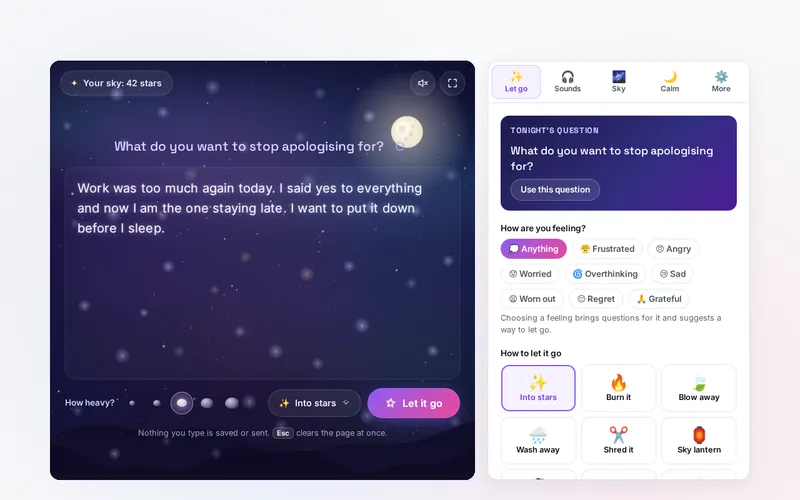
- Open the room - Stay on the page or press full screen for a dark screen with nothing else on it. Press the speaker for rain, waves or a summer night if you like.
- Type whatever is there - Exactly the way it feels. Tonight's question helps if you do not know where to start.
- Say how heavy it is - Tap a stone, from a pebble to a mountain, or skip it.
- Choose how to let it go - With the button next to Let it go, or by choosing how you feel for a suggestion.
- Press Let it go - Watch your words go, then see your new star arrive and how heavy it feels now.
- Rest a moment - Write another, breathe with the star for a minute, or look at your sky.
The Nine Ways of Letting Go
Different feelings want different endings, so the room offers nine. Each one is drawn live from a picture of your words, with its own sound.
- Into stars - Your words break into glowing dust that drifts up into the sky, with soft notes as they go. The gentlest way, and the one the room is named after.
- Burn it - A slow flame climbs the page from the bottom, the letters glow orange, and embers and smoke float away. Many people choose it for anger.
- Blow away - A breeze crosses the page and lifts your words letter by letter, carrying them off with petals. Good for a thought that keeps going round.
- Wash away - Rain falls across the room, the words run down and melt into puddles of light that ripple and are gone.
- Shred it - Your words become a sheet of lined paper that slides into a shredder and comes out in strips too thin to read.
- Sky lantern - The words gather into a glowing paper lantern that sways up into the night until it is only a faraway light. Gentle for worries.
- Pop bubbles - Every word floats up inside a bubble, and you pop them one by one with a tap. Surprisingly satisfying.
- Smash it - Cracks spread from the middle, and your words shatter like glass, the pieces tumbling down. For when you are properly cross.
- Keep the light - The one way for a good thought: the words turn into golden fireflies, and a gold star stays in your sky.
If you prefer not to see your words twice, switch on Fade as I type: each word melts into dust a few seconds after you finish it.
How the Room Keeps Your Words Private
- No storage - Your words are never written to your browser's storage, never saved as a draft and never sent. Closing or reloading the page loses them, by design.
- Emptied first - When you let go, the writing box is emptied before anything moves. The animation plays from a picture of the words that exists only while it plays, and is then thrown away.
- Numbers only - The room keeps how many thoughts you let go, how many words they had, the nights you came, your weight checks, where each star sits and your badges, in this browser, and nothing else.
- The gentle check - If your words sound like you might be in danger, a quiet note with helplines appears after the animation. The check runs only on your device and leaves no trace.
- Checked before publishing - We tested the rules apart from the page: 959,981 cases in 12 groups: how typed text is split into words and spaces in every kind of writing, how words are counted, the gentle check against every phrase and against ordinary sentences, the night from 4 am to 4 am in six time zones across two years, nights in a row against a plain count, the moon, where new stars go, what changes when a thought is let go, kept or weighed, the badges and milestones, and stored data made to break the tool. A second check of 138,663 cases, written in another programming language and sharing no code, works out the same answers on its own, including the true new and full moons of 2024 to 2032. The page was then tried in a test browser at phone and desktop sizes in both themes, and after every way of letting go it was checked that no word of the text was left anywhere in the page or in the browser's storage.
What Research Says
The idea of writing a feeling down and throwing it away is old, and in 2024 it was put to a small test. Yuta Kanaya and Nobuyuki Kawai of Nagoya University asked students to write about something that had made them angry. Those who then threw the paper in a bin or put it through a shredder went back to their earlier calm, while those who kept the paper stayed angrier (Scientific Reports, 2024). The study used paper rather than a screen, and its authors say digital versions still need testing, so treat it as encouraging rather than proof.
More broadly, since a 1986 study by James Pennebaker and Sandra Beall, many studies have asked people to write freely about difficult feelings, with results that vary from study to study. We do not promise more than this: many people find something easier to carry once it has been put into words. Stardust Room is a calm place to let off steam, not a treatment. If it is more than a bad day, please talk to someone: in India, Tele MANAS is free and open day and night on 14416, and findahelpline.com lists helplines everywhere else.
Frequently Asked Questions
The questions people ask most are answered on the tool page, just below the tool. The full list of 38 questions, from what is kept to the nine ways, the weight check and your sky, is on the tool's questions and answers page, and the help guide walks through every part of the room and lists the 20 badges.
Privacy & Security
This tool has no upload step, no account and no server-side storage. What you type is never stored, not even in your own browser, and is emptied the moment you let it go. The room keeps only numbers about your sky, in this browser, and nothing is written until you let your first thought go.
The tool asks no outside service for anything and never asks for the camera, the microphone or your location. Like every page on ZeroDataUpload, the tool page shows ads through Google AdSense and counts visits with Google Analytics; neither receives what you type. The Privacy Policy and the cookie banner explain both.
Something on your mind? It's free, private, and runs entirely in your browser.
Open Stardust Room →Related

Last Updated: November 24, 2026