
Sand Clock: a 3D Hourglass That Keeps Exact Time in Your Browser
A sand timer you can turn, zoom and flip, with a stopwatch, focus rounds, six glasses and soft sounds
Guide reviewed 16 November 2026 by Milan Salvi. How we write and correct guides.
Open Sand Clock →Step-by-step help guide and questions and answers for this tool.
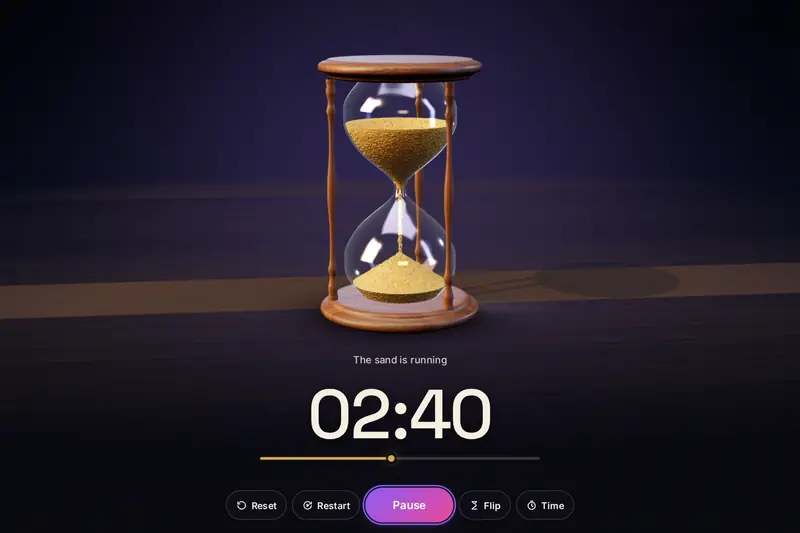
Table of Contents
Overview
An hourglass shows time in a way a row of digits cannot: you see at a glance how much is left, and how fast it is going. The Sand Clock puts one on your screen. It is a 3D hourglass that stands on a table, with a glass you can see through, sand that falls in a thin thread and heaps up below, and a frame of wood, metal or crystal. You can drag it round to look at it from any side, zoom in on the grains, and turn it over with one press, as you would by hand.
Under the picture it is an exact timer. You pick one of seven ready-made times from 1 to 30 minutes, or type any time from 1 second to 23 hours 59 minutes 59 seconds, and the glass runs for exactly that long. The time is worked out from your device's clock, so it stays right when the tab is in the background or the page is reloaded, and the amount of sand in each bulb is drawn to match the time. A stopwatch and focus rounds with breaks use the same hourglass.
All of it runs in your browser. There is nothing to install, no account, and nothing is uploaded.
Key Features
A 3D Hourglass
Clear glass, a thread of falling sand and thousands of single grains that slide, fall, strike the heap and roll to rest.
Time That Stays Right
Kept by your device's clock, not by the moving picture, so a slow device or a hidden tab never makes it run slow.
Presets and Your Own Times
1, 2, 3, 5, 10, 15 and 30 minutes, any time you type, and up to 24 saved presets with favourites.
Flip It Like the Real Thing
The hourglass is lifted and turned over, the sand pours across, and the time that had run becomes the time left.
Stopwatch and Focus Rounds
A stopwatch whose glass turns itself over, and rounds of work with short and long breaks.
Six Glasses, Four Scenes
Wood, modern, gold, antique, black titanium and crystal, in a dark room, daylight, black stone or a light studio.
Your Sand
Nine colours and your own, with grain size, amount, flow and texture. One of them glows.
Sounds Made as They Play
Falling sand, six finish sounds and four background sounds, each with its own volume, and one key to mute.
How to Use
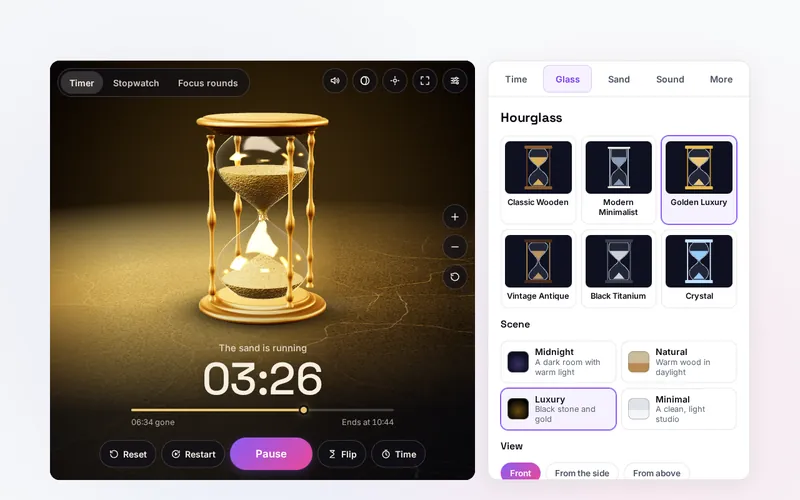
- Pick a time - Tap a preset on the Time tab, or type hours, minutes and seconds under Custom time and press Set this time.
- Press Start - The sand falls and the time counts down. The same button pauses and resumes; the sand stays exactly where it is while paused.
- Flip, reset or restart - Flip turns the hourglass over. Reset puts all the sand back on top. Restart puts it back and starts again at once.
- Look around - Drag to turn the hourglass, pinch or use plus and minus to zoom, and double-click for the starting view.
- Make it yours - Choose the hourglass and the scene on the Glass tab, the sand on the Sand tab and the sounds on the Sound tab.
- Settle in - Open the focus view for the hourglass alone, and let the finish sound or a notification tell you when the time is up.
How the Tool Works It Out
- The time - When you press Start, the tool notes the clock time. The time gone is the time already run before that start plus the clock time since then, and the time left is the length of the glass minus that. Nothing is added up picture by picture. So when a busy device draws fewer pictures a second, or the browser stops drawing a hidden tab altogether, the time is unaffected.
- The end - One alarm is set for the moment the glass runs out, and the finish sound is placed ahead of time on the browser's sound clock. Browsers slow the timers of hidden tabs, but a single alarm and the sound clock are not held back in that way, so the sound rings on time in a background tab. A sleeping device is different: it runs nothing, and the tool tells you afterwards when the glass ran out.
- The sand's two shapes - The amount of sand never changes: what has left the top bulb is in the bottom one. The top bulb empties through a dip that widens from the middle while the level sinks. The bottom bulb grows a cone that spreads until it meets the glass and then rises. Both rest at a slope of 32 degrees, about the slope a heap of dry sand settles at. For any moment, the tool finds the one position of the dip and the one height of the heap that hold exactly the right share of sand in a glass of that shape, so the picture cannot drift from the time.
- The single grains - On top of those shapes, grains move by simple mechanics: they slide down the dip towards the neck, fall under gravity in a thread that thins as it speeds up, strike the heap, a few bounce, and they roll down its side until friction stops them. All of them are drawn in one go from one shared shape, which is what lets a browser move thousands at once. It is not a grain by grain simulation of all the sand in the glass, which would be millions of grains.
- The glass - Each of the six glasses has its own outline, and the sand's shapes are worked out for that outline, so sand never pokes through the glass. The glass itself is drawn as thin blown glass: a faint tint that gathers at the edges, the reflections of studio lights, and small flaws, a little more of them on the antique one.
- Slow devices - The tool measures how long each picture takes. If a device cannot keep up, it lowers the sharpness, then the number of grains, then the shadows, one step at a time. Nothing is drawn at all while nothing moves, so a paused or finished glass costs almost nothing. If a browser cannot draw 3D, the hourglass is drawn flat from the same numbers.
- Checked before publishing - The working of the tool was run through 3,513,949 cases in 12 groups: the countdown against a second way of keeping time under random presses of the buttons, the stopwatch, every figure and word shown, typed times, saved settings and presets fed with broken and hostile values, a glass found again after a reload, focus rounds and the sand, where at 2,001 moments for each glass the sand in the two bulbs added up to the whole to within four parts in a million. A reference written separately, which builds each outline again from the published rule and adds up the volumes by another method, agreed in all 300 of its cases. The tool was then driven in a test browser through every button, tab and setting. The tests ran on a computer; no phone was held in a hand.
Using a Sand Timer Well
A sand timer suits anything where you want to feel the time pass without watching a number: a few minutes of tidying, a turn in a board game, steeping tea, a child's turn on the swing, a stretch between two meetings, a quiet sit. Teachers use them to give a task a visible end. For those, pick a preset, put the hourglass in the focus view and let it run. The Quiet display or Hourglass only hides the digits, so that only the sand tells the time.
For work, many people find it easier to start a task when it has a fixed, short length. Focus rounds give that: a stretch of work, a short break, and a longer break after a few rounds. The tool starts with 25 minutes of work, 5 minute breaks and a 15 minute long break after four rounds, a pattern many people use, and every number can be changed. There is no single right length: choose what you can keep to.
Know its limits. It is a web page. A phone that locks its screen puts the page to sleep, and nothing can ring during the sleep; Keep the screen awake helps where the browser offers it. A muted speaker is silent whatever the page does. So do not use it where a missed alarm could cause harm: for medicine, for cooking you have walked away from, or for anything to do with safety, use an alarm made for the job.
Frequently Asked Questions
The questions people ask most are answered on the tool page, just below the tool. The full list of 51 questions, from setting your own time and what Flip does to the hourglasses, the sand, the sounds, notifications and your privacy, is on the FAQ page, and the help page walks through every part of the tool.
Privacy & Security
This tool has no upload step, no account and no server-side storage, and it never asks for the camera, the microphone or your location. Your settings, your presets, your finished sessions and a glass that is running are kept only in this browser on this device, and you can clear each of them. Permission for notifications is asked for only if you switch notifications on.
The tool asks no outside service for anything: the hourglass, the time and every sound are made in your browser. Like every page on ZeroDataUpload, the tool page shows ads through Google AdSense and counts visits with Google Analytics; the Privacy Policy explains both.
Ready to turn the glass? It's free, private, and runs entirely in your browser.
Open Sand Clock →Related

Last Updated: November 16, 2026