
Chronos: a Daily Planner with Time Blocking and Time Tracking
Plan each day on a timeline, see it beside what you really did, and let your own numbers show how long things take
Guide reviewed 12 November 2026 by Milan Salvi. How we write and correct guides.
Open Chronos →Step-by-step help guide and questions and answers for this tool.
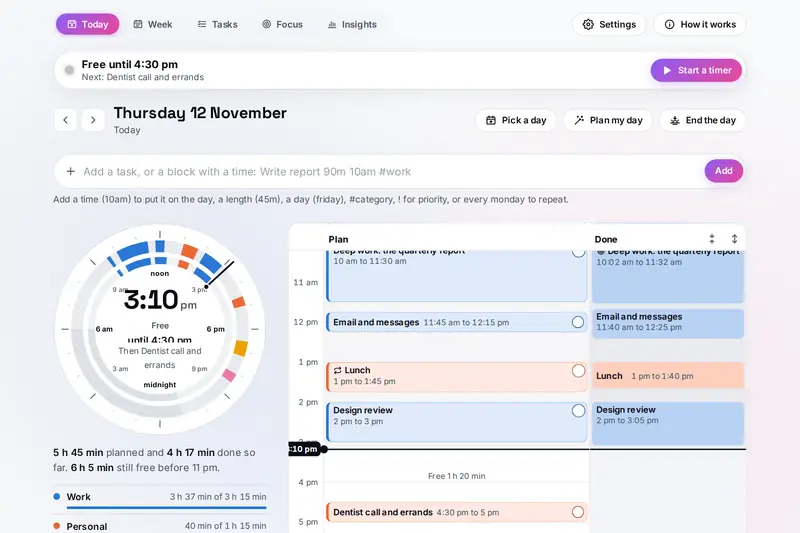
Table of Contents
Overview
A to-do list tells you what to do but not when, and it never shows whether the day can hold it all. Chronos puts each day on a timeline instead. You type tasks in plain words, such as "Write report 90m #work !!", and they wait until you give them a time; a line with a time, such as "Standup 9:30 15m", goes straight onto the day. Plan my day fits the waiting tasks into your free time, the most pressing first and the long ones into the hours you choose, and shows the result before it changes anything.
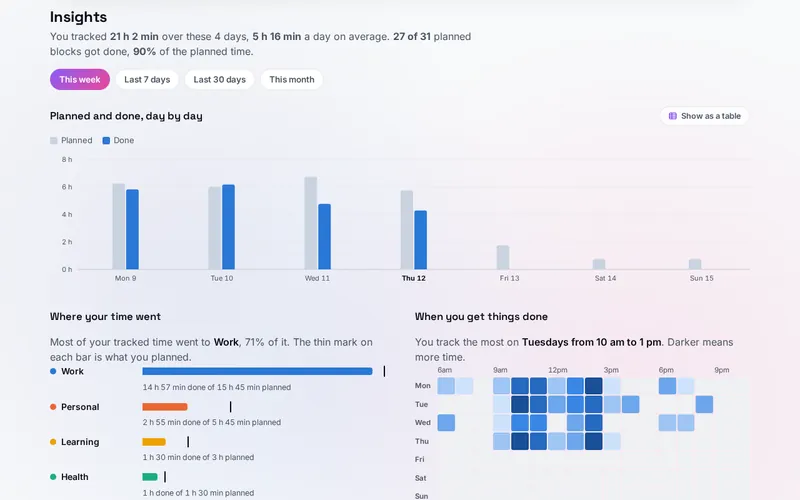
What makes Chronos different is the second lane. Next to the plan, the Done lane fills with what really happened: time from the one-tap timer, from focus rounds and from blocks you tick. At the end of the day you move what is unfinished and note how the day felt, and Insights compares planned with done over days and weeks: how much of the plan you keep, where the hours go, when in the week you get things done and how long tasks take against your guesses.
Routines that come back every week, a week board, weekly goals per category and calendar files in and out make it a full planner, and everything stays in your browser.
Key Features
Plan and Done, Side by Side
Each day drawn twice on a timeline, what you meant to do beside what you did, and as a 24-hour dial.
Plain-Words Quick Add
Time, length, day, category, priority, due date and repeat read from one typed line, shown before you add it.
Plan My Day
Waiting tasks fitted into your free time, most pressing first, long ones in your best hours, with a gap kept around each.
Week, Routines and Goals
Seven days side by side, blocks that come back every week, and a weekly goal of hours per category.
One-Tap Timer
The now bar shows what is on and times it with one press; time you forgot can be added by hand.
Focus Rounds
Rounds of focus and breaks in four rhythms or your own, a note box for what comes up, counted as done time.
End the Day and Insights
Unfinished tasks moved on, how the day felt, and charts of planned against done, categories, hours and estimates.
Calendar Files
Meetings brought in from an .ics file so the plan works around them, and your plan saved for any calendar app.
How to Use
- Type what is on your mind - On Today, add lines such as "Write report 90m #work !!" or "Gym 7am 1h every mon wed fri"; the words under the box show how each was read.
- Plan the day - Press Plan my day, check where the waiting tasks would go, and place them; or drag a task onto the timeline.
- Shape the timeline - Draw, move and resize blocks with the mouse, a finger (press and hold first) or the arrow keys.
- Track and focus - Press Track it on the now bar when a block starts, or work in focus rounds on Focus; the time fills the Done lane.
- End the day - Move what is unfinished to tomorrow, back to waiting or off the list, and say how the day felt.
- Look back - Open Insights for the week or the month, and plan the next day with what it shows.
How the Tool Works It Out
- Reading a typed line - A repeat makes a routine (9:00 and 30 minutes unless given), a time makes a block (an hour unless given), anything else a task (30 minutes unless given). A bare "at 6" means the evening, and 5/10 follows your date order.
- Plan my day - Tasks in order of past due, due that day, planned for that day, then priority, due date and length. Tasks of an hour or more, or marked deep, go into your best hours; the rest into the earliest free time. Times snap to 15 minutes by default, the chosen gap is kept on both sides of every block, and a long task is split into parts of at least half an hour only when all parts fit.
- Done - A planned block counts as done when you tick it, finish its task, or track at least half of its time. On the days the clocks change, tracked time sits at its clock times and counts its real length.
- Focus rounds - 25 and 5, 50 and 10, 90 and 20 or 52 and 17, with a long break after 4, 3, 2 or 3 rounds, or your own lengths. A phase end found more than ten minutes late (a computer that slept) does not start the next phase by itself.
- Insights - Planned and done per day and per category, a heat map of tracked time by weekday and hour, and for finished tasks the middle value of tracked time divided by the planned length.
- Calendar files - Written with lines folded at 75 bytes as the calendar standard asks; read with each event's own time zone, daily and weekly repeats, counts, end dates, skipped days and moved single events.
- Checked before publishing - We compared the tool with references written separately from these rules: 78,779 cases in 16 groups, run in four time zones, among them London, New York and Lord Howe Island, whose clocks move by half an hour: typed times and lengths, 6,000 quick-add lines, days and clock times on the days the clocks change, blocks side by side, free time, 3,000 days planned by Plan my day against a separate version of its rules (no overlap, the gap on both sides and the snap checked on their own as well), tracked time and the sums behind Insights, 1,500 focus sessions with pauses, skips and a computer that sleeps, the timer, reminder moments, 320 calendar files written and read back by the icalendar package, 280 calendar files read against repeats worked out by dateutil in each event's own time zone, the spreadsheet file read back by Python's csv module, and 3,000 saved states, 2,400 of them made to break the tool. The original version read "for 5 hours 26 jun" as 5 h 26 min and "due 28 jan 2026-10-20" as a due date in 2026, put tracked time an hour off on the days the clocks change, left no gap before a block Plan my day placed, counted focus time for hours a computer slept, kept a timer stretch of any length, wrote meetings from a calendar file back into the calendar file, left out moved routine days, read meetings in other time zones an hour off after a clock change, dropped repeats that began long ago, let formulas run from the spreadsheet file and let a backup reach every object of the page; that is fixed.
Plan, Done and the Gap Between Them
Time blocking, giving each task its own stretch of the day instead of keeping only a list, shows early whether a day can hold everything on it. Its weak spot is the length you give each block: people tend to underestimate how long their own tasks will take, even when they know similar tasks ran late before. Psychologists call this the planning fallacy (Roger Buehler, Dale Griffin and Michael Ross, Journal of Personality and Social Psychology, 1994).
That is why Chronos keeps a Done lane beside the plan. Once you have finished a few tasks with a length and tracked time, Your estimates in Insights shows how your real times compare with your guesses as one figure, such as "about 1.4 times as long as you plan". Plan my day uses the lengths you give, so the figure is a reminder to give tasks more room, not a rule the tool applies for you.
Some of Chronos overlaps other tools on the site. The Clock has alarms, a countdown timer and a stopwatch, but no plan. NoiseHaven has focus rounds to go with its sounds; in Chronos they count as done time on your day. Unplug makes a calendar file of a screen time plan. Chronos is the planner that ties a day's plan to what happened.
Frequently Asked Questions
The questions people ask most are answered on the tool page, just below the tool. The full list of 44 questions, from typing tasks in plain words and Plan my day to the timeline, routines, tracking, focus rounds, insights and calendar files, is on the FAQ page, and the help guide walks through every part of the tool.
Privacy & Security
This tool has no upload step, no account and no server-side storage. Your tasks, blocks, routines, tracked time and reviews are kept only in this browser on this device, and calendar files are read and written on the device. Delete everything, in Settings, removes them.
The tool asks no outside service for anything. Like every page on ZeroDataUpload, the tool page shows ads through Google AdSense and counts visits with Google Analytics; the Privacy Policy explains both, and what you type in the tool is never part of them.
Ready to plan a day you can see? It's free, private, and runs entirely in your browser.
Open Chronos →Related

Last Updated: November 3, 2026