
Frequency Studio: Any Tone You Ask For, and the Truth About What It Does
A tone generator from 1 Hz to 20,000 Hz with a library of 84 sounds, each with its uses and its evidence
Guide reviewed 18 November 2026 by Milan Salvi. How we write and correct guides.
Open Frequency Studio →Step-by-step help guide and questions and answers for this tool.
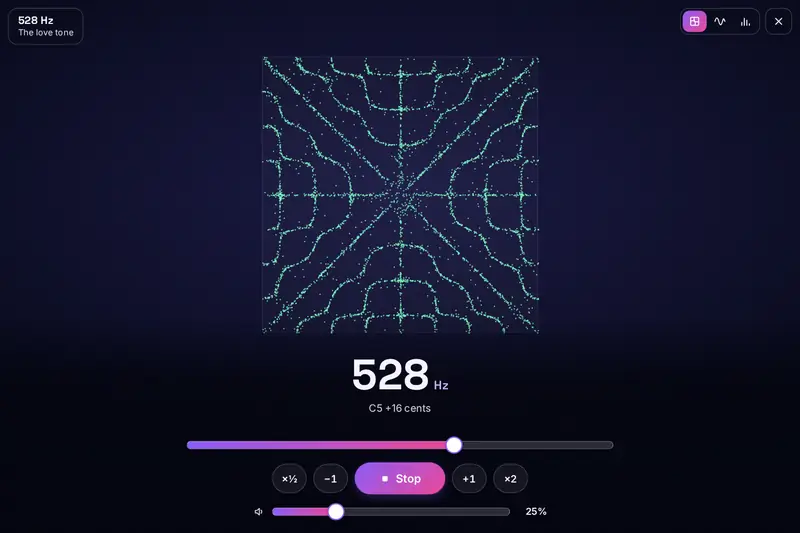
Table of Contents
Overview
Search for almost any number followed by "Hz" and you will find a page that promises something for it: sleep, love, money, a mended body, a house free of mosquitoes. Some of those pages are harmless, some are wrong, and very few say where the claim comes from. Frequency Studio was built to do two jobs at once: to play any tone you ask for, cleanly and exactly, and to tell you plainly what is known about it.
The first job is a tone generator. It plays any frequency from 1 Hz to 20,000 Hz in five wave shapes, beats for headphones or for speakers, sweeps that glide from one pitch to another, mixes of up to six tones and three kinds of noise. You can set a timer, keep your own sounds, copy a link that opens the same sound for a friend, or save the sound as a file.
The second job is a library of 84 sounds: brainwave beats, the Solfeggio and chakra tones, planet tones, tuning notes, test tones for speakers, tones near the top of human hearing, and the sounds people try on dogs, cats and mosquitoes. Every one of them has two short texts, "What people use it for" and "What we know", and a label that says how solid the claim is. The studies are named, so you can read them yourself.
It all runs in your browser, with nothing to install, no account and nothing uploaded. It is for listening, learning and testing equipment, and it does not treat any condition.
Key Features
Any Tone, Exactly
From 1 Hz to 20,000 Hz in steps of a hundredth of a hertz, by slider, by typing or by note, with the nearest note and its distance in cents shown.
An Honest Library
84 sounds with their uses and their evidence, labelled Fact, Studied, Belief, Not shown to work or For listening, with the sources named.
Beats Three Ways
A two-ear beat for headphones, an open beat and a pulse for speakers, with the rate, the carrying tone and the name of the brain rhythm.
Sweeps and a Mixer
Sweeps that run once, repeat or come back, and a mixer of six tones whose loudness is shared out so that it never distorts.
Three Pictures of Sound
Sand gathering into the pattern of the tone, the wave itself, and the spectrum with its overtones, plus a focus view.
A Hearing Range Check
A guided climb from 8,000 Hz that finds the highest tone you hear on your device, a left and right check and a ringing pitch finder.
A Tuner and Experiments
Reference notes for eight instruments, six sound experiments such as a tone that rises forever, and a telephone keypad.
Keep, Share, Save
Favourites, 30 sounds of your own, links that open a sound, and sound files of up to five minutes made on your device.
How to Use
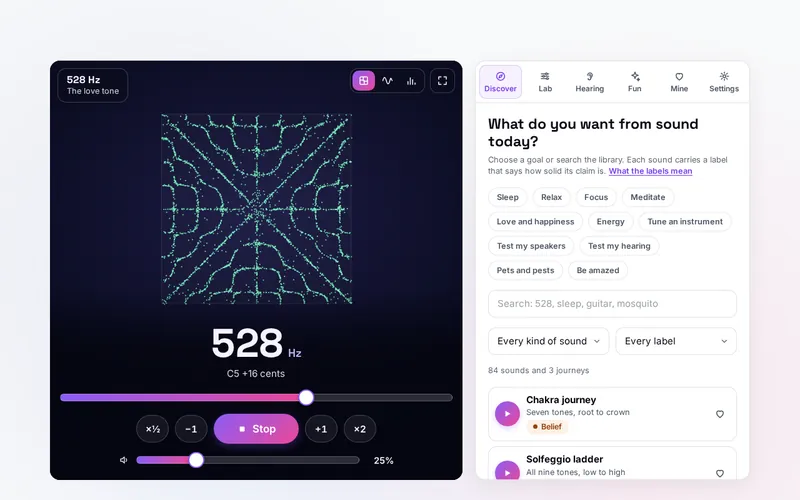
- Press Play - The studio opens on 440 Hz at a quarter of full volume. One press plays it; the same button stops it.
- Choose a frequency - Drag the slider, press the number to type an exact value, or step by one hertz or a whole octave with the buttons.
- Say what you need - In the Discover tab press a goal such as Sleep, Focus or Test my speakers, and play the sounds listed for it.
- Read the label - Open a sound to see what people use it for, what is known, any caution and the sources.
- Build your own - In the Lab tab make a tone, a beat, a sweep, a mix or noise, add a timer, and save, share or keep it as a file.
- Test and explore - The Hearing tab finds the highest tone you hear; the Fun tab has six experiments for your ears.
What the Famous Frequencies Really Do
The library gives every claim a label. Here are the best known sounds with their labels and the finding behind each. The full list, with all sources, is on the help page.
| Sound | What people use it for | Label | What was found |
|---|---|---|---|
| 528 Hz | Calm, love, an open heart | Belief | One study of nine people found lower stress markers after soft music tuned to 528 Hz. Nothing shows that it repairs DNA. |
| 432 Hz | A warmer, calmer tuning | Studied | A pilot with 33 volunteers found a heart rate about 5 beats a minute lower than at 440 Hz. The authors asked for larger trials. |
| Two-ear beats | Sleep, calm, focus | Studied | A review of 22 studies found a medium-sized effect overall. Whether the brain falls into step is unsettled: 5 studies yes, 8 no, 1 mixed. |
| 40 Hz pulse | Focus, curiosity | Studied | Research in mice was followed by a pilot with 15 patients, which found the method safe and worth a larger trial. |
| Solfeggio tones | Meditation, mood | Belief | The set was published in 1999. No record links it to medieval chant, and no research supports the powers given to each tone. |
| 136.10 Hz (OM) | A drone for meditation | Belief | The number is real arithmetic: the Earth's year raised by 32 octaves. That it carries a meaning is a tradition. |
| Pink and white noise | Sleep, concentration | Studied | A review of 13 studies found a small benefit on attention tasks for young people with ADHD and a slight drop for those without. |
| Mosquito tone | Keeping mosquitoes away | Not shown to work | Ten field studies all found no difference in the number of mosquitoes landing on people. |
| Dog whistle tone | Getting a dog's attention | Belief | Dogs hear to about 45,000 Hz, so they hear it. No solid research shows that a tone alone stops barking. |
| 440 Hz | Tuning instruments | Fact | The international standard pitch for the note A. |
One kind of sound is missing on purpose. There are no tones here that are said to treat cancer, infections or other illnesses, because no sound from a speaker does that.
How the Tool Works It Out
- Exact pitch - A tone is one wave repeated the stated number of times each second. The tool keeps frequencies to a hundredth of a hertz, and the checks measure the played sound itself to confirm it.
- No clicks - A sudden jump in pitch or loudness is heard as a click. Every change glides over a few hundredths of a second instead, and sounds fade in and out at their start and end.
- A slider that follows the ear - We hear in ratios: 100 to 200 Hz sounds like the same step as 1,000 to 2,000 Hz. So the slider moves in equal musical steps, which gives every octave the same room, and offers round values with three figures.
- Notes and cents - The nearest note is found from the concert pitch you chose (440 Hz unless you change it) with twelve equal semitones to the octave. The distance to that note is shown in cents, hundredths of a semitone.
- Beats - For a beat of 10 a second on a tone of 200 Hz, the tool plays 195 Hz and 205 Hz. In a two-ear beat each goes to one ear only. In an open beat both go to both ears and the air itself throbs. A pulse is one tone whose loudness is switched on and off with soft edges.
- Sweeps that keep time - A sweep is laid out in advance on the sound system's own clock, not on a timer of the page. Browsers slow the timers of hidden tabs, but the sweep goes on exactly, and the number on the stage is worked out from the same clock.
- A mix that cannot distort - When several tones or noise play together, their loudness is shared out so that all of them at full strength still fit. Wave shapes with strong overtones are turned down a little so that a square is not far louder than a sine.
- The sand pattern - The figure is chosen by the frequency from the shapes a square plate can take: few lines for low tones, many for high. Each grain is shaken according to how much the plate would move under it and so drifts to the still lines. It is a picture of the tone, not a measurement of your room.
- Sound files - The same parts that play live are run into memory at 44,100 samples a second and written as a 16-bit WAV file, at half of full level, with one channel where that is enough.
- Checked before publishing - The sums were run through 1,447,697 cases, and a second check written separately repeats the main ones (17,253 cases); each planet tone is worked out again from the length of its orbit. Every sound of the library is played into memory and measured: its pitch, its left and right channel and its loudness. Not tested: a real phone in a hand, Safari, and listening through real speakers.
Using It Well
For rest, choose by what you like to hear, not by the largest promise. A low, steady sound at a quiet volume is what most people settle with: the OM drone, the slow shimmer, brown noise, or a slow beat. Set the timer so that it fades out by itself, and switch on "Keep the screen awake" on a phone if the sound stops when the screen locks.
For work, many people prefer something even and without melody: pink noise, or a beat in the alpha or beta range with headphones. If it distracts you, it is the wrong sound for you, whatever a study says. People differ, and the review of noise and attention found that it helped some and slightly hindered others.
For testing equipment, start with the 1,000 Hz reference tone and set a comfortable volume. Then run the full sweep and listen for where the sound begins, where it ends and where it dips. A boomy note is usually the room. A buzz that comes and goes with the pitch is something loose; the rattle finder moves slowly enough to catch it.
For tuning, open the instrument tuner in the Lab tab. Play the string and the reference together and listen for the slow wobble between them: the slower it gets, the closer you are, and when it stops you are in tune.
Listening Safely
Set a comfortable volume with the 1,000 Hz reference tone and leave it there. Never turn the volume up to hear a very high or very low tone: a tone you cannot hear can still be loud, and deep tones can strain small speakers. With headphones, keep it lower still. The tool starts at a quarter of full volume and keeps a volume limit switched on.
If you have epilepsy or another seizure condition, ask your doctor before listening to beats or pulses. Do not use sounds meant for rest or sleep while driving or using machinery. Animals hear high tones more sharply than we do: stop if a pet seems upset, and never use a sound to hurt or frighten an animal.
Frequency Studio does not diagnose, treat or cure any condition, and its hearing check is a game with your own device, not a hearing test. For hearing trouble, ringing in the ears, poor sleep or anxiety, please see a professional.
Frequently Asked Questions
The questions people ask most are answered on the tool page, just below the tool. The full list of 60 questions, from what a hertz is and which beat to choose to the mosquito tone, the hearing check, sound files and your data, is on the FAQ page.
Privacy & Security
This tool has no upload step, no account and no server-side storage, and it never asks for the microphone, the camera or your location. Your settings, favourites, the sounds you saved and the result of your last hearing check are kept only in this browser on this device, and you can delete them at any time with one button.
The tool asks no outside service for anything: every sound and every picture is made in your browser, and a sound file is made on your device. A shared link holds only the settings of a sound. Like every page on ZeroDataUpload, the tool page shows ads through Google AdSense and counts visits with Google Analytics; the Privacy Policy and the cookie banner explain both.
Ready to hear it for yourself? It's free, private, and runs entirely in your browser.
Open Frequency Studio →Related

Last Updated: November 18, 2026