
Rainbow Piano: A Free Online Piano to Play, Learn Songs and Record
Nine instruments, 46 songs with falling notes and backing chords, ear and memory games, chord pads, beats and a recorder, played by touch, a computer keyboard or a MIDI keyboard, with everything kept on your device
Guide reviewed 13 November 2026 by Milan Salvi. How we write and correct guides.
Open Rainbow Piano →Step-by-step help guide and questions and answers for this tool.
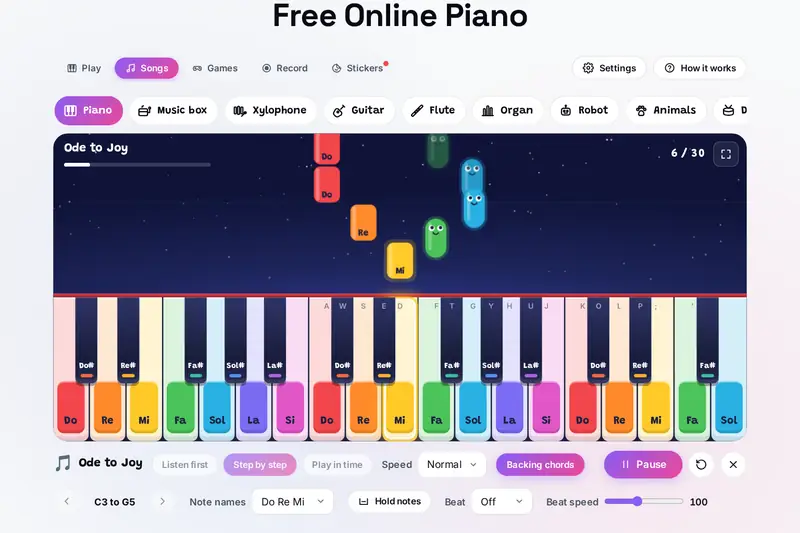
Table of Contents
Overview
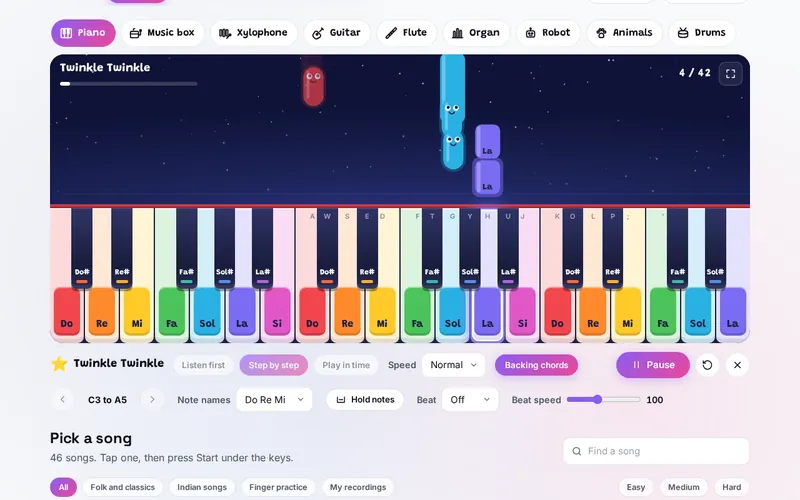
A keyboard on a screen is easy to find; one that helps you play is not. The Rainbow Piano gives every note its own colour, from red Do to pink Si, on the keys, on the notes that fall towards them and on the chord pads, so you can follow a tune before you read a single line of music. Each note you play sends a little note creature up into a night sky, and three keys held together are named as a chord.
Behind the colours sits a full practice tool. There are nine instruments made live in the browser, from a piano and a music box to singing animals and drums. 46 songs fall towards the keys and wait for you step by step, or keep the beat and score every note; each gets backing chords worked out from its tune. Two games train your ear and your memory, a recorder keeps what you play and saves it as a sound file, and 24 stickers mark your progress.
It is meant for players of every age: someone touching a piano for the first time, a learner working through scales and finger exercises at their own speed, or a player who just wants a quick keyboard in the browser, with a MIDI keyboard if they have one. Every sound is made on your device, and nothing you play is uploaded.
Key Features
Nine Instruments
Piano, music box, xylophone, guitar, flute, organ, robot, singing animals and drums.
Colours That Guide
Each note keeps its colour on the keys, the falling notes and the chord pads.
46 Songs
Folk tunes, classics, Indian songs and finger practice, marked Easy, Medium or Hard.
Three Ways to Learn
Listen first, step by step at your own pace, or in time with Perfect, Good and Missed.
Backing Chords
An accompaniment for every song, worked out from its tune, and chord names as you play.
Ear and Memory Games
Echo repeats a growing row of notes; Note hunt finds notes by colour, name, staff or sound.
Recorder
Up to three minutes a recording, played back, learned as a song or saved as a WAV file.
Any Keyboard
Touch with several fingers, your computer keys, or a MIDI keyboard with its pedal.
How to Use
- Pick a sound - Choose an instrument from the row above the keys; a short note lets you hear it.
- Play - Touch, click or slide across the keys, or use A to K and W, E, T, Y, U on your computer; Z and X move an octave.
- Learn a song - Open Songs, tap a tune and press Start, or press the first glowing key to begin step by step.
- Pick your speed - Start at Slow or Steady, turn the backing chords on or off, and move to Play in time when the notes are easy.
- Play a game - Echo builds your memory for tunes; Note hunt teaches where each note lives on the keyboard and on the staff.
- Record and share - Open Record, press Record and play, then save the recording as a sound file to keep or send.
How the Tool Works It Out
- The sounds - Every instrument is made from scratch in the browser as you press a key, from a few tones and a touch of noise shaped over time; the guitar is a plucked string worked out note by note, and each animal sings at the pitch of its key. Nothing is downloaded and nothing leaves the device.
- The backing chords - The tool finds the key the tune is in from the notes it uses most and the note it ends on, then for each bar or half bar picks the chord whose notes best match the melody notes sounding there, with a small preference for staying on the same chord.
- The scores - Step by step counts slips against the number of notes; Play in time measures how far each note is from its beat, within about a tenth of a second for Perfect and a fifth for Good.
- Recordings and sound files - A recording keeps each note's pitch, start, length, loudness and instrument, not the sound itself, so it stays small. Save sound file plays those notes again into a WAV file, much faster than they were played: a few seconds for a short tune, and about 17 seconds for a full 3-minute recording on a computer in our test. Each note is added to the file shortly before it starts, so the time grows evenly with the length.
- Checked before publishing - We compared the tool with independent references, with the test values made first: 377,649 cases in 10 groups, including every note name and key position for all 128 MIDI notes against the rules of the keyboard, 61,894 chords against a list worked out from music theory (every set of up to five notes in two octaves and 6,000 larger ones), the 46 songs note by note with their beats and finger numbers, the backing chords and steps of every song and 3,000 random tunes against the earlier version, 305,778 samples of 40 sound files read back by an independent WAV reader, and 3,600 saved states, 3,000 of them made to break the tool. The original version could be stopped by 1,222 of those 3,000 states (an instrument named "constructor" in the saved settings, for example, silenced every key); that is fixed.
Getting the Most from Practice
Learning a tune goes best in small steps. Listen first to hear how it goes, then play it step by step at the Slow speed, where the piano waits on every note and the next key glows; when you can play it without slips, try Steady and Normal, and finally Play in time, which keeps the beat whether you are ready or not. The finger practice pieces show the finger to use on each note, 1 for the thumb to 5 for the little finger, as printed piano music does.
The colours are a way in, not a crutch. Once a song feels easy, switch the note names under the keys from Do Re Mi to letters or to none, or turn Key colours to Black and white under Settings, and see whether your hands still find the notes. Note hunt with Music notes connects each key to its place on the treble staff, and with Sounds trains you to find a note by ear. The 46 songs are all traditional or long out of copyright.
Frequently Asked Questions
The questions people ask most are answered on the tool page, just below the tool. The full list of 30 questions, from instruments and MIDI keyboards to songs, stars, the games, recording and where your progress is kept, is on the FAQ page, and the help guide walks through every part of the tool.
Privacy & Security
This tool has no upload step, no account and no server-side storage. Every sound is made in your browser, and your recordings, stars, scores and settings are kept only in this browser on this device. A recording leaves the device only when you save it as a sound file yourself.
A MIDI keyboard is read only after you press Use a MIDI keyboard, and the recorder records notes, never a microphone. Clear stars and stickers, under Settings, resets your progress, and clearing the browser's site data removes everything. Like every page on ZeroDataUpload, the tool page shows ads through Google AdSense and counts visits with Google Analytics; the Privacy Policy explains both, and what you play is never part of them.
Want to play a tune, learn a song or record one? It's free, private, and runs entirely in your browser.
Open Rainbow Piano →Related

Last Updated: November 3, 2026