
Quiz Maker: Turn Your Notes into a Quiz
Paste a chapter, an article or your study notes and test yourself on them, in your browser
Guide reviewed 12 November 2026 by Milan Salvi. How we write and correct guides.
Open Quiz Maker →Step-by-step help guide and questions and answers for this tool.
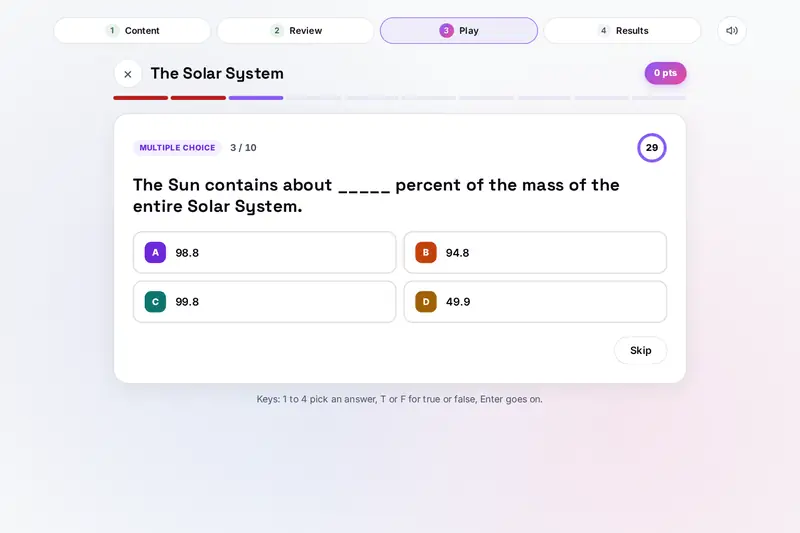
Table of Contents
Overview
Most quiz makers ask you to type every question yourself, or offer a bank of questions someone else wrote. This one starts from your own material: paste a chapter, an article or the notes you are revising, press a button, and get a quiz about exactly that text, with multiple choice, true or false and fill in the blank questions.
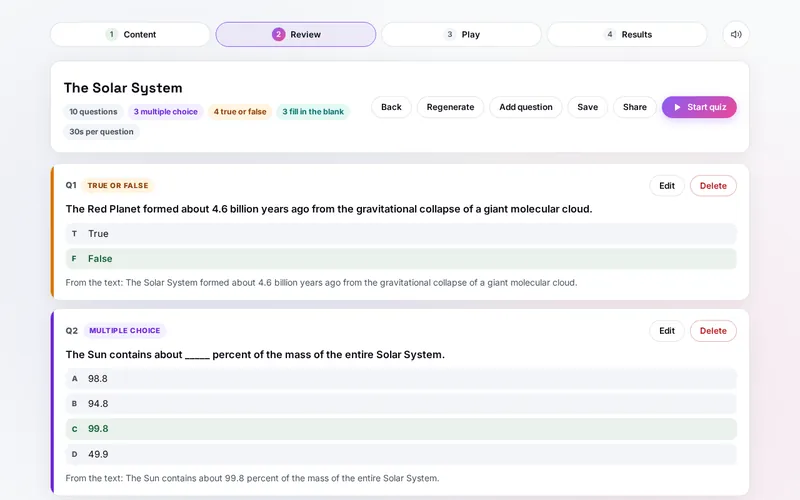
The questions are made by rules from your sentences: a name, a number or a key word is hidden, offered among other names or numbers from your text, or swapped to make a false statement. You read them on a Review screen, fix or delete anything that does not work, add your own, and then play the quiz against a clock with points and streaks. The results show every answer with the sentence it came from, and you can retry only the ones you missed.
All of it runs in your browser: your text, your quizzes and your scores stay on your device.
Key Features
Questions from Your Text
Paste text, open a .txt or .md file, or try one of three samples, and get up to 30 questions at once.
Three Kinds of Question
Multiple choice, true or false and fill in the blank, mixed or one kind only.
Believable Choices
Wrong answers are names and numbers of the same kind from your own text: other years for a year.
Review and Edit
Every question with its answer and source sentence; edit, delete, add or make a fresh set.
Timer, Points and Streaks
15, 30 or 60 seconds a question, extra points for speed and for answers in a row, and a grade.
Fair Typed Answers
Capitals and small typos do not count against you, and correctly rounded numbers are accepted.
Results to Learn From
A breakdown by kind of question, every answer explained, and a retry of the missed ones.
Save and Share
Keep up to 30 quizzes, send one as a link or a file, or copy it as printable text with an answer key.
How to Use
- Add your text - Paste it, open a .txt or .md file, or pick a sample. The page counts the sentences it can use.
- Pick the settings - A title, 3 to 30 questions, the kinds of question, a time limit or none, shuffling, and whether answers show after each question.
- Generate - Press Generate quiz.
- Review - Read every question with its answer; edit, delete or add questions, then save or share the quiz.
- Play - Answer with a tap or the keys 1 to 4, T and F; type the missing word for a fill in the blank.
- Learn from the results - See your score, grade and time, look back over every answer and retry the ones you missed.
How the Tool Works It Out
- Finding the facts - The text is split into sentences of 5 to 45 words. In each one, names (capitalised words such as Great Red Spot), numbers (such as 1831 or 99.8) and key words after "the", "a", a preposition, a name or a number are scored; rare, longer words and names score higher, and words found in most sentences lower. The best word of each sentence becomes a question, and with more questions asked for, a second word from some sentences.
- Making the choices - Wrong choices are names or numbers of the same kind from your text: a number with the same unit (years, kilometres, percent), a name used the same way (a place after "in", a person before "was" or "led"). When the text has too few, close numbers are made instead; a percentage of 100 or less never gets a wrong choice above 100. A simple sentence becomes a Who, What, When or Where question.
- True or false - Half the statements are your sentence word for word (true); the other half swap one word for another of the same kind (false). Read them on the Review screen: now and then a swapped statement can happen to be true as well.
- Typed answers and points - A typed answer counts without capitals or "the" in front, with one typo in words of five letters or more and two in words of nine or more, and as a correctly rounded number. A right answer earns 100 points, up to 50 more for the time left and 10 more for every right answer in a row after the first, up to 50.
- Checked before publishing - We compared the tool with references made separately: 436,858 cases in 13 groups: thousands of quizzes made from the three samples and from made-up texts, with every question checked (its answer found in its sentence, no wrong choice equal to the right one or to another choice, every true statement word for word from the text, every false one differing by a single swap, every blank filled back to its sentence), the same questions as the original version with all kinds on, only the picked kinds with fewer on, typed answers with capitals, typos, alternatives and rounded numbers compared with a separate checker, points and the clock, quiz files and share links read back and made to break the tool, saved data, and texts of 100,000 characters made of long runs of spaces, commas or letters timed. The original version took minutes on such texts, stopped on a number with more than 20 decimals, turned questions into kinds that were switched off, offered a percentage over 100 as a wrong choice, could mark another sentence of the text as a false statement, let a crafted link put markup into the page and skipped a question when a key was pressed just before the next one; that is fixed.
Studying with Your Own Quizzes
Reading your notes again feels like learning, but recalling an answer is a different kind of practice. In a well-known study by Henry Roediger and Jeffrey Karpicke (Psychological Science, 2006), students who took tests on a short passage remembered more of it a week later than students who used the same time to read it again. A quiz made from the chapter you are revising is a quick way to try that yourself.
A few habits help: make the quiz a day or two after you first read the material, turn on the time limit once the questions feel easy, retry the missed questions until they stick, and read the source sentence shown after each answer. Fill in the blank asks you to recall the word yourself, while multiple choice asks you to recognise it.
The quiz is only as good as the text: a sentence with a mistake makes a question with a mistake. And because the questions are made by rules, they are not a teacher's questions; use the Review screen to drop the easy ones and add the questions you know matter. The site's MindSharp trains memory and speed with ready-made puzzles, and the Elemental Periodic Table has a quiz about the elements; the Quiz Maker is the one that works on any text you give it.
Frequently Asked Questions
The questions people ask most are answered on the tool page, just below the tool. The full list of 30 questions, from how the questions are made to playing, saving, share links and your privacy, is on the Quiz Maker FAQ page, and every part of the tool is explained step by step in the help guide.
Privacy & Security
This tool has no upload step, no account and no server-side storage. The questions are made in your browser, and the last text you used, your saved quizzes and your scores are kept only in this browser on this device. A share link carries the quiz after the # sign, a part of a link that browsers never send to a server, so it reaches only the people you send it to.
The tool asks no outside service for anything. Like every page on ZeroDataUpload, the tool page shows ads through Google AdSense and counts visits with Google Analytics; the Privacy Policy explains both.
Ready to test yourself? It's free, private, and runs entirely in your browser.
Open Quiz Maker →Related

Last Updated: November 3, 2026