
TextForge: a Word Counter with Everyday Text Tools
Count words and characters, see the room left on X, Instagram, LinkedIn and SMS, and change, fix and convert the same text, in your browser
Guide reviewed 15 November 2026 by Milan Salvi. How we write and correct guides.
Open TextForge →Step-by-step help guide and questions and answers for this tool.
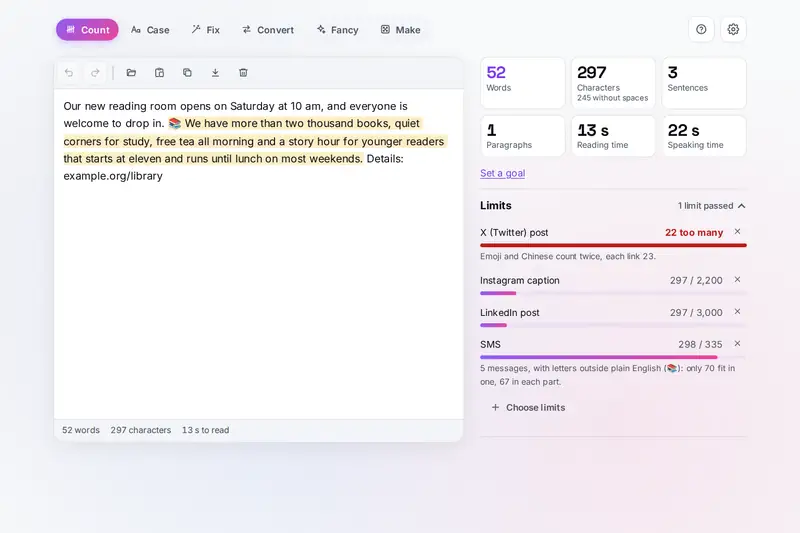
Table of Contents
Overview
Most writing has a limit: a post that must fit X, a caption for Instagram, a message that should go as one SMS, an essay of 1,500 words. TextForge counts as you type, and it counts the way each site counts, so an emoji, a link or a Hindi letter takes the room it really takes there, not the room a plain character counter guesses.
The same text then goes through the other tools without copying it anywhere: readability scores and writing checks, Sentence and Title Case in the Chicago, APA, AP or MLA style, find and replace, clean-up of text copied from a PDF or a web page, line tools, converters from binary to Morse, fancy letters for a bio and placeholder text or passwords when you need them.
All of it runs in your browser: your text stays on your device.
Key Features
Words and Characters
Words, characters as you see them, sentences, paragraphs, reading and speaking time, and a goal.
Limits Counted as Each Site Counts
X, Instagram, LinkedIn, Bluesky, Threads, Mastodon, YouTube and SMS, each from its own published rules.
Readability and Checks
Six readability scores for English, and marks for long sentences, the passive voice and repeated words.
Sentence Lengths, Words and Letters
How many sentences are short or long, a line of their lengths, and the most used words and letters.
Word Cloud, Compare and Report
A picture of your most used words, two texts side by side in numbers, and the counts to copy or save.
Title Case in Four Styles
Chicago (18th edition), APA, AP and MLA, with short forms, brand names and your own names kept as typed.
Find, Replace and Clean Up
Whole words, patterns and many replacements at once, curly quotes, hidden characters and broken lines fixed.
Line Tools
Sort, remove repeats, number, join, split, filter, wrap and reverse lines, each change one step to undo.
Converters
Binary, hex, Base64, URL and Unicode codes, Morse with sound, NATO, Braille and classic ciphers, both ways.
Fancy Letters and Placeholder Text
58 Unicode styles and a post editor for bold words, Lorem ipsum, passwords, IDs and random lists.
How to Use
- Paste your text once - Type, paste or open a file in the text box. The counts appear at once, and Count, Case and Find and fix all work on the same text.
- Check the limits - Choose the sites you write for; each bar shows the room left, counted the way that site counts.
- Read it through - See the readability score, switch on the writing checks you want and jump from one marked sentence to the next. Sentence lengths shows whether short and long sentences take turns.
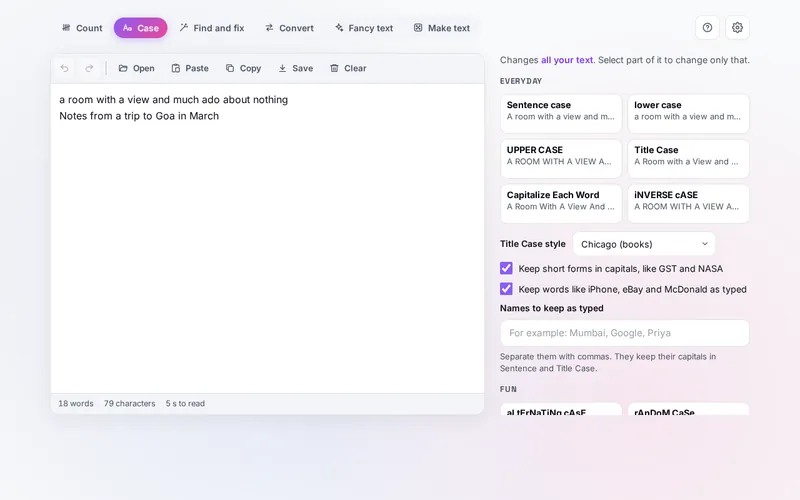
- Change the case - On Case, pick Sentence case or Title Case in your style guide; select part of the text to change only that.
- Find and fix - Replace words, clean up text copied from a PDF or a web page, and sort, number or join lines. Undo takes back any step.
- Convert and make - Turn text into codes and back, style a name with fancy letters, or make placeholder text and passwords.
How the Tool Works It Out
- Words and characters - A word is everything between spaces that holds a letter or a number; scripts written without spaces, such as Chinese and Thai, are split into words by your browser. A character is what you see as one sign, so an emoji with its skin tone or a Hindi syllable with its vowel sign counts once.
- X - Following X's counting rules and its published settings file, most letters, Indian scripts included, weigh one, Chinese, Japanese, Korean and emoji two, and every link counts as 23.
- SMS - A message holds 160 letters of the 7-bit alphabet in the 3GPP standard, where a few signs take two places, or 70 when any other letter is in it; longer texts go in parts of 153 or 67, because each part carries a short header.
- Reading time - 238 words a minute unless you change it: the average for adults reading non-fiction silently in a review of 190 studies (Brysbaert, 2019).
- Readability - Flesch reading ease, Flesch-Kincaid, Gunning fog, SMOG, Coleman-Liau and the Automated Readability Index, from their published formulas, with syllables estimated from the spelling.
- Checked before publishing - We compared the tool with references made separately: 1,505,386 cases in 11 groups: on random texts made of words, punctuation, spaces, tags and links, the counts, sentences, readability, writing checks, every case, the web page, Word, OpenDocument and RTF readers, links, line tools, converters and letter styles give exactly the results of the original TextForge, apart from the changes described here; the limits worked out again from each site's published rules on 6,000 texts, with the SMS alphabet read from the 3GPP standard itself; 63 title case examples written from the style guides; the six readability formulas worked out again from their published constants on 3,000 texts; 4,000 saved states made to break it; and long texts of 200,000 characters that used to take minutes, now all under a second and a half.
Writing to a Limit
Write first and trim afterwards: a limit you watch from the first word makes for stiff sentences. When the bar turns amber you are near the limit; when the number turns red it says how many characters are too many. For X, links and emoji are the usual surprise, since a link always takes 23 characters and an emoji two; for SMS a single curly quote or emoji can halve the room, and Find and fix's Plain punctuation turns curly quotes and long dashes into plain ones in one step.
The readability score is a hint, not a grade. Long sentences raise it most, so the writing checks' marks for long sentences are the quickest way to bring it down: split the longest one, then look at the words with a simpler form. A word count goal keeps an essay or an article in its range, and selecting a paragraph shows its own count and reading time.
Until 15 November 2026 this site also had TextTransform, which changed the case of a text and cleaned it, and TextAnalyzer Pro, which analysed one. Both are part of TextForge now, so there is one tool for counting, checking and changing a text, and their old addresses open it. What only they had came along and is described in the three parts below. Parts of TextForge are also tools of their own on this site: the Text Case Converter, the Fancy Text Generator, CipherBox and the Encode / Decode converter, the Lorem Ipsum Generator, UltraPass Pro for passwords, and the text cleaner of ToolForge.
Cases for Code and File Names
Programmers write names of several words without spaces, and each way of doing it has a name. On the Case tab, under For code and file names, every line is changed on its own, and words are found even when they are already joined: firstName, user_profile_id and XMLParser are each split in the right places before they are put together again.
- camelCase - the usual choice for variables and functions in JavaScript and Java.
- PascalCase - commonly used for classes and types.
- snake_case - common in Python and for the columns of a database.
- kebab-case - common in web addresses, CSS class names and file names.
- CONSTANT_CASE - commonly used for constants and environment variables.
- dot.case - often used for the keys of a configuration file.
- Train-Case - the way the names of HTTP headers are usually written, as in Content-Type.
A project usually has its own rules, so follow the style of the code you are working in.
Sentence Lengths and Two Versions
A readability score is one number for a whole text. Sentence lengths shows where that number comes from: how many sentences are short, medium, long and very long, and a line that follows their lengths from the first sentence to the last. A line that goes up and down means short and long sentences take turns; a stretch that stays above the dashed lines is a run of long sentences, and the writing checks mark exactly those in the text.
When you have rewritten a piece, Compare two texts answers the question whether the new version is really shorter or easier: paste the old version, and the words, sentences, the average sentence, reading ease and the passive voice of both stand side by side with the difference. Report puts the counts of one text into plain text, to paste into a message or keep with a draft.
Most Used Words, Letters and the Word Cloud
With common words left out, the words a text uses most show what it is about, and a word that turns up far more often than you meant is easy to spot. Pairs and threes of words catch terms that a count of single words breaks apart. The word cloud draws the same list as a picture, the most used words largest, which you can save and put on a slide or a cover page.
Most used letters counts letters instead of words. In an English text e is usually the most used letter, and that is the first clue when solving a letter puzzle or a simple cipher in which every letter stands for another.
Frequently Asked Questions
The questions people ask most are answered on the tool page, just below the tool. The full list of 42 questions, from how words are counted to the limits, readability, case, find and fix and the converters, is on the TextForge FAQ page, and every part of the tool is explained step by step in the help guide.
Privacy & Security
This tool has no upload step, no account and no server-side storage. The text you type, paste or open is read by your browser on your device and is never sent anywhere. Your text and choices are kept only in this browser, up to 200,000 characters a box; Keep my text in Settings turns that off, and Clear empties the box.
The tool asks no outside service for anything. Like every page on ZeroDataUpload, the tool page shows ads through Google AdSense and counts visits with Google Analytics; the Privacy Policy explains both.
Ready to count? It's free, private, and runs entirely in your browser.
Open TextForge →Related

Last Updated: November 15, 2026