
TypeMaster Pro
Measure your typing speed in words per minute and train it: practice texts by difficulty, timed tests from 30 seconds to 5 minutes, lessons for every row of the keyboard, your own texts, four typing games, a keyboard that shows which finger to use, and progress charts that remember every session, all kept in your browser
Guide reviewed 7 October 2026 by Milan Salvi. How we write and correct guides.
Open TypeMaster Pro →Step-by-step help guide and questions and answers for this tool.
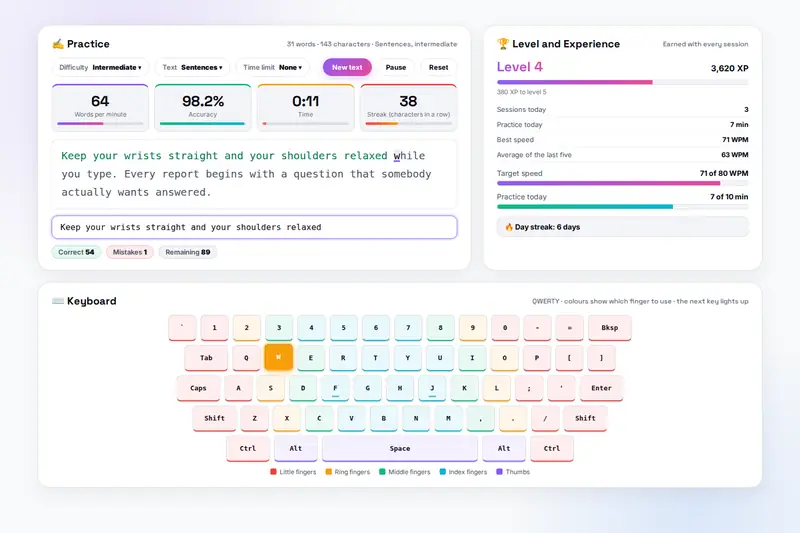
Table of Contents
Overview
TypeMaster Pro is a typing speed test and typing trainer that runs entirely in your browser. The Practice tab gives you a text by difficulty (Beginner to Expert) and kind (common words, sentences, paragraphs, code, numbers or punctuation), with an optional time limit; as you type, correct characters turn green and mistakes red, and four tiles show your words per minute, accuracy, time and streak. A virtual keyboard under the text colours every key by the finger that should press it and lights the next key up.
The Speed Test tab measures you under standard conditions over 30 seconds, 1, 2 or 5 minutes and keeps your best per length. Lessons take you row by row across the keyboard, from the home row to pangrams, and any text you paste or open becomes a lesson of your own with its best speed. Four games, Word Rain, Speed Race, Accuracy Zen and Code Challenge, train the same skill with three difficulties and high scores. Experience points, levels, daily challenges, a target speed and a daily practice goal with a day streak keep the ten minutes a day going.
The Progress tab remembers every session: a summary for the last 7, 30 or 90 days with the change against the previous period, a chart of speed and accuracy, the spread across speed bands, twelve achievements, the keys you mistype most on a keyboard map, insights that name your weakest fingers and whether your speed is rising, and the full history with downloads. Nothing is uploaded: sessions, lessons, scores and settings stay in your browser, one Export button saves them as a file, and Clear all data removes them.
Key Features
Practice by Difficulty and Kind
Four difficulties and six kinds of text, from common words to code with indents and line breaks, numbers that change every time and punctuation-heavy sentences, with a time limit of up to five minutes, pause and reset.
Speed Tests
30 seconds, 1, 2 or 5 minutes with a text long enough for the whole time, a countdown, the standard net speed and accuracy, and your best result per length.
Lessons and Your Own Texts
Eight lessons from the home row to the full keyboard, and custom lessons from any text of 50 to 10,000 characters or a text file, each with your best speed on it.
Four Typing Games
Word Rain, Speed Race, Accuracy Zen and Code Challenge, each with three difficulties, a score multiplier and a top-ten of high scores under your name.
Keyboard With Finger Colours
Every key coloured by its finger, the next key lit with the right Shift, the pressed key shown, home-row bumps, and QWERTY, Dvorak or Colemak labels.
XP, Levels and Challenges
Experience for every session, a level every 1,000 XP, three daily challenges, a target speed and a daily practice goal with a day streak.
Progress and Insights
A performance chart, a speed distribution, twelve achievements, problem keys on a keyboard map, insights on your weakest fingers and consistency, and a session history with CSV and JSON downloads.
Everything on Your Device
Sessions, lessons, scores and settings kept in your browser, exported and imported as one file; no account, no upload, no external libraries.
How to Use
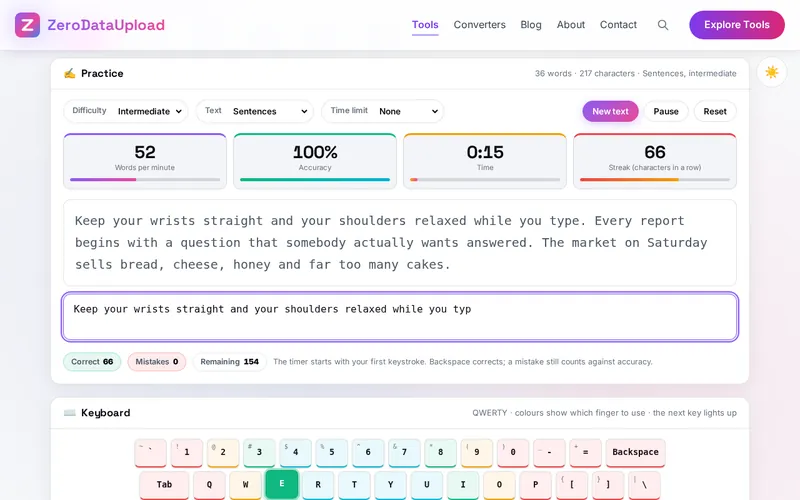
- Start with a practice text - Choose a difficulty, a kind of text and a time limit if you like, press New text, click the box and type. The clock starts with your first keystroke; Backspace corrects, Esc pauses.
- Let the keyboard guide your fingers - The keyboard card colours each key by its finger and lights the next key up. Switch the labels to Dvorak or Colemak in Settings, or hide the keyboard once you no longer need it.
- Take a speed test - Pick 30 seconds to 5 minutes on the Speed Test tab and press Start. The result window shows your speed, accuracy, mistakes and time; Best Results keeps your best per length.
- Work through the lessons - Row by row from the home row to pangrams, or create a lesson from your own text or a file and keep your best speed on it.
- Play when the drills get dull - Word Rain, Speed Race, Accuracy Zen and Code Challenge, with three difficulties and high scores.
- Read your progress - The summary, the chart, the speed bands, the achievements, the problem keys, the insights and the history, with CSV and JSON downloads. Set a target speed and a daily goal in Settings.
Speed, Accuracy and Technique
- What the numbers mean - A "word" is five characters, spaces and punctuation included, so texts of short and long words are weighed alike. Net words per minute counts only correct characters; accuracy counts every keystroke, corrected or not. Most adults type 35 to 45 words per minute; 60 is a comfortable professional speed, 80 is fast, 100 and above is expert.
- Touch typing, row by row - Every finger has a territory and returns to its home key (A S D F and J K L ;), the thumbs take the space bar, and the eyes stay on the text. Learn the home row until it is automatic, then the top row, the bottom row, numbers and symbols, then capitals with the opposite hand's Shift.
- How to improve - Accuracy before speed (stay above 97 percent and let speed rise on its own), short daily sessions rather than long occasional ones, and your weak spots on purpose: the problem keys, the weakest fingers and a custom lesson built from the words you mistype.
Frequently Asked Questions
The questions people ask most about TypeMaster Pro are answered on the tool page, just below the tool. The full list of 38 questions, from storage and privacy to troubleshooting, is in the TypeMaster Pro FAQ, and the help guide walks through every feature step by step.
Privacy & Security
What you type, the texts you practise, including a confidential document pasted as a custom lesson, and every result are handled on the page. TypeMaster Pro has no upload step, no account and no server-side storage: sessions, lessons, scores and settings are kept in your browser's storage until you clear them, and the only copies that leave are the files you export yourself.
The tool asks for no permissions and loads nothing from outside the site: the charts are drawn on the page and the key sounds are made by the browser. Like every page on ZeroDataUpload, the tool page shows ads through Google AdSense and uses Google Analytics; the Privacy Policy and Cookie Policy explain what those services collect and how the cookie banner controls them. Your typing is never part of it.
Ready to try TypeMaster Pro? It's free, private, and runs entirely in your browser.
Open TypeMaster Pro →Related

Last Updated: October 7, 2026