
Unplug: a Screen Time Calculator and Digital Detox Plan
See your screen time as weeks of your life, log your phone's numbers, sort your apps by how they leave you feeling and follow a day-by-day plan
Guide reviewed 11 November 2026 by Milan Salvi. How we write and correct guides.
Open Unplug →Step-by-step help guide and questions and answers for this tool.
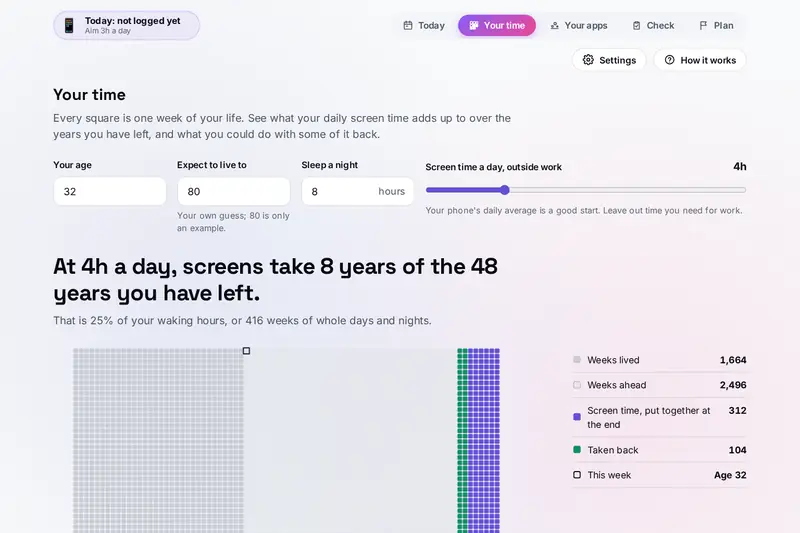
Table of Contents
Overview
A daily number such as four hours on a phone is easy to shrug off. Unplug turns it into something you can see: every week of a life drawn as a square, with your screen hours added up and put together at the end of the grid. Move a slider to take back an hour a day and watch part of that block turn green again.
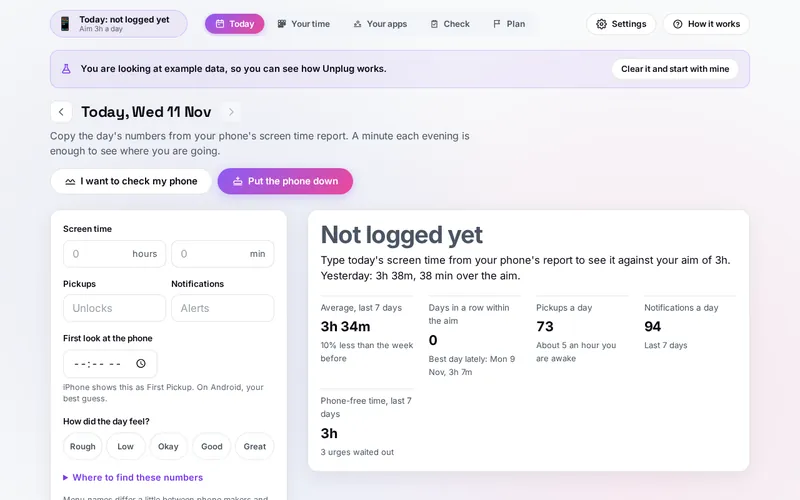
From there it helps you act on it. Each evening you copy three numbers from your phone's own screen time report into Today: screen time, pickups and notifications. Your apps are sorted by the minutes, the alerts and how each one leaves you feeling into what to keep, limit and cut. A ten-statement self-check from a published smartphone scale shows which habits weigh most. A day-by-day plan turns that into one to three small steps a day, with a screen time aim that comes down slowly, as a calendar file if you like. When you need a break, a phone-down timer counts the time you spend without the phone, and a 90-second pause helps you wait out the urge to check it.
Unplug cannot see your phone and asks for nothing it does not need: the numbers you type stay in your browser.
Key Features
Weeks of Your Life
Your screen time over the years you have left, drawn as a grid of weeks, with what an hour less returns.
A Minute-a-Day Log
Screen time, pickups, notifications, the first look and the mood, with a 30-day chart against your aim.
Apps Sorted by Feeling
Keep, limit or cut each app by its minutes and how it leaves you feeling, with what to do about its alerts.
A Published Self-Check
The ten statements of the Smartphone Addiction Scale, short version, compared with your own earlier checks.
A Day-by-Day Plan
Small steps that build on each other, from turning off app alerts to a phone-free evening, at your pace.
An Aim That Comes Down
The daily screen time aim steps down from where you are to where you want to be, never past either.
Calendar, Print and Copy
The whole plan as a calendar file with one entry a day, on paper or as plain text.
Phone-Down Timer
Phone-free blocks counted from the clock, on every day they touch, and a pause for the urge to check.
How to Use
- See your weeks - On Your time, type your age, the age you expect to live to and your sleep, and set your daily screen time outside work.
- Log a day - Each evening, copy screen time, pickups and notifications from Digital Wellbeing (Android) or Screen Time (iPhone) into Today.
- Sort your apps - Add your most used apps with their minutes and alerts, and say whether each leaves you feeling better, worse or no different.
- Take the check - Answer ten statements from strongly disagree to strongly agree; the ones you agree with most suggest where to start.
- Make a plan - Choose up to three areas, the length, the start and the pace, then tick the steps each day; add the plan to your calendar.
- Put the phone down - Start a phone-free block, lock the phone, and use the 90-second pause when the urge to check comes.
How the Tool Works It Out
- Years on screens - Daily screen time times the days left until the age you expect to live to (365.25 a year), shown in years, in weeks of whole days and nights, and as a share of your waking hours. The age to live to is your own guess; 80 is only an example. An age at or past it is pointed out, not guessed around.
- What the hours could be - The same hours at the rates shown: 6 hours a book, 5 km an hour of walking, 8 hours a night of sleep, 3 hours an evening, and 700 hours of classes for a language close to English (the US Foreign Service Institute estimates 600 to 750).
- The apps - Worse: cut to 40 percent of the time from 20 minutes a day, otherwise remove. No change: a limit of 60 percent from 45 minutes. Better: kept, with a limit of 80 percent from 2 hours. Alerts from people who need a quick reply stay on, other messages wait in a summary, app alerts go off. An app you have not rated is not counted.
- The log - The last seven days against the seven before, the days in a row within each day's aim, your best day of the last 30, pickups an hour you are awake (from your sleep hours) and phone-free time.
- The plan - Easier steps first, a set-up before a habit before a one-day try, at most one try a day, a look back every seventh day. The aim comes down in steps of 5 minutes and is reached 70 percent of the way through.
- Phone-free blocks - Counted from the clock, so a locked phone or a closed page still counts; a block across midnight counts on both days, and an open block at most 12 hours.
- Checked before publishing - We compared the tool with references written separately from these rules: 75,570 cases in 13 groups, each run in two time zones, including typed times, the years left for 6,000 combinations of age, expected age, sleep and screen time, the check's totals and areas, the suggestions for 4,000 lists of apps, 3,000 plans step by step, the averages, streaks and best days of 1,500 logs, 400 calendar files against the calendar standard, 4,000 phone-down blocks across midnight and summer time, and 3,000 saved states, 2,500 of them made to break the tool. The original version quietly changed an age at or past the age you expect to live to, read 1:75 as 2h 15m, counted apps you had not rated in the time saved and in the plan, let a day's aim go above where you started, wrote calendar lines too long for the standard, counted a block across midnight on one day, split emoji in app names and kept impossible dates and repeated ids from a backup; that is fixed.
The Self-Check and What It Does Not Say
The ten statements come from the Smartphone Addiction Scale, short version, published by Min Kwon, Dai-Jin Kim, Hyun Cho and Soo Yang in PLoS ONE in 2013 under an open licence. Each is answered from strongly disagree to strongly agree, counting 1 to 6, so totals run from 10 to 60. Unplug words the statements for adults: work or study instead of class and assignments, chats and social media instead of two named sites.
The study tested the scale with 540 school students with an average age of 14.5 in South Korea and suggested 31 for boys and 33 for girls as a point for a closer look. No agreed point exists for adults, so Unplug does not label your score as high or low. It shows your total, the statements you agreed with most and how your total changes from one check to the next. It is a self-check, not a diagnosis; if your phone use worries you, talk to a doctor or a counsellor.
Some of this overlaps other tools on the site. The Life Discipline Tracker scores a whole day across 23 areas of life, with screen time as a few of its items; the Clock has a countdown timer that rings; Prana Breathing Exercises has fifteen breathing techniques. Unplug is only about the phone: the urge pause is one 90-second slow breath, and the phone-down timer adds the time you spent without the phone to your week.
Frequently Asked Questions
The questions people ask most are answered on the tool page, just below the tool. The full list of 35 questions, from the weeks of your life and the log to your apps, the check, the plan and phone-free time, is on the FAQ page, and the help guide walks through every part of the tool.
Privacy & Security
This tool has no upload step, no account and no server-side storage. Unplug cannot see your phone: the numbers, apps, answers and plan you type are kept only in this browser on this device. Delete everything, in Settings, removes them.
The tool asks no outside service for anything. Like every page on ZeroDataUpload, the tool page shows ads through Google AdSense and counts visits with Google Analytics; the Privacy Policy explains both, and what you type in the tool is never part of them.
Ready to see where your hours go? It's free, private, and runs entirely in your browser.
Open Unplug →Related

Last Updated: November 3, 2026