
ResumeForge
Write a resume and a matching cover letter on real, print-exact pages, with eight templates, a red-pencil review that marks the lines worth another look, a keyword match with the job ad you paste, and downloads as PDF, Word or plain text, with nothing you type leaving your browser
Guide reviewed 3 November 2026 by Milan Salvi. How we write and correct guides.
Open ResumeForge →Step-by-step help guide and questions and answers for this tool.
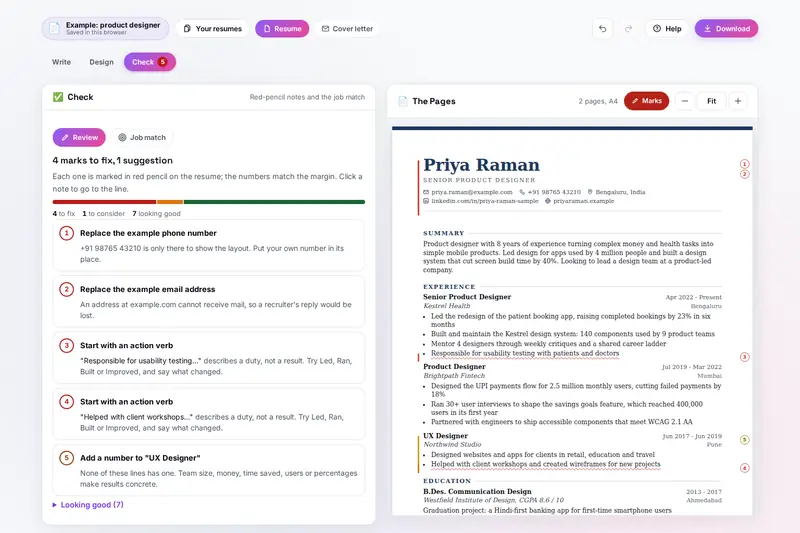
Table of Contents
Overview
ResumeForge builds a resume in your browser. You fill in your details on the left, section by section: personal details and a photo if you want one, a short summary, your experience, education and skills, and any of ten more sections such as projects, certifications or languages. On the right the real pages appear as you type, laid out in millimetres on A4 or US Letter, page breaks included, so the PDF comes out exactly as shown.
Eight templates draw your own content, from the single-column Classic that applicant tracking systems read most reliably to the coloured Sidebar. A red-pencil review then reads the resume the way an editor would and marks the lines worth another look, such as a line that starts with Responsible for or a job without a single number. Paste a job ad and ResumeForge shows which of its key terms your resume already uses.
A cover letter in the same design comes with it, and a first draft can be started from your resume and the job. Download a PDF for emailing, a Word file to edit, plain text for job portals or a backup to carry on later. Nothing is uploaded. There is no account and no server.
Key Features
Print-Exact Pages
The pages beside the form are the real pages in millimetres, on A4 or US Letter; entries continue across page breaks and headings never stay alone.
Eight Templates
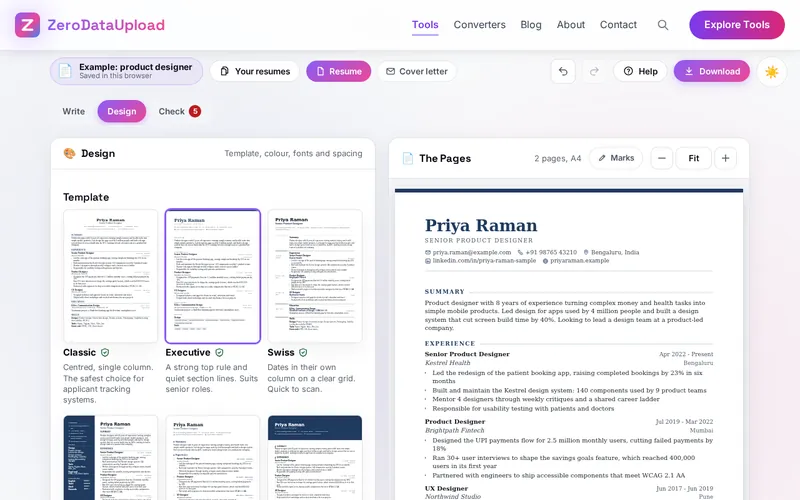
Classic, Executive, Swiss, Sidebar, Timeline, Banner, Compact and Elegant, drawn with your content; six are single-column for job portals.
Fit on One Page
Tightens spacing, line height, margins and text size step by step until the resume fits, never below a readable 8.75 pt.
Red-Pencil Review
Numbered marks in the margin and a note for each: weak openers, lines without numbers, I and my, overused phrases, dates and length.
Job Ad Match
Paste the ad to see its key terms in two groups, already in your resume and missing, weighed by how much the ad stresses each one.
A Matching Cover Letter
Same name, contact details and design as the resume, with a first draft from your strongest lines and a gap for what only you can say.
Seven Languages
Headings, month names and letter phrases in English, Spanish, French, German, Portuguese, Italian or Hindi; dates typed any way.
Files for Every Form
PDF, a single-column Word file without an author name, plain text, Markdown, JSON Resume and a backup; import from pasted text too.
How to Use
- Start - Fill in the example to see every part, start empty, or import the resume you have by pasting its text from Word, a PDF or LinkedIn.
- Write your details - Personal details, a summary of two to four sentences, experience newest first, education and skills. Start a line with a dash for a bullet.
- Choose a design - A template, a colour, fonts and spacing. Fit on one page tightens the design until everything fits.
- Read the red-pencil notes - Open Check and go through the numbered notes. Click one to go to the line, and the Verbs button helps rewrite it.
- Match the job ad - Paste the ad under Job match and work the missing terms that are true for you into your lines.
- Add a letter and download - Switch to Cover letter for a letter in the same design, then download the PDF, the Word file or plain text.
What the Review Looks At
- Contact details - Your name, an email address that looks complete, phone, city, a headline under your name and a profile or portfolio link; the example's phone number and email, if they are still there.
- Summary - Missing, under 15 or over 110 words (40 to 90 reads best), written with I, me or my, or carrying an overused phrase such as team player or hard worker.
- Each job - A title, an employer, dates that can be read and an end that is not before the start, a description, lines that start with a duty such as Responsible for or Helped with, lines over about 38 words, more than seven lines, and a job without any number.
- The whole resume - The same opening word on three or more lines, jobs not listed newest first, gaps of six months or more, education, between 5 and 30 skills, the number of pages for your years of experience, and two-column templates for online forms.
- Fixed rules - The review works by rules written in advance, and nothing you write is sent anywhere. Before publishing, we checked the date reading against an independent date parser for 30,000 dates typed 19 ways, and the JSON Resume file against the format's official schema. The notes help you spot lines worth another look; you decide what to change.
Frequently Asked Questions
The questions people ask most about ResumeForge are answered on the tool page, just below the tool. The full list of 35 questions, from sections and dates to templates for job portals, fit on one page, the review, the job match, the cover letter and the files, is in the ResumeForge FAQ, and the help guide walks through every part of the tool step by step.
Privacy & Security
A resume holds your name, phone number, email, address and every job you have held. ResumeForge has no upload step, no account and no server-side storage: the pages and files are made in your browser, your resumes live in your browser's storage until you delete them, and the only copies that leave it are the files you download yourself.
The tool asks for no permissions and loads nothing from outside the site. The photo keeps only the cropped picture, without the camera's hidden details, the Word file carries no author name, and the page title never changes to show your name. Like every page on ZeroDataUpload, the tool page shows ads through Google AdSense and uses Google Analytics; the Privacy Policy and Cookie Policy explain what those services collect and how the cookie banner controls them. What you type is never part of it.
Ready to try ResumeForge? It's free, private, and runs entirely in your browser.
Open ResumeForge →Related

Last Updated: November 3, 2026