
Prayer Counter Pro: a Tasbih, Mala and Rosary Counter for Any Tradition
Keep count of prayers, mantras or any repetition with a tap or a key, and see your practice over time, in your browser
Guide reviewed 12 November 2026 by Milan Salvi. How we write and correct guides.
Open Prayer Counter Pro →Step-by-step help guide and questions and answers for this tool.
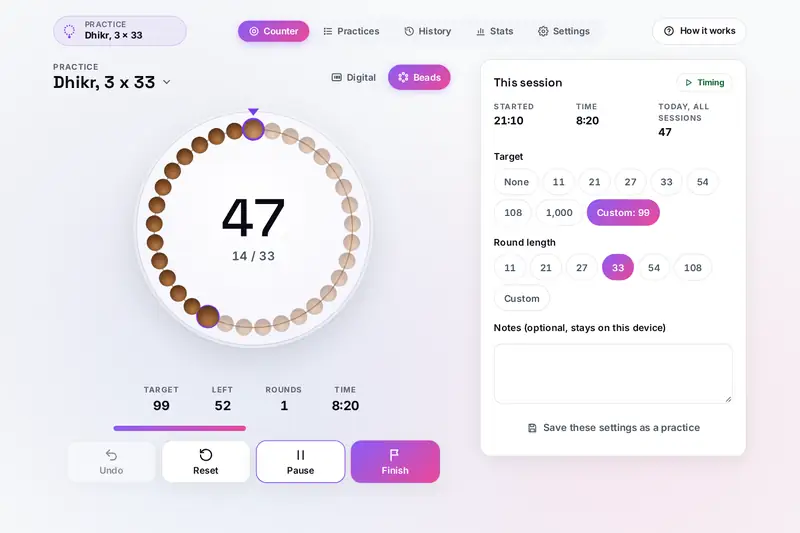
Table of Contents
Overview
Many prayers and practices are repeated a set number of times, and keeping count by hand takes attention away from the words. Prayer beads solve that with touch: one bead, one repetition. Prayer Counter Pro brings the same idea to a phone or a computer. Tap a large circle, press a key or click a page turner, and it keeps the count, marks each round and tells you when you reach your target.
It is made for any tradition: a mala of 108, a tasbih of 33 or 99, the decades of the rosary, breath counting in meditation, or an affirmation you repeat. Save the setups you return to as practices, and Finish a session to keep it. History and Stats then show what you counted, day by day, without estimating anything.
All of it runs in your browser: what you count stays on your device.
Key Features
A Large Tap Counter
Tap anywhere on the circle. The number is easy to read, with rings for the round and the target.
A Ring of Beads
Beads mode moves on by one bead per count, with a larger first bead where each round starts.
Targets and Rounds
Any target up to ten million and any round up to 10,000, with a message, chime or vibration as you choose.
Saved Practices
Name a setup once, with its target, round, mode, sound and a note, and start it with one tap.
A Fair Timer
It counts only the time the page is open, pauses when the device sleeps, and offers to resume.
History and Statistics
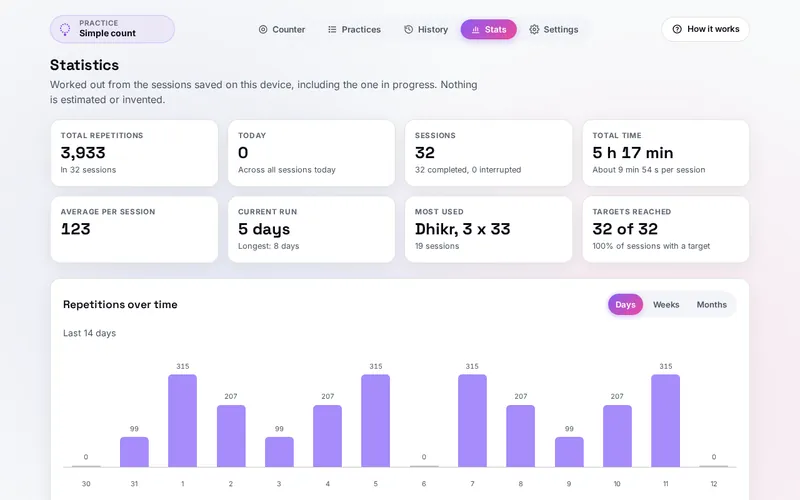
Sessions by day with filters, totals, runs of days and charts by day, week and month.
Keys and Clickers
Count with Space or a key of your choice, such as the Page Down key a page turner sends.
Three Languages
English, Hindi and Spanish, with high contrast, four counter sizes and screen reader announcements.
How to Use
- Tap to count - Tap the circle or press Space. The count and the timer start at once.
- Choose a practice - Tap the name above the circle to pick a saved practice, or keep a simple count.
- Set a target and a round - Pick them in the panel beside the counter, or type your own numbers.
- Pick numbers or beads - Digital shows a large number; Beads shows a ring that moves one bead per count.
- Finish - Save the session to History; a new one with the same settings is ready.
- Look back - History lists your sessions by day, and Stats shows your totals, runs of days and charts.
How the Tool Works It Out
- Rounds and targets - A round is complete each time the count reaches a whole number of rounds (33, 66, 99 with a round of 33). The target is reached once, when the count first gets to it; counting goes on after it. With a target of 20 or more, quiet notes come at 25, 50 and 75 percent.
- Undo - Undo takes back the last count or a reset. Undoing the first count of a session returns it to Not started, timer and all.
- The timer - It starts with the first count and runs only while the page is open: if the page is closed or the device sleeps for more than a minute and a half, it stops at the last moment the page was known to be open. A pause you did not choose ends with your next count.
- Days and runs of days - Each repetition counts on the calendar day it was made, on your device's calendar, so a session past midnight is split between the two days. A run of days counts the days in a row with at least one repetition; the current run ends yesterday if you have not counted yet today.
- Statuses - A session is saved as Completed when it reached its target, as Finished otherwise, and as Interrupted when it was set aside after the page had been closed.
- Checked before publishing - We compared the tool with references made separately: 110,586 cases in 13 groups, in six time zones (India, New York, London, Auckland, Santiago and Lord Howe Island, the last two with clock changes at midnight and by half an hour): long random sequences of counts, undos, resets and changes of target, round and mode with every round, milestone and target event, the timer through pauses, sleep and reloads, sessions saved as completed, finished and interrupted, the calendar day of thousands of moments around midnight, runs of days, the charts by day, week and month, the statistics, the History filters, today's total, saved settings, sessions and practices made to break the tool, backup files and Add and Replace with the limits, the spreadsheet file read back by a separate reader, and texts cut without splitting an emoji. The original version kept the timer running after the first count was undone, could end an interrupted session before its timer stopped, took a saved day split years outside its session and a timed length of years, let a backup set a count key the browser needs such as F5, and cut texts in the middle of an emoji; that is fixed.
Counting in Different Traditions
Prayer beads are found in many faiths. Many Hindu and Buddhist malas have 108 beads, many Muslim prayer beads (a tasbih or misbaha) have 99 or 33, and the Catholic rosary is prayed as five decades of ten Hail Marys. The example practices in the tool follow these customs: one mala of 108, dhikr in three rounds of 33, and five decades of ten. Traditions and teachers differ in the details, so treat the examples as a start and set the numbers you were taught.
A round length and a target cover most of them. A tasbih of 33 said three times is a round of 33 with a target of 99. Japa of several malas is a round of 108 with a target of 216 or 1,008. A rosary is a round of 10 with a target of 50. Breath counting from 1 to 10 has a round of 10 and no target.
The site also has Digital Mala, made for japa: a 108-bead mala with thirty mantras, sankalpa vows and sandhya times for your place. Prayer Counter Pro is the plain counter for any tradition, with any round length, and with a history and statistics of your sessions. Its breath counting simply counts; Prana Breathing Exercises guides the pace of each breath.
Frequently Asked Questions
The questions people ask most are answered on the tool page, just below the tool. The full list of 29 questions, from targets and rounds to beads, the timer, keys and clickers, practices, history and your data, is on the Prayer Counter Pro FAQ page, and every part of the tool is explained step by step in the help guide.
Privacy & Security
This tool has no upload step, no account and no server-side storage. Your counts, practices, notes and settings are kept only in this browser on this device, and nothing is kept at all until you first count or change something. A backup file is yours to keep, and one button removes everything the tool saved.
The tool asks no outside service for anything. Like every page on ZeroDataUpload, the tool page shows ads through Google AdSense and counts visits with Google Analytics; the Privacy Policy explains both.
Ready to count? It's free, private, and runs entirely in your browser.
Open Prayer Counter Pro →Related

Last Updated: November 3, 2026