
Digital Mala: a Japa Mala Counter with Sankalpa and Sandhya Times
Count japa on a 108-bead mala that turns at the Meru, keep a sankalpa, and see the sandhya times and lunar days for your place
Guide reviewed 11 November 2026 by Milan Salvi. How we write and correct guides.
Open Digital Mala →Step-by-step help guide and questions and answers for this tool.
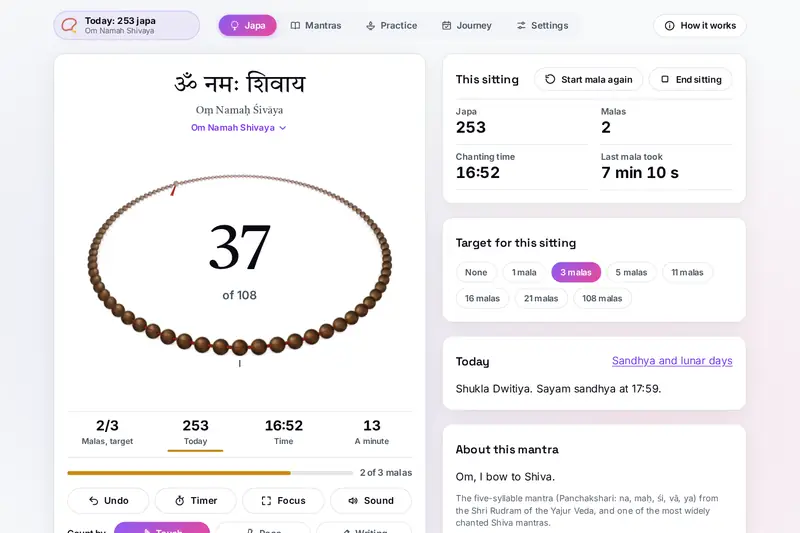
Table of Contents
Overview
Japa is the repetition of a mantra, often counted on a mala of 108 beads with one larger bead, the Meru, where the counting begins and ends. Digital Mala puts that mala on your screen: the beads lie in a loop seen in perspective, the bead in your hand sits at the front, and each one you tap or pull with your thumb moves on with a soft click. When the mala is complete, the Meru with its tassel comes round, a bell rings and, by custom, the mala turns so you go back the way you came.
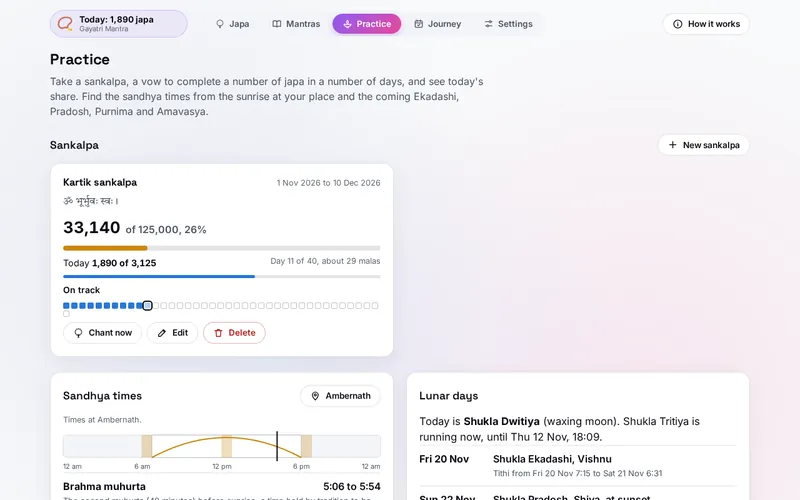
Around the mala are the things a daily practice needs: thirty mantras in their own script with their meanings, a steady pace with a breath guide, likhita japa written on a pad and kept in a notebook, a sitting timer, a tanpura or shruti box drone, and Focus, which fills the screen in black for night practice. On Practice you can take a sankalpa, such as 1,25,000 japa in 40 days, and see each day's share, and Journey keeps every day and every sitting.
For the sandhya times and the lunar days, choose your place: sunrise, noon and sunset, and the tithi from the Moon and the Sun, are worked out in your browser for that place and shown on its own clock.
Key Features
A Mala You Can Pull
108, 54, 36, 27 or 21 beads in ten materials on six threads; tap, or pull the beads with your thumb.
The Meru Kept
The guru bead with its tassel ends each mala with a bell, and the mala turns back by custom.
Thirty Mantras
Hindu, Buddhist, Sikh and Jain mantras in their own script, with meanings and sources, and your own.
Pace and Breath
A steady beat that can count for you, a breath circle, and the mantra read by a voice on your device.
Likhita Japa
Write the mantra on a pad; each one counts and fills a notebook of 108 to a page.
Sankalpa
A number of japa in a number of days, with each day's share worked out again from what is left.
Sandhya and Lunar Days
The sandhya times from your sunrise and the coming Ekadashi, Pradosh, Purnima and Amavasya.
Your Journey
Twelve months of practice, streaks, every sitting with its note, CSV files and a backup.
How to Use
- Choose a mantra - Press the mantra at the top of the Japa view and pick one of thirty, or add your own in any script.
- Count - Tap the mala or pull the beads to the left; with the mala selected, Space or Enter counts and Backspace takes one back.
- Complete a mala - At the 108th bead the Meru comes round with a bell; set a target in malas or a sitting timer if you like.
- Pace, write or focus - Let Pace keep a steady beat, write the mantra on the pad, or fill the screen with Focus.
- Take a sankalpa - On Practice choose how many japa in how many days; each day shows its share on the Japa view.
- Choose your place - Pick a city or type its coordinates to see the sandhya times and the coming lunar days.
How the Tool Works It Out
- Beads and malas - Each tap, pull, key, beat or written mantra counts one bead; the last bead of the mala completes it, and the next mala starts a moment later, turned round if you keep the custom. Undo goes back one bead at a time, up to 300.
- Sittings - A sitting starts with the first bead and ends with End sitting, another mantra, other beads in a mala, or 30 minutes without a bead. Chanting time adds the gap between beads up to a minute each, so a pause does not count as chanting.
- Sankalpa - Each day's share is the japa still to do divided by the days left. Ahead, on track or behind compares what you have done with an even share for each day so far.
- Sandhya times - Sunrise and sunset are when the top of the Sun meets the horizon with average refraction (0.833 degrees below it); solar noon is when the Sun crosses the meridian. The windows use the common reckoning of a muhurta as 48 minutes.
- Tithi - Each 12 degrees the Moon gains on the Sun, from the apparent positions of both (Jean Meeus, Astronomical Algorithms); a day takes the tithi at its sunrise, Pradosh the tithi at sunset.
- Days and time zones - Your counts belong to the days of your device's calendar; the sandhya times and the lunar days belong to the place's own calendar and clock.
- Checked before publishing - We compared the tool with references made separately: 30,102 cases in 13 groups: sunrise, solar noon and sunset on the place's own day at 36 places from the equator to Svalbard and Antarctica, and the tithi with its start and end at 3,000 moments from 2000 to 2040, both against JPL's DE421 ephemeris; a year of lunar days at 22 places worked out from DE421 with the same rules; 3,000 runs of counting, undo, sittings, idle pauses, mantra and bead changes and deleted sittings; sankalpas, streaks and totals; 3,000 saved states, 2,500 of them made to break the tool; the reminder file against the calendar standard and the CSV cells. The original version put a faraway place's sunrise and lunar day on the date of this device's day, took a sitting that ran past midnight off the wrong day when it was deleted, kept a sankalpa complete after its japa fell short, wrote calendar lines too long for the standard, let a note that looks like a formula into a CSV file as one, and read back impossible values from a backup; that is fixed.
Sandhya, Tithi and Your Own Calendar
The three sandhyas follow the Sun: dawn, midday and dusk. Digital Mala shows Brahma muhurta, the second muhurta before sunrise, and the three sandhya windows by the common reckoning of a muhurta as 48 minutes, worked out from the sunrise, solar noon and sunset at your place. Many families and schools reckon them differently, and the steps of sandhya vandanam summarised under the times differ too; follow what your elders or your teacher taught you.
A tithi lasts while the Moon gains 12 degrees on the Sun, so it can start at any hour and be shorter or longer than a day. A panchang names each day by the tithi running at its sunrise, and Digital Mala does the same for your place, with Pradosh taken at sunset. When a tithi starts or ends within minutes of sunrise, calendars made with other methods can name another day, and traditions keep fasts by their own rules (Vaishnava Ekadashi, for example, looks at the tithi before dawn). For vrat days, check your own panchang or temple calendar.
Some of this overlaps other tools on the site. Sun and Moon is a full almanac, with twilight, the Moon and a daily panchang of tithi, nakshatra, yoga and karana; Prana Breathing Exercises has fifteen breathing techniques; the Clock has a countdown timer that rings. Digital Mala uses the same astronomy as Sun and Moon only for the times of your practice, its breath guide follows the pace of your chant, and its sitting timer sounds a bowl while you keep counting.
Frequently Asked Questions
The questions people ask most are answered on the tool page, just below the tool. The full list of 35 questions, from counting and the Meru to mantras, sankalpas, the sandhya times, the lunar days and your data, is on the FAQ page, and the help guide walks through every part of the tool.
Privacy & Security
This tool has no upload step, no account and no server-side storage. Your counts, sittings, notes, sankalpas, written pages and place are kept only in this browser on this device. Delete everything, in Settings, removes them.
The tool asks no outside service for anything, and it does not use the microphone or your location. Like every page on ZeroDataUpload, the tool page shows ads through Google AdSense and counts visits with Google Analytics; the Privacy Policy explains both, and what you count or type in the tool is never part of them.
Ready for your next mala? It's free, private, and runs entirely in your browser.
Open Digital Mala →Related

Last Updated: November 3, 2026