
CelebriCards: an Online Invitation Maker for Weddings, Birthdays and Pujas
Invitations and greeting cards in 28 designs and four languages, with a page for every function, in your browser
Guide reviewed 12 November 2026 by Milan Salvi. How we write and correct guides.
Open CelebriCards →Step-by-step help guide and questions and answers for this tool.
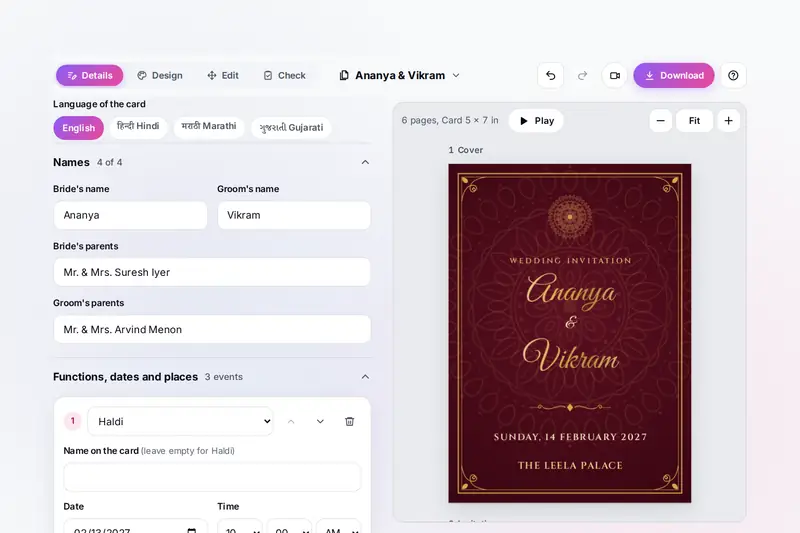
Table of Contents
Overview
An invitation has to say a lot in a small space: the names, the occasion, the date, time and place of every function, a contact for replies, and often a blessing at the top, all in a design that suits the event and in the language the guests read. Then it has to reach them: as a picture in a chat, a PDF, a printed card, perhaps with each guest's name on it.
CelebriCards does this in one place. You pick the occasion (a wedding, engagement, reception, save the date, anniversary, birthday, baby shower, naming or thread ceremony, housewarming, puja, festival, party, office event or a greeting card), type the details, and choose one of 28 designs. The words are laid out and sized for you, and every change shows on the card at once. A wedding can have every function, from Ganesh Puja and Haldi to the reception, each with its own page.
All of it runs in your browser: your details, photos and guest list stay on your device, and the pictures, PDFs and video are made there.
Key Features
15 Occasions
Weddings and their functions, birthdays, pujas, housewarmings, baby showers, parties, office events and greeting cards.
28 Designs
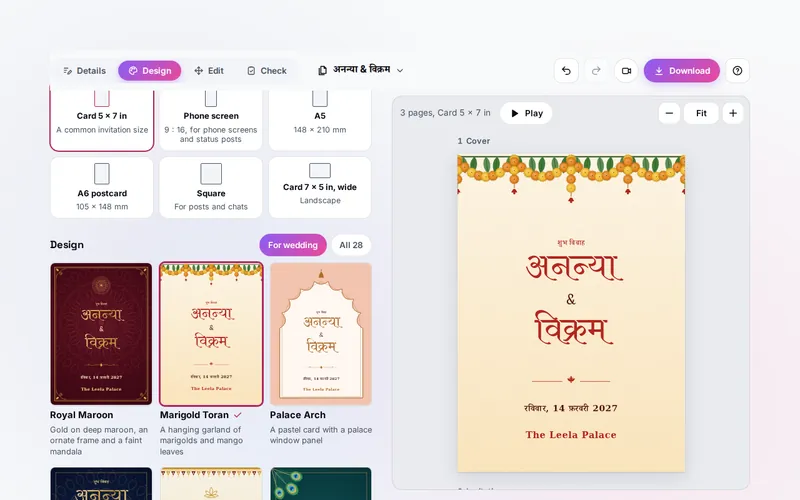
Royal Maroon, Marigold Toran, Temple Gold, Mandala Night and 24 more, each with its own colour sets.
Four Languages
English, Hindi, Marathi or Gujarati for the printed words, dates and times, with local or English digits.
A Page per Function
Haldi, Mehendi, Sangeet, the wedding and the reception, each with its own date, place, page and picture.
Edit on the Card
Move, resize and turn anything, type on the card, and add photos, pictures, shapes and QR codes.
A Card for Each Guest
Paste a guest list and get a card with each guest's name, as PDFs or pictures, or one by one.
Video Invitation
The pages come to life with falling petals, confetti or sparkles and your own song, made on your device.
Ready for Printing
A PDF at 300 dots per inch with bleed and cut marks, or several cards on an A4 sheet.
How to Use
- Pick the occasion - The card fills in with example words in a design made for it.
- Type the details - The names, each function's date, time and place, a message, the RSVP contact and a blessing line or symbol; choose the language of the card.
- Choose a design - One of 28 designs, a colour set, the fonts, the card size and the pages.
- Make it your own - Click anything on the card to move, resize or turn it, double-click words to change them, and add a photo or a QR code.
- Check it - The Check tab lists example words still on the card, words too small or too faint, and dates in the past or out of order.
- Send or print it - Download pictures, a PDF, a PDF for printing, a video, a card for each guest, a message with the details or a calendar file.
How the Tool Works It Out
- The layout - Each page is a list of lines (a blessing, a heading, the names, a message, the date, the venue) stacked in the middle of the card, inside the design's frame, borders and corners. The lines are measured in the chosen fonts and the whole stack is made larger or smaller until it fits; names get smaller before they wrap, and a word too long for the card is broken between whole letters. Changes you make by hand are kept apart and laid over the layout, so the details can still change underneath.
- Sharp at any size - The frames, flowers, garlands, symbols and borders are drawn as shapes, not pasted as pictures, so the same card is drawn sharply on the screen, at 300 dots per inch for printing and in every frame of the video.
- Languages - The fixed words of each occasion are written out in Hindi, Marathi and Gujarati, and dates are written with the month and day names of each language; times are written with the part of the day, such as सायं for the evening.
- QR codes - A QR code is printed dark on white with a margin of four modules all round, and on a card that is not turned each module covers whole pixels of the picture, so phones read it at every size.
- Files - Pictures and PDFs are made from the card in your browser and carry no author, tool name or date inside; the video is drawn frame by frame and made into a video file on your device.
- Checked before publishing - We compared the tool with references made separately: 46,519 cases in 15 groups: dates in four languages and five styles compared with a separate program and with the month and day names the Unicode Consortium publishes for each language, times and their parts of the day, calendar files read back by another program, the message, pictures and PDFs read back for their size, pages, bleed, cut marks and to confirm that no tool name is inside, every QR code printed on the RSVP page of all 28 designs at all six sizes read back by two QR readers, zips read back, saved and opened invitations made to break the tool, backups kept whole, the layout of every occasion, design, size and language with long names and words, file and guest names, picture sizes read from file headers, the video read back by another program, and the fonts' licences. The original version put a Google Maps address it made from the venue into the QR code, the message and the calendar file, drew QR codes that one of the two readers could not read, made zips of more than 65,535 files that list the wrong number, let long words run off the card, and used saved and opened values without checking them, so a crafted backup file could put its own markup into the page; that is fixed.
Sending, Printing and the Guest List
For chats, a picture of each page is the easiest to send; the phone screen size fills a phone in portrait. Paste the message with the details next to it: it lists every function with its date, time and place, so guests can copy the address. The calendar file lets guests add all the functions to their calendar at once. For a map, open the venue in your map app, choose Share and copy the link, then paste it under RSVP and map: the RSVP page prints a QR code for it. CelebriCards makes no map link itself.
For printing, choose PDF for printing: 300 dots per inch, with bleed (the background running 3 mm past the edge) and cut marks for a print shop, or several cards on an A4 sheet to cut at home. Print a test page at 100% size first, and read the names, dates and phone numbers aloud once. A guest list pasted under A card for each guest gives every guest a card with their name, such as Dear Sharma family, as PDFs or pictures in one zip, or to share one by one from a phone.
Some of this overlaps other tools on the site. CertificateMaker makes certificates, Biodata Maker makes a marriage biodata, the QR Code Generator makes QR codes of many kinds, GIF Forge makes animated GIFs and the Employee ID Card Generator makes ID cards from a list. CelebriCards is the one for invitations and greeting cards.
Frequently Asked Questions
The questions people ask most are answered on the tool page, just below the tool. The full list of 33 questions, from the occasions and functions to languages, designs, editing on the card, the guest list, saving, printing, the video and your privacy, is on the CelebriCards FAQ page, and every part of the tool is explained step by step in the help guide.
Privacy & Security
This tool has no upload step, no account and no server-side storage. Your details, photos and guest lists are kept only in this browser on this device, and the pictures, PDFs and video are made here. A backup file keeps an invitation with its photos, to store it or open it on another device.
The tool asks no outside service for anything and makes no links to outside services; a map link appears on the card only when you paste one. Like every page on ZeroDataUpload, the tool page shows ads through Google AdSense and counts visits with Google Analytics; the Privacy Policy explains both.
Ready to make your invitation? It's free, private, and runs entirely in your browser.
Open CelebriCards →Related

Last Updated: November 3, 2026