
GPS Speedometer: Your Speed, Trips and a 0 to 100 Timer in Your Browser
Live GPS speed on a dial with a speed limit warning, big digits and a windscreen view, trips with the route coloured by speed, splits and laps, GPX files and a performance timer, with your position kept on your device
Guide reviewed 13 November 2026 by Milan Salvi. How we write and correct guides.
Open GPS Speedometer →Step-by-step help guide and questions and answers for this tool.
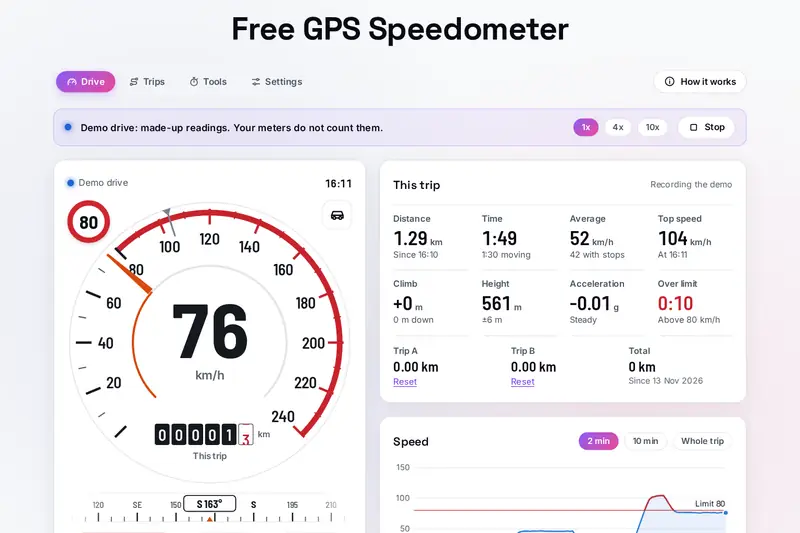
Table of Contents
Overview
Every phone with GPS knows how fast it is moving, but few show it well. The GPS Speedometer turns those readings into an instrument: a dial with a needle, a speed limit warning you set yourself, a second needle at your top speed and an odometer that rolls like a car's, with big digits for a phone holder and a mirrored view you can read in the windscreen at night.
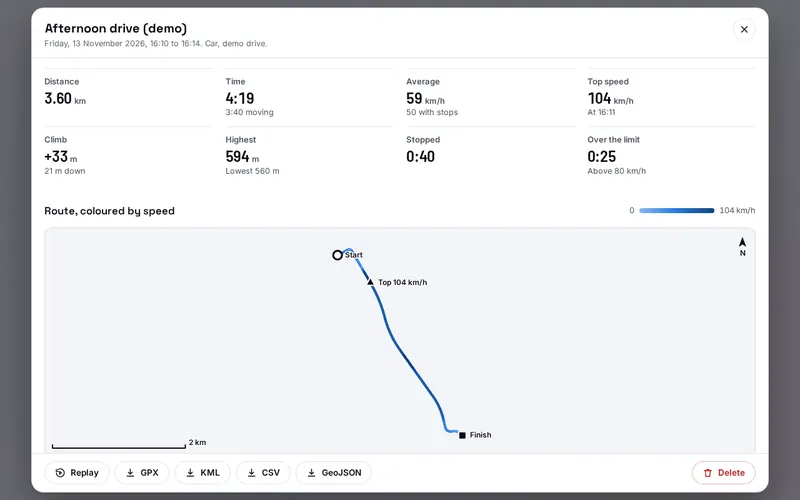
It records trips with their distance, time, averages, climb and laps, and keeps each one with its route drawn in colours by speed, its speed and height charts, splits and the time spent at each speed. You can open GPX files from a watch or bike computer, back everything up to one file and save any trip as GPX, KML, CSV or GeoJSON. The Tools tab adds a performance timer, a check of your car's speedometer, an average speed check, a g-meter and your position as a Plus Code.
This is the one page of the site that may ask for your location, and only when you press a button that needs your speed. The position is worked out in your browser and never sent anywhere; the ads and analytics on the page cannot read it.
Key Features
A Real Dial
Needle, top speed needle, rolling odometer, heading strip and a range that suits your vehicle.
Speed Limit Warning
Your own limit and margin, with a chime, beeps, vibration or a spoken "Slow down".
Windscreen View
Mirrored digits to read in the glass at night, or big digits for a phone holder.
Trip Recording
Distance, time, averages, top speed, climb, laps and time over the limit, kept on your device.
Routes Drawn by Speed
Each trip's route in colours by speed, with speed and height charts and splits.
Performance Timer
0 to 100, rolling tests, eighth and quarter mile and braking, timed between readings.
Two Speed Checks
How far your car's speedometer reads high, and an average speed zone kept under the limit.
Your Own Files
GPX in, GPX, KML, CSV and GeoJSON out, and one backup file for every trip.
How to Use
- Show your speed - Press Show my speed and allow location when your browser asks; the lamp turns green once readings arrive.
- Pick your vehicle - Tap the vehicle in the dial's top right corner; it sets the dial's range and when you count as stopped.
- Set your limit - Tap the round sign at the top left and pick the limit of your road; above it the dial turns red and warns you.
- Record a trip - Press Start trip before you set off, Pause at a stop, Lap for a stretch of road and Finish when you arrive.
- Look back - Open a trip under Trips for its route, charts, splits and laps, replay it or save it as a file.
- Try the tools - On a closed road or a track time 0 to 100, check your car's speedometer with a passenger, or read out your position.
How the Tool Works It Out
- The speed - The browser hands the tool each GPS reading with a speed and the phone's own estimate of its accuracy. Readings vaguer than your limit in Settings, and jumps faster than your vehicle can go, are kept out of the distance and the top speed; when a device gives no speed, as many laptops do, it is worked out from the change of position over a few seconds.
- The distance - Distance is counted only while you move, between the places the readings put you, and a step longer than the speed allows is cut back to what the speed says, so a parked phone whose position wanders adds nothing.
- The timer - Between two readings the speed is read as a straight line, so the moment you passed 100 km/h or the end of a quarter mile is found between them, and the start of a standing launch is worked back from the first readings. With steady acceleration that gives the exact time whatever the number of readings a second.
- Trips and files - Each trip keeps its readings on this device in the browser's own database. A GPX file is read in one pass, and every value of a saved trip, a backup or the settings is checked before the page uses it.
- Checked before publishing - We compared the tool with independent references, with the test values made first: 294,942 cases in 14 groups, including the speed and distance units against their exact definitions, 20,000 distances and bearings against GeographicLib on the WGS84 ellipsoid, 20,010 Plus Codes against Google's own library, the performance timer against exact answers for steady acceleration in 6,000 runs at 1 to 10 readings a second, splits and the time at each speed against an independent reference, the GPX reader against the earlier version on 30,000 random files, 300 saved GPX files against the published GPX 1.1 schema, and 22,506 settings, trips and backups made to break the tool. The original version took minutes or stopped on GPX files with many unclosed tags, stopped on files of more than about 120,000 points, wrote files that XML readers refuse when a name held a control character, read emoji in names wrongly, crashed on some saved settings, and could advise up to three times the speed limit in an average speed zone; that is fixed.
Reading GPS Speed Well
Under an open sky a phone's GPS usually follows your speed closely, a second or so behind. Tall buildings, tunnels, car parks and a phone deep in a bag weaken the signal: the lamp above the dial turns amber and the tool keeps vague readings out of the distance and the top speed. A car's speedometer often shows a little more than the GPS, and that is on purpose: the international rule for car speedometers, UN Regulation No. 39, says the speed shown must never be less than the true speed and may be up to 10 percent plus 4 km/h more. The Speedometer check measures your own car's difference.
The height deserves a word too. Browsers give the GPS height above the WGS84 ellipsoid, a mathematical model of the Earth's shape, not above sea level, so it can differ from a map or a road sign, and it wobbles more than position. Keep your eyes on the road: set everything up before you drive or let a passenger use the speedometer, follow your country's rules on phones in vehicles, and use the performance timer only on a closed road or a track. The speed limit warning is a reminder you set yourself; the road signs always apply.
Frequently Asked Questions
The questions people ask most are answered on the tool page, just below the tool. The full list of 33 questions, from accuracy and the speed limit warning to trips, GPX files, the performance timer and where your location goes, is on the FAQ page, and the help guide walks through every part of the tool.
Privacy & Security
A list of trips can say where you live, work and travel. This tool has no upload step, no account and no server-side storage: your position is read only after you press a button that needs your speed, worked out in your browser, and your trips, results and settings are kept only in this browser on this device. Delete, under Settings, removes the trips and results.
This is the one page of the site the browser lets ask for your location; the rest of the site, and anything embedded in this page, cannot. A trip's route is drawn from your own points with no map underneath, so nothing about where you went is fetched, and photos and videos from the Camera view are saved straight to your device. Like every page on ZeroDataUpload, the tool page shows ads through Google AdSense and counts visits with Google Analytics; the Privacy Policy explains both, and those scripts cannot read your location.
Want to see your speed, record a trip or time a run? It's free, private, and runs entirely in your browser.
Open GPS Speedometer →Related

Last Updated: November 3, 2026