
AutoCalc: Car Calculators and Garage Log
The real on-road price and loan, what a car costs to own, a trip's fuel or charging, tyre sizes and your real mileage, worked out in your browser
Guide reviewed 9 November 2026 by Milan Salvi. How we write and correct guides.
Open AutoCalc →Step-by-step help guide and questions and answers for this tool.
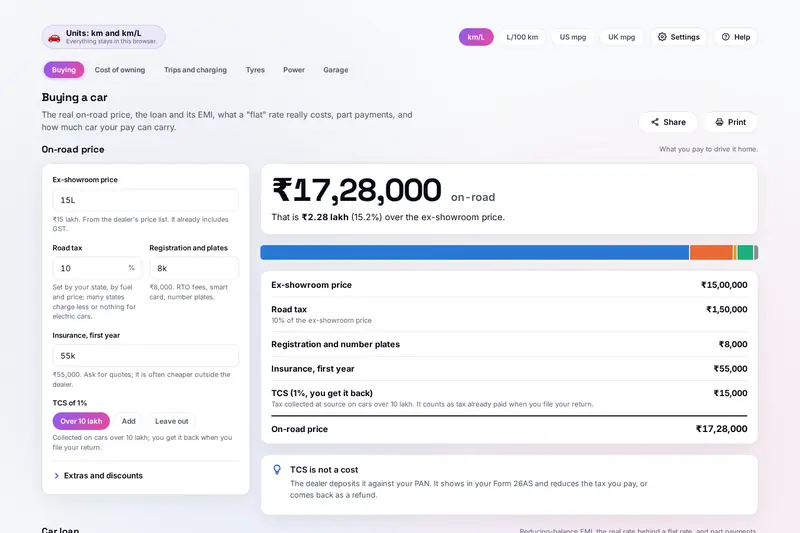
Table of Contents
Overview
Buying a car means a string of numbers from people with something to sell: an ex-showroom price that is not what you pay, a loan quoted at a "flat" rate that sounds cheaper than it is, a mileage figure from a brochure. AutoCalc works out the real ones from what you type. The on-road price adds road tax, registration, insurance and the TCS on a car over 10 lakh to the ex-showroom price; the loan's EMI uses the reducing balance banks use, shows the real rate behind a flat quote, and counts a processing fee in the cost.
Owning a car costs more than its fuel. AutoCalc adds up the value it loses, fuel or charging, insurance, service and loan interest over the years you keep it, compares up to three cars of any fuel, and shows when a dearer car pays back its higher price in lower running costs. It costs a trip with tolls split between friends, the time and cost of charging an electric car, and the difference a new tyre size makes to the speedometer.
Its garage log turns your fill-ups into your real mileage, full tank to full tank, adds up your spending, and reminds you before a service, the insurance or the pollution certificate is due. Figures that differ by city, state, lender and car, such as fuel prices, road tax, the interest rate and how fast a car loses value, are yours to type; the figures AutoCalc does use are named with their source.
Key Features
On-Road Price
Road tax, registration, insurance, TCS, FASTag and extras added, discounts taken off.
Car Loan EMI
Reducing-balance EMI, the real rate behind a flat rate, fees and part payments.
The 20/4/10 Check
The price and the loan checked against your income, and the most car the rule allows.
Cost of Owning
Up to three cars of any fuel, the cost a month and a km, and when the dearer one pays back.
Trips and Charging
Trip cost split between people, fuel stops, and EV charging time and cost on any charger.
Tyre Sizes
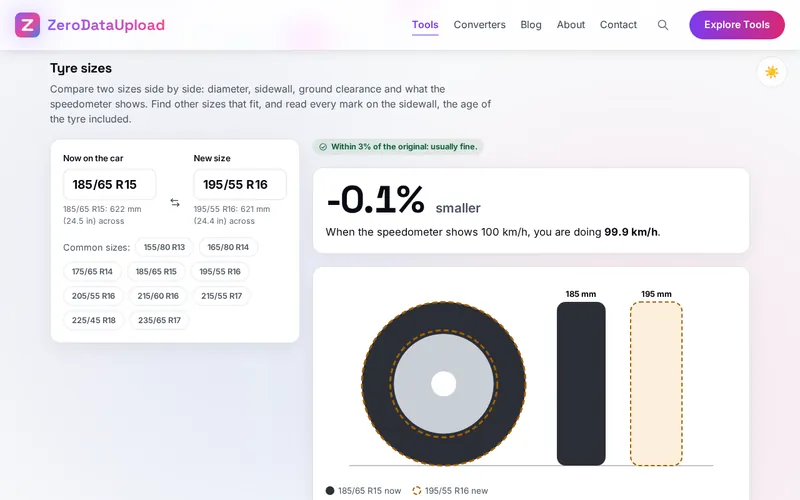
Two sizes drawn to scale, the speedometer error, sizes that fit and every sidewall mark read.
Power and Gears
Power, torque and rpm in every unit, speeds in each gear, engine size and a rough 0 to 100.
Garage Log
Real mileage, spending, service reminders, papers and a calendar file of the due dates.
How to Use
- Price the car - Type the ex-showroom price, your state's road tax, registration and insurance; see the on-road price line by line.
- Plan the loan - Choose the down payment, the quoted rate (reducing or flat) and the years; see the EMI, the interest and what part payments save.
- Check what you can afford - Type your monthly income to test the car and the loan against the 20/4/10 rule.
- Compare what it costs to own - Add up to three cars with price, real mileage, fuel price, insurance, service and the resale you expect.
- Cost a trip, a charge or a tyre - Type a distance and your mileage, a battery and a charger, or two tyre sizes.
- Keep a garage log - Log fill-ups, services and expenses to see your real mileage and spending, with reminders before each due date.
How the Figures Are Worked Out
- On-road price - The ex-showroom price (with GST) plus road tax as a percent of it, registration, insurance, FASTag, accessories, warranty and other charges, less discounts. TCS is 1% of the price of a motor vehicle over 10 lakh, per vehicle; it is tax already paid and comes back against your income tax. Road tax is typed, because each state sets its own.
- Loans - The EMI is P x r x (1 + r)n / ((1 + r)n - 1), with r the yearly rate divided by 1,200 and n the months. A flat rate charges interest on the whole loan for the whole time; the real rate is the reducing rate that gives the same EMI (a flat 7% over five years is a reducing 12.5%). With a processing fee, the real cost is the rate at which the money you receive buys the same EMI. Part payments keep the EMI and end the loan sooner.
- Cost of owning - Month by month over the years you keep the car: fuel (the distance over the mileage times the price, rising by any yearly rate you set), insurance, service, loan interest from the loan's own schedule, and the value lost from the resale price you expect or the shares you type for the first year and each year after. AutoCalc has no resale curve of its own. Payback is when the dearer car's lower running costs add up to the difference in price.
- Insured value - The maker's listed price less 5% up to 6 months, 15% up to a year, 20% up to two years, then 30, 40 and 50% up to five, from the India Motor Tariff; older cars' IDV is agreed with the insurer.
- Trips, CO2 and charging - Fuel is the distance over the mileage. Stops count a refill when about 10% is left, or a charge from 10 to 80%. CO2: petrol 2.35 kg a litre and diesel 2.69 kg (US EPA), CNG 2.75 kg a kg (as methane), electricity 0.675 kg a kWh (India's grid in 2025-26, Central Electricity Authority). Charging time follows typical AC and DC charging curves, limited by the charger and the car, with 88% (AC) or 93% (DC) of the electricity reaching the battery unless you type your own figure.
- Tyres - The diameter is the rim plus two sidewalls (width x aspect); the speedometer error is the ratio of the two diameters. Load indexes and speed ratings come from the standard tables. A common guide keeps the new diameter within about 3% of the original. Tyre makers advise replacing tyres 10 years after they were made at the latest, and Continental advises replacing at 3 mm of tread.
- Garage - Real mileage is the distance from one full tank to the next over all the fuel put in between. Reminders are due by distance or months, whichever comes first, with the date for the distance from how far you drive a day. The service intervals filled in for a new vehicle are examples to change to your owner's manual.
- Checked before publishing - We checked the stated figures against their sources and compared the tool with a reference written separately from these rules: 15,914 amounts written in many ways, 27,004 mileage conversions, 1,201 on-road prices, 6,490 loan cases with flat rates, fees and part payments, 600 affordability checks, 789 ownership cases and paybacks, 318 IDV ages, 1,800 trips, 1,060 charging sessions, 21,016 tyre cases with other sizes found by a search of every size, 3,825 power, gear and engine cases, 1,106 garage logs, reminders and spending records, and 4,720 dates, calendar files and spreadsheets: 85,901 cases with no differences. AutoCalc is a calculator for planning; check prices, taxes and service intervals with your dealer, insurer, lender and owner's manual.
Frequently Asked Questions
The questions people ask most are answered on the tool page, just below the tool. The full list of 48 questions, from typing amounts to TCS, flat rates, the cost of owning and the IDV, trips and charging, tyre sizes and age, the 0 to 100 estimate, the garage log and your data, is in the AutoCalc FAQ, and the help guide walks through every tool step by step.
Privacy & Security
What you earn, what you plan to spend on a car and where you drive are nobody else's business. AutoCalc has no upload step, no account and no server-side storage: everything is worked out by your browser, and what you type, your garage log included, is kept in your browser's storage until you choose Delete everything. A backup file, a spreadsheet of your log or a calendar file is saved to your own device.
The tool loads nothing from outside the site, and the page title never shows an amount or a registration number. Like every page on ZeroDataUpload, the tool page shows ads through Google AdSense and uses Google Analytics; the Privacy Policy and Cookie Policy explain what those services collect and how the cookie banner controls them. Your figures are never part of it.
Ready to work out what a car really costs? It's free, private, and runs entirely in your browser.
Open AutoCalc →Related

Last Updated: November 3, 2026