
CompassPro: A Compass, Bearings and the Qibla in Your Browser
Magnetic, true and grid north, bearings and distances to your saved places, a position from two bearings, the Sun, the Moon and the Qibla on the dial, a world map and every common coordinate format
Guide reviewed 10 November 2026 by Milan Salvi. How we write and correct guides.
Open CompassPro →Step-by-step help guide and questions and answers for this tool.
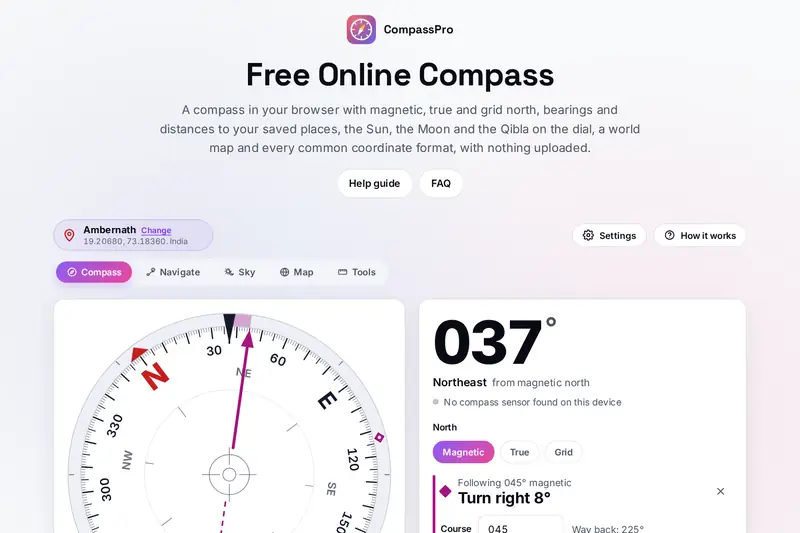
Table of Contents
Overview
Almost every phone carries a compass sensor, but the compass that comes with the phone usually stops at a needle and a number. CompassPro is the rest of a compass: it shows magnetic, true or grid north, follows a bearing and tells you how far to turn, keeps your places with their bearing and distance, works out where you are from two bearings, and puts the Sun, the Moon, the pole star and the Qibla on the dial.
The heading combines the compass sensor with the tilt sensors, so it stays right when the phone is not flat and reads the camera's direction when you hold it upright to sight a distant hill. On a computer, which has no compass, the page says so and lets you turn the dial by hand, and everything else works the same: the calculators, the sky, the world map and the coordinate converter.
The angle between magnetic and true north comes from the World Magnetic Model 2025 of NOAA and the British Geological Survey, the same model phones and navigation systems use, and distances and bearings are worked out on the shape of the Earth GPS uses.
Key Features
A Tilt-Corrected Dial
The card turns like a real compass, stays right when the phone tilts and turns by hand on a computer.
Three Norths
Magnetic, true and grid north, with the declination and grid convergence at your place.
Follow a Bearing
Lock in a course, see how far to turn and follow the reverse with Way back.
Saved Places
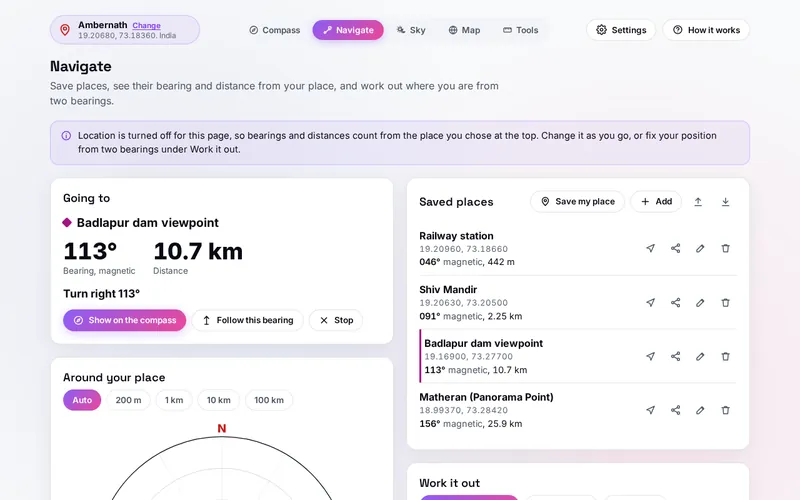
Up to 500 places with their bearing and distance, a radar around you and GPX files in and out.
Where Am I
Your position from the bearings to two places you can see, with how good the fix is.
Sun, Moon and Qibla
Marks on the dial, a chart of the sky for any time and the times the Sun points to the Qibla.
A World Map
The world drawn from your place, with the lines of equal declination and the night side.
Every Coordinate Format
Decimal, degrees and minutes, UTM, MGRS, plus codes and map links, each with a copy button.
How to Use
- Choose your place - Press the place button and pick a town, type coordinates or pick a point on the map.
- Read the heading - On a phone hold it flat; an iPhone asks first, after you tap Start the compass. On a computer drag the dial.
- Pick a north - Magnetic for the needle, True for the North Pole, Grid for a paper map with a kilometre grid.
- Follow a bearing - Face the way you want to go and press Follow this bearing; the panel says how far to turn.
- Save places - On the Navigate tab add places from coordinates, the map or a GPX file, and press Go here on one.
- Use the sky - Turn on the Sun, the Moon, the Qibla or the pole star under the dial, or open the Sky tab for any time.
How the Tool Works It Out
- The heading - The browser reports the phone's orientation as three angles from its compass and tilt sensors. The tool turns them into the direction of the top of the screen, or of the camera when the phone is upright, so tilting the phone does not move the reading, then smooths the needle so a shaky hand does not make it jump.
- The three norths - The declination at your place and today's date comes from the World Magnetic Model 2025, the 90 coefficients NOAA publishes, valid from 2025 to the end of 2029; the grid convergence comes from the UTM projection of your place. True north adds the declination to the magnetic reading; grid north then takes the convergence off.
- Distances and bearings - Between two places the tool solves the shortest path on the WGS84 ellipsoid; for points on nearly opposite sides of the Earth, where the usual method does not settle, it searches for the shortest line that reaches the far point. A position from two bearings starts where the two lines cross and is refined until the bearings from it match the ones you measured.
- The sky - The Sun and the Moon follow the same astronomy as the site's Sun and Moon tool, and the pole stars are moved to today's date from their catalogue positions.
- Checked before publishing - We compared the tool with independent references, with the test values made first: 242,382 cases in 17 groups, including the magnetic field at 12,000 places and dates against NOAA's own model and its 90 coefficients, 25,309 distances and bearings against an independent geodesy reference (nearly and exactly opposite points among them), 15,000 points reached on a bearing, 4,000 positions from two bearings, UTM and MGRS at 30,000 places, plus codes, 50,277 coordinates typed in 17 formats and 1,544 hostile texts, the Sun, the Moon and the pole stars against a planetary ephemeris of NASA's Jet Propulsion Laboratory, local midnight at every clock change from 2000 to 2030 in 15 time zones, sunrise and sunset, the Qibla from 3,203 places, 300 GPX files against the published GPX 1.1 schema, the heading from the sensors and 2,807 saved states made to break the tool. The original version put two points on exactly opposite sides of the Earth 0 km apart and nearly opposite points up to 17 km and 81 degrees off, found no position from two bearings on some long lines at high latitudes, used the wrong Svalbard UTM zones at 84 degrees north, started days at a clock change at midnight an hour off and kept stored settings and names unchecked; that is fixed.
Three Norths and Your Place
A compass needle points to magnetic north, which can be many degrees from the true north of a map: the difference, the declination, changes from place to place and slowly from year to year. That is why CompassPro asks for your place before it shows true north, and why the facts under the dial show the declination there and how fast it is changing. Near the magnetic poles the part of the field a compass uses becomes weak, and the page marks the areas where NOAA says compasses may not be fully accurate or are unreliable.
Location is turned off for CompassPro's page, as for every page of this site except the GPS Speedometer, so it never asks where you are: you choose a town, type coordinates, pick a point on the map or work out your position from two bearings, and distances count from that place. The site's Sun and Moon tool overlaps the Sky tab here: Sun and Moon is a calendar of sunrise, sunset, twilight, moon phases and eclipses for any day, while CompassPro turns the same sunrise and sunset into directions on a dial and adds the Qibla and ways to find north without a compass.
Frequently Asked Questions
The questions people ask most are answered on the tool page, just below the tool. The full list of 38 questions, from using the compass on a phone or a computer to the three norths, saved places, GPX files, the Qibla, the sky, the map and your data, is on the FAQ page, and the help guide walks through every part of the tool.
Privacy & Security
A list of saved places can say where you live, work and walk. This tool has no upload step, no account and no server-side storage: every bearing and position is worked out in your browser, and your place, saved places and settings are kept only in this browser on this device. Delete everything, under Settings, removes them.
The magnetic model, the astronomy, the world map and the list of towns are part of the page, so the tool asks no outside service. The camera picture in Sight is shown on your screen only and never recorded, and a shared place travels after the # sign of a link, which browsers do not send to a server, and leaves the address bar as soon as the page opens. Like every page on ZeroDataUpload, the tool page shows ads through Google AdSense and counts visits with Google Analytics; the Privacy Policy explains both, and what you do in the tool is never part of them.
Need a bearing, true north or the Qibla? It's free, private, and runs entirely in your browser.
Open CompassPro →Related

Last Updated: November 3, 2026