
EngCalc: Free Engineering Calculators
Beams, sections and columns, stairs and steel, pipes, pumps and tanks, cables and circuit codes, in SI or US units, worked out in your browser
Guide reviewed 9 November 2026 by Milan Salvi. How we write and correct guides.
Open EngCalc →Step-by-step help guide and questions and answers for this tool.
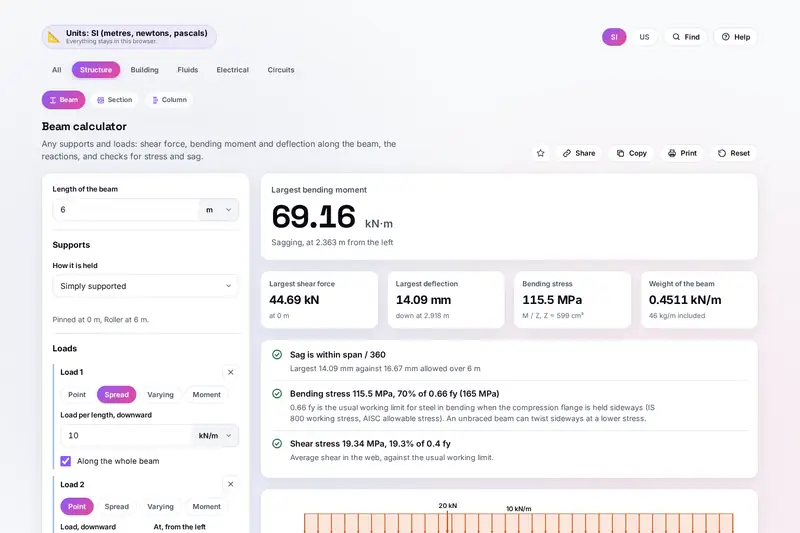
Table of Contents
Overview
Most engineering sums are short, but they are easy to get wrong in a hurry: a unit left in millimetres, a factor read from the wrong column, a load put on the wrong side of a support. EngCalc puts twenty-eight of them in one place, each with boxes that take any unit and an answer that shows every step, so you can check it by hand.
Its beam calculator takes any straight beam, with supports anywhere and point, spread, varying and moment loads together, and draws the shear, moment and deflection along it. Sections, Indian ISMB beams and columns follow IS 808, IS 800, Eurocode 3 and AISC 360; stairs are checked against India's National Building Code 2016, the US IRC and IBC and the UK's Part K; cables follow IEC 60364 or the US NEC.
Figures that differ in real life, such as pipe roughness, a liquid's viscosity, an LED's forward voltage or how much soil swells, are marked typical and can be replaced by your own. Concrete, cement and bricks are worked out in HomeCalc, so the same sums are not kept in two places.
Key Features
Beam Solver
Any supports and loads, the reactions, and shear, moment and deflection diagrams you can read anywhere.
Sections and Columns
Area, inertia and moduli of common shapes and ISMB beams, and column strength by three codes.
Stairs to the Code
Risers and treads for a floor height, checked against NBC 2016, the IRC, the IBC or Part K.
Steel and Site Work
Bar weights with laps and cutting, metal weight, roof pitch, slopes and digging with truck loads.
Pipes, Pumps and Tanks
Pressure drop with fittings, the pipe size, the motor to buy, and a tank's volume at any level.
Cable Size
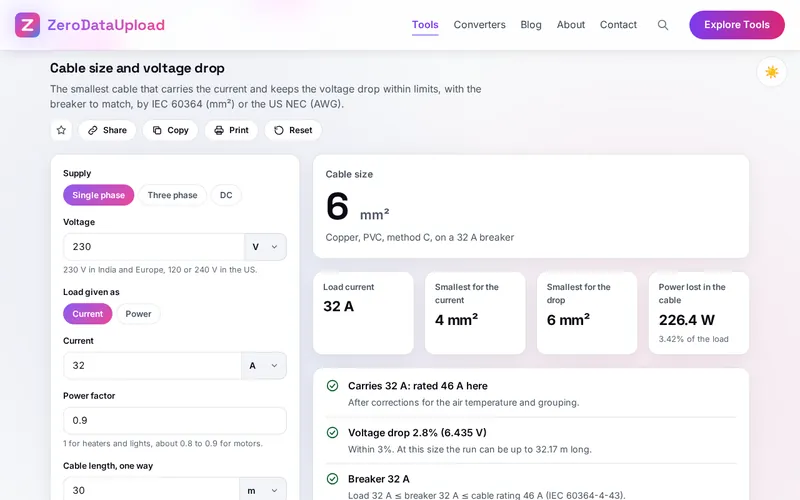
The smallest cable for the current and the voltage drop, with its breaker, by IEC or the NEC.
Electrical Basics
Current from kW, Ohm's law, wire gauges, power factor capacitors and battery backup time.
Circuit Codes
Resistor colours and SMD codes, capacitor codes, LED resistors, dividers, timers and PCB traces.
How to Use
- Pick a calculator - Open a kind with the tabs, or search All for a word such as beam, cable or resistor; press / to find one from anywhere in the tool.
- Choose SI or US units - The switch converts every box between metres, newtons and pascals and feet, pounds and psi.
- Type what you know - Every calculator opens with example values; type over them, with a unit after any number, feet and inches, sums or part codes such as 4k7.
- Read the answer and the checks - The main answer comes first, then the other results and notes that compare them with the usual limits and the codes.
- See how it is worked out - Each formula is listed with your numbers in it; on the beam's diagrams, point or use the arrow keys to read values anywhere.
- Share, copy or print - A link that opens the calculator with your numbers, the numbers and answer on the clipboard, or a clean printed sheet.
How the Figures Are Worked Out
- Beams - The reactions come from beam elements with a node at every support and load, the shear and moment from balancing the forces left of each point, and the deflection from at least 800 short elements: the results of an elastic beam, to within a few parts in 100,000. Stress is the moment over the section modulus, against 0.66 fy (0.4 fy for shear); sag against span/180 to span/360 as the codes give.
- Sections - Shapes are split into rectangles; the centroid comes from the first moments and each part adds b h3/12 plus its area times its distance squared. The plastic modulus halves the area. ISMB values are those of IS 808:1989, which IS 808:2021 has since replaced.
- Columns - Euler's load is pi2 E I / (KL)2. IS 800:2007 and EN 1993-1-1 reduce the yield strength by a factor from the buckling curve (imperfection 0.21, 0.34, 0.49 or 0.76, and 0.13 for Eurocode's a0) with partial factors of 1.10 and 1.0; AISC 360-16 uses 0.658 to the power fy/Fe or 0.877 Fe, with 0.9 (LRFD) or 1.67 (ASD).
- Stairs - Risers are the height over the riser you want, kept within the code: NBC 2016 190 mm and 250 mm treads for one- or two-family homes, 150 and 300 mm for other buildings, at most 12 risers a flight and 2.2 m headroom; the IRC 7 3/4 in and 10 in; the IBC 4 to 7 in and 11 in; Part K 150 to 220 mm rise, 220 to 300 mm going, 42 degrees.
- Pipes and pumps - Darcy-Weisbach with the Colebrook-White friction factor (64/Re when laminar), K times the velocity head for fittings; Hazen-Williams for comparison with water. Pump power is density x g x flow x head over the efficiency; motors are the IEC 60072-1 and IS 12615 sizes.
- Cables - The rating of each size, corrected for air temperature and grouping, against the load; the voltage drop as k x I x L x (R cos phi + X sin phi), with R at the cable's working temperature. Copper ratings from IEC 60364-5-52 and NEC Table 310.16 (2023); aluminium on IEC sizes is estimated at 75% of copper. The breaker sits between the load and the cable's rating.
- Circuits - Colour codes by IEC 60062, standard values from the E series of IEC 60063, capacitor codes by the EIA marking, the 555 timer's 0.693 RC times and IPC-2221's trace formula, I = k dT0.44 A0.725.
- Checked before publishing - We checked the stated figures against their sources (IS 808:1989, IS 800:2007, NBC 2016, IS 1172, IS 12615:2018, the IRC and IBC, the NEC and IEC tables) and compared the tool with a reference written separately from these rules, with 22,380 cases: 3,768 values typed in every unit, 843 beams against textbook formulas and a separate solution, 305 sections against hand formulas and polygon integrals, 15 checks of the ISMB table, 801 columns by every code, 1,504 stairs, 2,000 roofs, slopes and digs, 3,322 pipe and water cases, 2,000 pumps, tanks and belts, 3,023 electrical cases, 4,501 circuit cases, 253 bar schedules, 38 hostile values and 7 checks of sourced figures.
Frequently Asked Questions
The questions people ask most are answered on the tool page, just below the tool. The full list of 48 questions, from typing units to beam sign conventions, sag limits, ISMB values, column curves, stairs, pipe friction, cable ratings and resistor codes, is on the EngCalc FAQ page, and the help guide walks through every calculator.
Privacy & Security
Drawings, loads and project figures are often confidential. EngCalc has no upload step, no account and no server-side storage: everything is worked out by your browser, and what you type is kept only in this browser on this device, so it is there next time. Delete everything, in the tool's Help window, removes it.
The tool loads nothing from outside the site, and the page title never changes with what you type. A shared link carries your numbers in the part after #, which browsers never send to a server, and the page removes them from the address as it opens. Like every page on ZeroDataUpload, the tool page shows ads through Google AdSense and counts visits with Google Analytics; the Privacy Policy explains both, and your numbers are never part of them.
Ready to check a beam, a pipe or a cable? It's free, private, and runs entirely in your browser.
Open EngCalc →Related

Last Updated: November 3, 2026