
HomeCalc: Home and Property Calculators
Measure your rooms once, then work out the paint, tiles, cement, sand and bricks to buy, the carpet area you really get and the rent you can afford, worked out in your browser
Guide reviewed 9 November 2026 by Milan Salvi. How we write and correct guides.
Open HomeCalc →Step-by-step help guide and questions and answers for this tool.
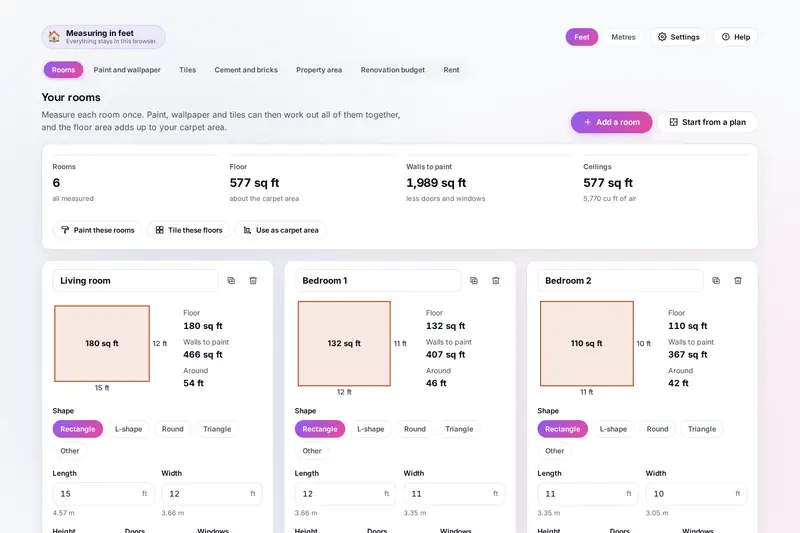
Table of Contents
Overview
Painting a flat, laying new tiles or casting a slab starts with the same questions: how much do I buy, and what will it cost? The answers usually come from a shopkeeper's guess or a contractor's quote, with no way to check them. HomeCalc works them out from your own measurements: you measure each room once, in feet or metres, and the paint, wallpaper, tile and plaster calculators use those rooms to give a shopping list in the units shops sell, from tins of paint and boxes of tiles to bags of cement and brass of sand.
It also answers the questions around buying and renting. Builders quote a super built-up area, but you live in the carpet area; HomeCalc turns one into the other and shows what each square foot you can use really costs with GST, stamp duty and registration. It converts guntha, cent, ground and acres, keeps a renovation budget with payments, and works out the rent your take-home pay carries.
Everything is worked out by your own browser, and every answer shows how it was worked out. The figures it starts from, such as what a litre of paint covers or how much water concrete may take, come from the makers' sheets and the Indian standards, and you can change each one to what is printed on the pack you buy.
Key Features
Rooms Measured Once
Any shape, doors and windows taken off, drawn as plans and shared by every calculator.
Paint and Wallpaper
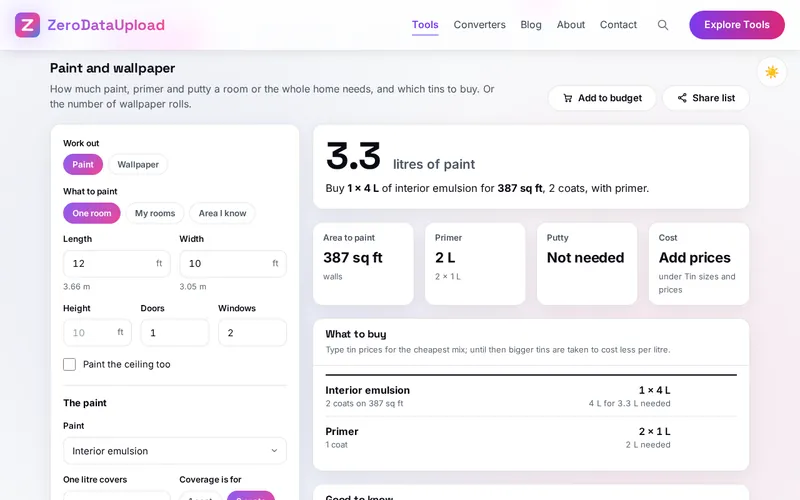
Litres, primer and putty with the cheapest mix of tins, or wallpaper rolls by the strip.
Tiles From the Layout
Tiles counted and drawn with their cuts, boxes, skirting, adhesive or mortar, and grout.
Cement, Sand and Bricks
Concrete, brick and block walls and plaster in bags, cubic feet, brass and tonnes.
Carpet Area and Price
Carpet, built-up and super built-up from any one of them, with the real price per square foot.
Land Units
Guntha, cent, ground, acre, hectare, square yards, square feet and square metres.
Renovation Budget
Items from every calculator, a buffer for surprises, payments, a spreadsheet and a printout.
Rent You Can Afford
Two limits from your pay and costs, and each flat checked with the cash to move in.
How to Use
- Measure your rooms - Add each room with its shape and sizes (12'6" and 3.8 m both work), or start from a 1, 2 or 3 BHK example and change the sizes.
- Work out the paint - Pick the rooms, the paint and the coverage printed on the tin; get the litres, the tins, primer and putty.
- Lay out the tiles - Choose the tile and pattern; see the layout with its cuts and get the boxes, skirting, adhesive and grout.
- Cement, sand and bricks - Type the slabs, beams, walls or plaster; get the bags of cement and the sand and aggregate.
- Check the area and price - Turn the super built-up area into carpet area and see the all-in price per square foot.
- Budget and rent - Send each list to the budget, record payments, and check the rent your pay carries.
How the Figures Are Worked Out
- Paint - The walls are the distance around the room times its height, less doors and windows (at the sizes in Settings), plus the ceiling if chosen. Litres are the area times the coats divided by what one litre covers in one coat, plus the extra for spills. Indian tins give the coverage for two coats; the starting figures are the lower end of a large Indian maker's product sheets: 130 sq ft a litre for two coats of interior emulsion, 140 for premium emulsion, 55 for exterior emulsion and 95 for gloss enamel, primer 215 sq ft a litre in one coat and putty 16 sq ft a kg in two coats. The tins are the cheapest mix that holds enough, found by searching every mix.
- Tiles - A rectangle laid straight is laid out tile by tile from a corner or centred, and thin cut pieces are cut several from one tile with 3 mm lost to each cut. Other shapes are counted by area plus 10% for cuts laid straight or as bricks, 15% diagonally and 20% in herringbone, then the spare for breakage. Grout is (A + B) / (A x B) x joint x thickness x 1.6 kg a square metre plus 10%; a mortar bed is 20 mm of 1 : 4 with grey cement slurry at 3.3 kg a square metre.
- Concrete - The dry materials take 1.54 times the wet volume, split by the nominal mix (M20 is 1 : 1.5 : 3), with cement at 1,440 kg a cubic metre, so a 50 kg bag is 0.0347 cubic metres. IS 456 allows nominal mixes only up to M20, and the water shown is the most its Table 9 allows per 50 kg bag (30 litres for M20). Steel is the weight per cubic metre from your structural drawing.
- Bricks and plaster - A wall one brick thick is its volume divided by a brick with its 10 mm joint on every side (500 modular bricks a cubic metre); half a brick or a block is counted by its face. Mortar and plaster take 1.33 times their wet volume in dry materials, plus 10%. One brass is 100 cubic feet.
- Property - Carpet area is the floor inside the walls, the area builders must state under RERA (2016). Built-up and super built-up are the carpet area raised by the percentages you type; the loading starts at 40%, the average ANAROCK found in India's seven largest cities in early 2025. GST is 5% under construction, 1% for an affordable flat and none on a ready one; stamp duty and registration are your state's. A guntha is 1,089 sq ft, a cent 435.6 sq ft and a ground 2,400 sq ft.
- Checked before publishing - We checked the starting figures against their sources and compared the tool with a reference written separately from these rules: 8,787 lengths, 1,213 areas and 4,763 amounts written in many ways, 600 rooms of every shape, the tins for 500 jobs against a search of every mix, 400 paint jobs, 300 wallpaper jobs, 800 rows of tiles and 400 floors laid out piece by piece, 400 tiling jobs, 400 concrete jobs, 500 walls and plasters, 400 flats' areas and prices, and 400 budgets, rent plans and flats. HomeCalc is a calculator for planning and buying, not a structural design; ask your engineer or contractor before you build.
Frequently Asked Questions
The questions people ask most are answered on the tool page, just below the tool. The full list of 46 questions, from typing measurements to paint coverage, tiles and boxes, cement and water, carpet area and loading, land units, the budget, rent and your data, is in the HomeCalc FAQ, and the help guide walks through every calculator step by step.
Privacy & Security
The size of your home, what you plan to spend and what you earn are nobody else's business. HomeCalc has no upload step, no account and no server-side storage: everything is worked out by your browser, and what you type is kept in your browser's storage until you choose Delete everything. A backup file is saved to your own device.
The tool loads nothing from outside the site, and the page title never shows a size or an amount. Like every page on ZeroDataUpload, the tool page shows ads through Google AdSense and uses Google Analytics; the Privacy Policy and Cookie Policy explain what those services collect and how the cookie banner controls them. Your figures are never part of it.
Ready to work out what to buy? It's free, private, and runs entirely in your browser.
Open HomeCalc →Related

Last Updated: November 3, 2026