
FairShare: Expense Splitter for Roommates and Flatmates
Split rent, bills and groceries with the people you live with, keep every balance to the paisa and settle up in the fewest payments, worked out in your browser
Guide reviewed 9 November 2026 by Milan Salvi. How we write and correct guides.
Open FairShare →Step-by-step help guide and questions and answers for this tool.
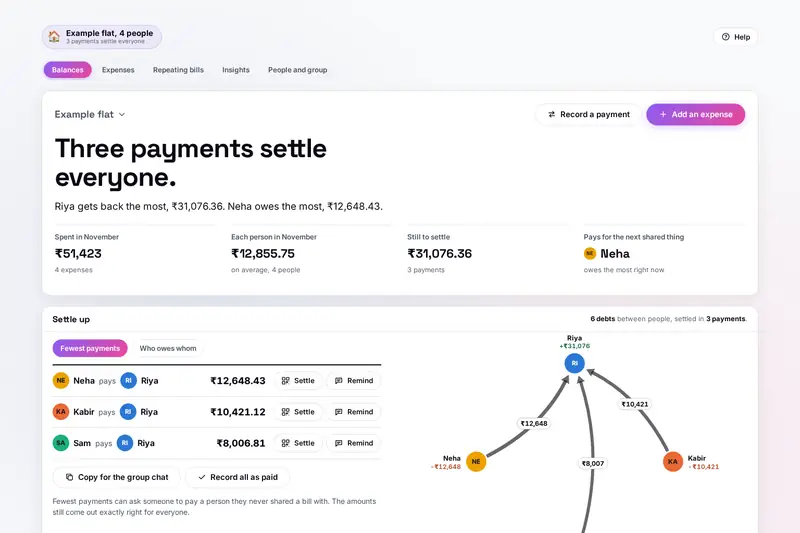
Table of Contents
Overview
Living with other people means a steady stream of shared costs: the rent one person pays the landlord, the Wi-Fi on someone else's card, the maid, the electricity that changes every month, grocery runs and takeaways, and the flatmate who moved in halfway through. Keeping it fair by memory or in a chat thread soon goes wrong. FairShare keeps one record of who paid what and who shares it, and turns it into a balance for each person and the fewest payments that settle everyone.
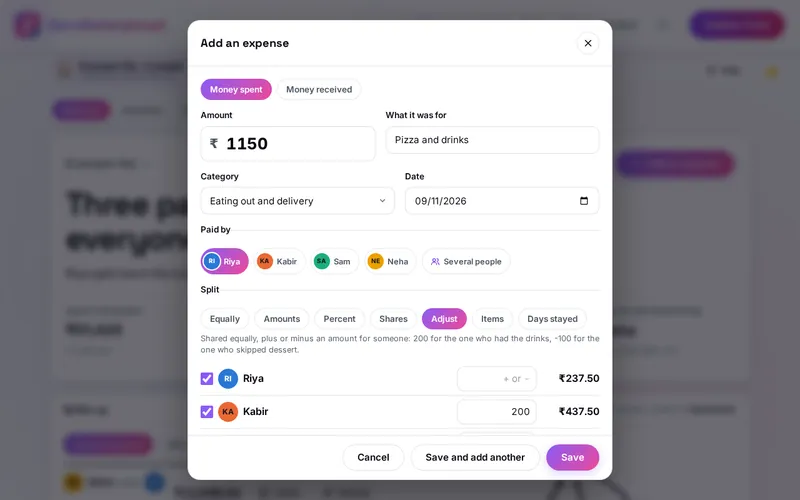
A bill can be split equally, by amounts, percent or shares, with an adjustment for one person, by the items on a receipt, or by the days each person lived there. Rent and Wi-Fi repeat by themselves, move-in and move-out dates keep anyone from paying for days they were not there, and the rent can be split fairly by room size or by what each room is worth to each person. For a flat in India, settling up opens any UPI app with the amount filled in.
Everything is worked out by your own browser. There is no account and no server: the group stays in this browser on your device, and you share it with your flatmates by sending a link or a file.
Key Features
Seven Ways to Split
Equally, amounts, percent, shares, adjustments, receipt items or days stayed, with several payers.
Exact to the Paisa
Every share adds up to the bill, and the odd paisa goes round from bill to bill.
Fewest Payments
The smallest number of payments that settles the flat, drawn as a map of who pays whom.
Repeating Bills
Rent, Wi-Fi and help added on their day; bills that change each time wait for the amount.
Moving In and Out
Move-in and move-out dates, bills shared by days stayed, and balances kept until settled.
A Fair Rent Split
By room size and extras, or by what each room is worth, with envy-free prices.
UPI Codes and Reminders
A QR code that opens any UPI app with the amount, and a friendly reminder to copy or share.
Shared Without a Server
The group sent by link or file and merged, Splitwise spreadsheets imported, backups and statements.
How to Use
- Start a group - Name the flat, type who lives there and choose the currency; add move-in dates under People and group.
- Add what anyone pays - Type the amount (1450, 1.2k or 450 + 320), what it was for and who paid; the category is guessed.
- Choose how to split it - Equally, by amounts, percent, shares, an adjustment, receipt items or days stayed.
- Set up repeating bills - Add the rent, Wi-Fi or the maid once; bills that change each time wait for the amount.
- Settle up - Follow the fewest payments, pay with a UPI code, record each payment and send a friendly reminder.
- Share with your flatmates - Send a link or a file; when a flatmate opens it, it is merged with their copy.
How the Figures Are Worked Out
- Shares of a bill - Every amount is a whole number of paise (or cents). A bill is shared in proportion to the split (equal, shares, percent or days); what is left after rounding down goes one paisa each to the largest remainders, and a tie is settled by the bill itself, so the odd paisa goes round. Receipt items are shared equally by the people who had them, and tax and delivery in proportion to each person's items.
- Balances - Each person's balance is what they paid for the group minus their share, plus what they paid flatmates and minus what flatmates paid them. Money received back (a refund, a deposit returned) counts the other way. The balances always add up to zero.
- The fewest payments - People are split into the largest number of groups whose balances cancel out among themselves; each group of n people needs n - 1 payments, so the total is as small as it can be. This is found exactly for up to 20 people with money owed. "Who owes whom" instead keeps every debt between the two people who shared the bill.
- Repeating bills - A bill is added on each day it falls due, on the same date each month (or the last day of a shorter month). Shared by everyone, it follows the people living there on that day; shared by days stayed, it counts each person's days since the bill last fell due.
- Fair rent - By room size, the share you choose is split equally and the rest by room size times (100 + extras in percent). By what each room is worth, the rooms go to the people who value them most in total and the prices are the envy-free ones that leave the least happy person as well off as possible; both are rounded to whole rupees and add up to the rent.
- Checked before publishing - We compared the tool with a reference written separately from these rules: 1,524 typed amounts, 2,500 bills split every way, 3,000 sharings-out of the odd paisa, 400 random flats and 504 sets of balances with the fewest payments checked against an exact search, 1,500 repeating-bill cases against a separate date library, 650 rent splits (the envy-free prices against a separate linear programme), 150 pairs of merged copies, 1,622 spreadsheet cases and 69 QR codes read back by two separate readers. FairShare is a calculator for sharing costs, not financial or legal advice.
Frequently Asked Questions
The questions people ask most are answered on the tool page, just below the tool. The full list of 38 questions, from adding and splitting expenses to settling up, UPI codes, repeating bills, fair rent, sharing with flatmates, Splitwise and your data, is in the FairShare FAQ, and the help guide walks through every part of the tool step by step.
Privacy & Security
Who owes whom in a flat is nobody else's business. FairShare has no upload step, no account and no server-side storage: everything is worked out by your browser, and your groups are kept in your browser's storage until you choose Delete everything. To share a group, you send your flatmates a link or a file yourself.
The share link carries the group after its # sign, a part browsers do not send to any website, and the page takes it off the address before its ad and analytics scripts load; anyone who has the link can read the group, so send it only to the people in it. The tool loads nothing from outside the site, and the page title never shows a name or an amount. Like every page on ZeroDataUpload, the tool page shows ads through Google AdSense and uses Google Analytics; the Privacy Policy and Cookie Policy explain what those services collect and how the cookie banner controls them. Your figures are never part of it.
Ready to settle up with your flatmates? It's free, private, and runs entirely in your browser.
Open FairShare →Related

Last Updated: November 3, 2026