
HandWritten: a Text to Handwriting Converter for Notes, Cards and Pages
Type or paste text and get pages that look written by hand, in English and five Indian languages
Guide reviewed 11 November 2026 by Milan Salvi. How we write and correct guides.
Open HandWritten →Step-by-step help guide and questions and answers for this tool.
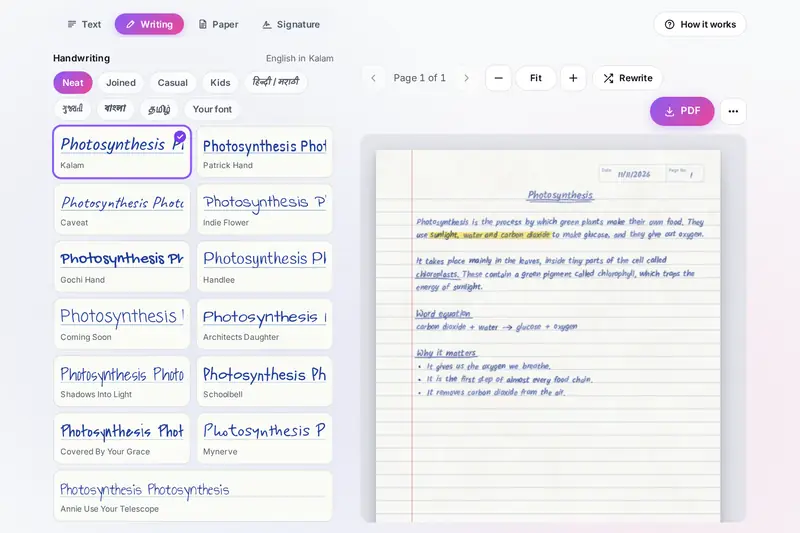
Table of Contents
Overview
Some things simply look better written by hand: a thank-you note, a page of revision notes, a recipe card, a journal page or the lettering in an art project. HandWritten takes text you type or paste and draws it as pages that look written with a pen on paper, with every letter a little different from the last, the writing sitting on the ruled lines, and the small marks real pages carry, from crossed-out words to a highlighter stroke.
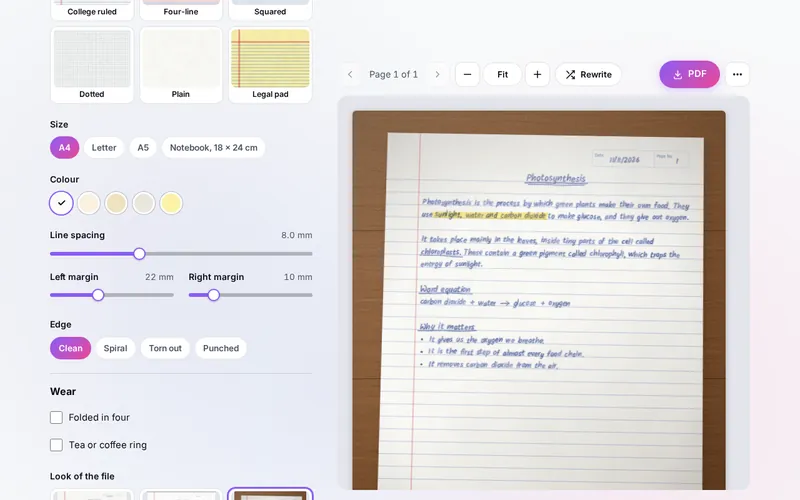
There are 54 handwriting styles: neat, joined, casual and children's styles for English, and styles for Hindi and Marathi, Gujarati, Bengali and Tamil, whose letters are shaped and joined as whole words. Choose a ballpoint, gel, fountain or felt pen or a pencil, an ink, a notebook, ruled, copybook, squared, dotted, plain or legal pad paper, and how the saved file should look: a clean page, a scan or a phone photo on a desk.
Your pages download as one PDF, as PNG or JPG pictures or in a ZIP, at 150 or 300 dots per inch, or go straight to your printer. A signature maker turns your typed name into a signature in a script style, or keeps the one you draw, as a picture with a clear background.
Key Features
54 Handwriting Styles
Neat, joined, casual and kids' styles for English, plus your own handwriting font if you have one.
Indian Languages
Hindi, Marathi, Gujarati, Bengali and Tamil in their own styles, shaped as whole words, mixed with English.
On the Lines
Letter size set from the line spacing, so the writing sits on notebook, copybook or squared paper.
Simple Formatting
Titles, headings, underlines, highlighter, crossed-out words, lists, arrows and new pages as you type.
Pens and Inks
Ballpoint, gel, fountain pen, pencil and felt tip, three tips, seven inks and any colour you pick.
Real-Life Touches
Natural variation, crossed-out mistakes, blots, doodles, folds, a tea ring and spiral or torn edges.
PDF, Pictures and Print
All pages as one PDF, pages as PNG or JPG or in a ZIP, at 150 or 300 dpi, clean, scanned or photographed.
Signature Maker
A typed name in twelve script styles with a flourish, or drawn by hand, as a PNG with a clear background.
How to Use
- Type or paste your text - Use the Text box or a sample; the buttons add titles, headings, underlines, highlights, crossed-out words, lists and new pages.
- Choose a handwriting - Under Writing, pick a style for each language on the page, then the pen, tip, ink, size, slant and spacing.
- Pick the paper - Under Paper, choose the paper, size, colour, line spacing, margins, edge and any wear.
- Add touches - Turn on crossed-out mistakes, writing that loosens down the page, blots or doodles if you want them.
- Check the pages - Go through every page and zoom in; Rewrite gives a fresh variation of the same text.
- Save - Download the PDF, a page as PNG or JPG, or all pages in a ZIP, or print, copy or share.
How the Tool Works It Out
- Lines and letter size - Each paper sets where its lines fall: 8 mm ruled lines, 7.1 mm college ruled (9/32 inch), 8.7 mm on a legal pad (11/32 inch), 5 mm squares, or sets of four lines on a copybook. The letter body is made about a third of the line spacing (on a copybook, the middle band), and each language's letters are matched to the English ones in height.
- Natural variation - Every letter (or every word, for joined styles and Indian languages) is drawn with small changes in size, slope, height above the line and ink, the lines wave gently and tilt a little, and the gaps between words vary. The changes come from a number kept with your settings, so the same settings always give the same page and the download matches the preview; Rewrite picks a new number.
- Wrapping and pages - Words fill each line up to the right margin, a slightly long last word may squeeze in as a writer would, and a word longer than the line is broken between whole letters. A heading never starts with fewer than three lines left on a page. One text fills at most 100 pages.
- Ink and paper - The paper gets a faint unevenness and grain, the ink is laid on top as on real paper, and each pen adds its own texture: the small skips of a ballpoint, the spread of fountain pen ink, the grain of a pencil. The scanned and photo looks are drawn over the finished page.
- Files - Each page is drawn again at 150 or 300 dots per inch and stored in a PDF or a ZIP that the tool writes itself, with no author or program details in the file.
- Checked before publishing - We compared the tool with references made separately: 574,038 cases in 13 groups: the marks for titles, underlines, highlights and crossed-out words compared with a separate reading of the same rules; the layout checked for words that leave the line, change order or are cut inside a letter; very long and broken text laid out against a time limit; the lines of every paper compared with the rules for each paper; PDFs read back by a separate PDF reader, ZIP files by a separate ZIP reader and PNGs by a picture library; saved settings made to break the tool checked value by value; file names; and every font file's licence compared with the licence list. The original version froze on a very long word or a line full of marks, cut emoji and Indian letter clusters in half when it broke a long word, dropped its underline, had no limit on pages, let a long name line run off the page, wrote two sRGB chunks into some PNGs, and read back saved settings without checking them; that is fixed.
Typed, Not Handwritten
The pages HandWritten makes are typed text drawn in a handwriting style, however natural they look. They suit notes for yourself, cards and letters to friends and family, journal and planner pages, scrapbooks, art and craft projects, mock-ups of a design and practice sheets. Where a teacher, an exam, an employer or an office asks for your own handwriting, write it by hand: a page made here is not that.
The same goes for the signature maker. It makes a picture of your name in a script style, or of what you draw, which looks good on a letter, a card or an email. Whether a picture of a signature is accepted on a document depends on who asks for it; for official papers, sign by hand or use the signing method they name.
Two other tools on the site sound similar. EmailSignature builds the signature block for your emails, with your name, job, links and logo as text for a mail program, and the Fancy Text Generator swaps letters for decorative characters you paste as text. HandWritten draws whole pages, and a signature, as pictures.
Frequently Asked Questions
The questions people ask most are answered on the tool page, just below the tool. The full list of 34 questions, from formatting and handwriting styles to Indian languages, pens and papers, PDF, pictures and ZIP, the signature maker and your privacy, is on the HandWritten FAQ page, and every part of the tool is explained step by step in the help guide.
Privacy & Security
This tool has no upload step, no account and no server-side storage. Your text, your signature and your own font are drawn by this browser, and the PDF, pictures and ZIP are made on your device. Your settings and text are kept only in this browser on this device, once you change something.
The tool asks no outside service for anything: the 54 handwriting styles are free fonts under open licences, stored with the tool. Like every page on ZeroDataUpload, the tool page shows ads through Google AdSense and counts visits with Google Analytics; the Privacy Policy explains both.
Ready to write your page? It's free, private, and runs entirely in your browser.
Open HandWritten →Related

Last Updated: November 3, 2026