
GIF Forge: a GIF Maker and Editor for Video, Pictures and Text
Turn part of a video, a screen recording or pictures into a GIF, edit it frame by frame, and save it small
Guide reviewed 11 November 2026 by Milan Salvi. How we write and correct guides.
Open GIF Forge →Step-by-step help guide and questions and answers for this tool.
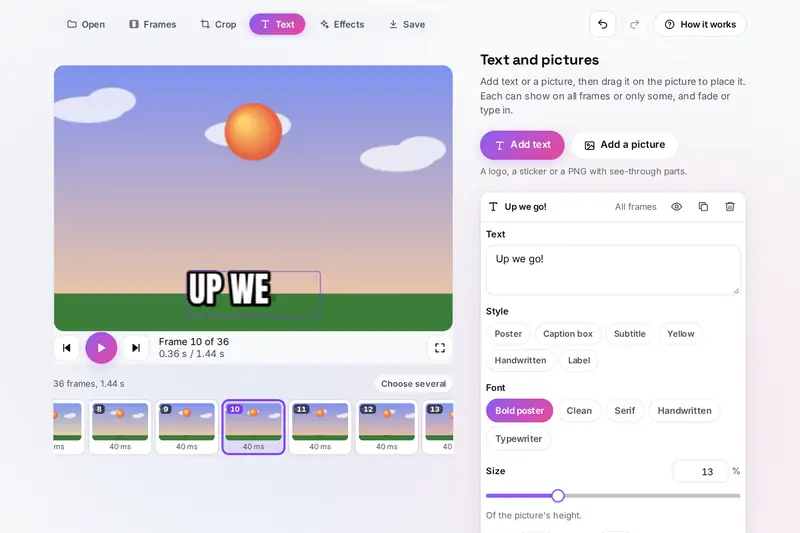
Table of Contents
Overview
A GIF is still the animation that plays almost everywhere: in chats, in documents, on web pages and in email. GIF Forge makes one from what you have, part of a video, a recording of your screen, a set of pictures or a sprite sheet, or opens a GIF you already have, and lets you edit it frame by frame before you save it.
The editing covers what a GIF usually needs: choosing, moving, copying and timing frames, the speed and length, reverse and boomerang, trimming, turning and cropping, space around for square and tall posts, the size, text that can fade or type in, a logo or sticker, twelve looks and the light and colour sliders, and a colour made see-through for a green screen. Every change can be undone.
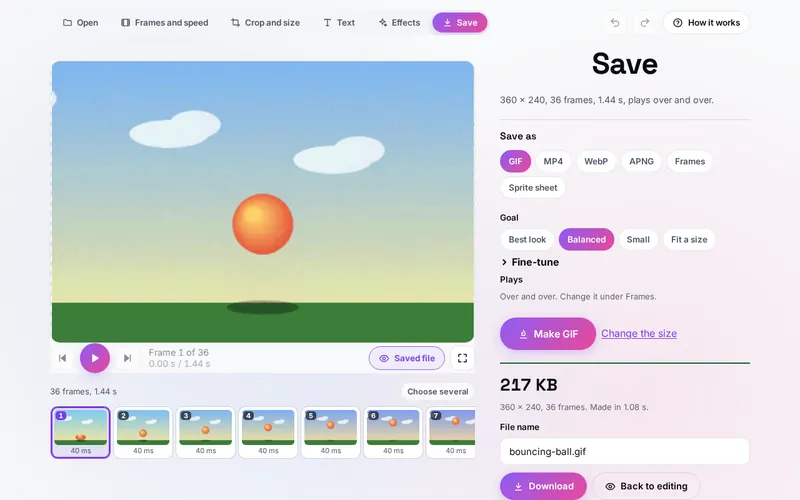
When you save, GIF Forge writes the GIF itself and shows the real file playing on the stage with its size. It can aim for the best look, a balance or a small file, or fit the GIF under a size you choose, and it can also save an MP4, an animated WebP or PNG, every frame as a picture, or a sprite sheet.
Key Features
Video to GIF
Pick the start, the end, the frames each second and the width, with an estimate before anything is made.
Pictures and Recordings
Photos in order with blends, sprite sheets, animated WebP and PNG, and a recording of your screen.
Frame by Frame
Choose, copy, move and time frames; speed, length, reverse, boomerang, drop frames and smooth loops.
Crop, Turn and Size
A crop box with shapes, plain edges cut off, space around for posts, and sharp pixels for pixel art.
Text and Stickers
Six text styles in five fonts that fade, type, pop, slide or blink, on all frames or some.
Looks and Effects
Twelve looks, light and colour sliders, blur, sharpen, pixelate, dark corners and see-through colours.
Small GIFs
Best look, Balanced, Small or Fit a size, with the real file and its size shown before you download.
More Than GIF
MP4, animated WebP, animated PNG, every frame in a zip with a timing list, and sprite sheets with CSS.
How to Use
- Open something - Drop a GIF, a video or pictures on the page, paste a picture, or press Open files; for a video choose the part, the frames each second and the width.
- Edit the frames - Under Frames and speed choose frames in the strip to copy, move, remove or time, and change the speed, the order or the length.
- Crop and size - Turn, mirror and crop, add space around for a square or tall post, and set the width.
- Add text and a look - Add a caption or a sticker and drag it into place, then pick a look or fine-tune the colours.
- Save - Choose GIF and Best look, Balanced, Small or Fit a size, or another format, and press Make; the real file plays on the stage.
- Download - Name the file and download it, or share it where your device offers sharing.
How the Tool Works It Out
- Frames from a video - The video plays in your browser and a frame is taken at each step of one second divided by the frames each second, from the start to the end you chose, at the width you chose.
- Colours - A GIF frame holds at most 256 colours. GIF Forge counts the colours of up to 80 frames spread over the animation and chooses one set of 255 for all of them (Xiaolin Wu's method, then refined), keeping the last place for see-through pixels; a frame with few colours keeps them exactly.
- Only what changes - Each frame stores only the box around the pixels that changed since the frame before; pixels that changed less than the setting allows are left see-through so the frame before shows through, and frames that change nothing are joined into the frame before.
- Packing - The pixels are packed with the LZW method of the GIF standard. The lossy setting lets a pixel take a nearby colour when that continues the run being packed, which makes the file smaller; no pixel moves further from its colour than the setting allows.
- Timing - A GIF counts frame times in hundredths of a second. Most browsers play frames of 10 ms or less at 100 ms, so every frame is kept at 20 ms or more, and the rounding is carried from frame to frame so the total length stays right.
- Checked before publishing - We compared the tool with references made separately: 29,093 cases in 13 groups: GIFs made by another program read frame by frame and compared pixel for pixel; GIFs, APNGs and animated WebPs written by the tool read back by another program and compared with what went in, including lossy packing within its allowance; the packing checked against the GIF standard; damaged, cut short and oversized files; the colour effects against the formulas of the web's filter standard; saved settings and kept animations made to break the tool; and the timing list read back by a spreadsheet reader. The original version asked for gigabytes of memory for a GIF frame larger than its picture, opened GIFs and pictures without any limit, gave a wholly see-through frame after a cleared frame the look of the frame before, cut an emoji in half in typed-in text, let a file name that looks like a formula into the timing list as one, and read back saved settings without checking them; that is fixed.
Making a GIF Small
A GIF's size depends on how many pixels change from frame to frame, how many colours there are and how many frames. The quickest savings are a smaller width (half the width is about a quarter of the pixels), fewer frames each second, a shorter part and cropping away what does not move. Under Save, Small allows more change before a pixel is stored again and packs harder; Fit a size does the work for you, trying stronger compression first, then a smaller picture, then every second frame, until the file is under the size you set, and tells you what it changed.
For a long clip, an MP4 is usually much smaller than the same animation as a GIF, and most phones and chat apps play it; it has no see-through parts and plays once, so GIF Forge can repeat the frames inside the video. Animated WebP keeps millions of colours and soft edges and is often smaller than a GIF; animated PNG keeps every colour exactly at a larger size.
Some of this overlaps other tools on the site. The MORPH media converter turns a whole video into an animated GIF at 12 frames a second and 480 pixels wide, along with many other conversions; UltraCompress Pro makes still pictures smaller. GIF Forge is the one to use when you want to choose the part, edit the frames, add text or control how small the GIF is.
Frequently Asked Questions
The questions people ask most are answered on the tool page, just below the tool. The full list of 34 questions, from opening videos and pictures to editing, text, small GIFs, MP4, WebP and APNG and your privacy, is on the GIF Forge FAQ page, and every part of the tool is explained step by step in the help guide.
Privacy & Security
This tool has no upload step, no account and no server-side storage. The videos, pictures and GIFs you open are read, edited and saved by this browser. Your settings and your last animation are kept only in this browser on this device; Start over or Forget it removes the animation.
The tool asks no outside service for anything. Record the screen uses your browser's screen sharing only when you press it, and the recording stays in this browser. Like every page on ZeroDataUpload, the tool page shows ads through Google AdSense and counts visits with Google Analytics; the Privacy Policy explains both.
Ready to make your GIF? It's free, private, and runs entirely in your browser.
Open GIF Forge →Related

Last Updated: November 3, 2026