
TextAnalyzer Pro
Read your text the way an editor would: counts and reading time, six readability formulas with a consensus grade, the tone and the words that set it, keywords and a word cloud, long and passive sentences, writing suggestions and two drafts compared, with every word kept in your browser where nobody else can see it
Guide reviewed 7 October 2026 by Milan Salvi. How we write and correct guides.
Open TextAnalyzer Pro →Step-by-step help guide and questions and answers for this tool.
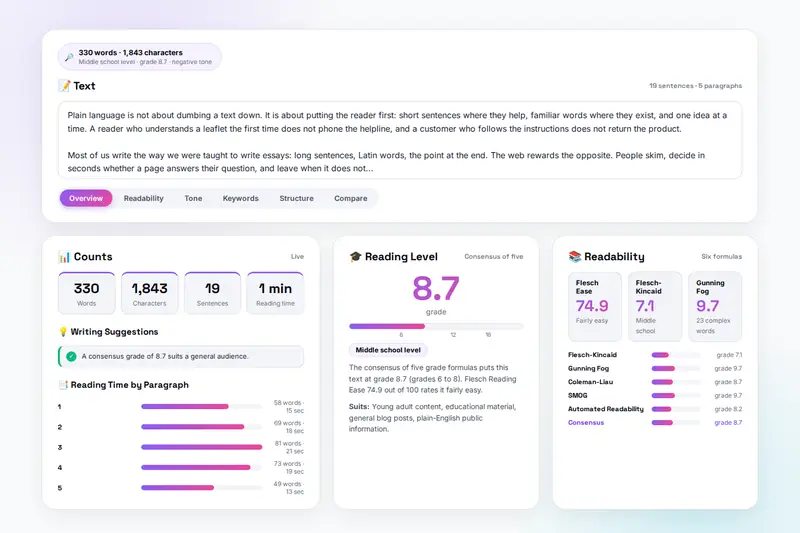
Table of Contents
Overview
TextAnalyzer Pro is a text analyzer that runs entirely in your browser. Paste a text and it counts words, characters, sentences and paragraphs, estimates reading and speaking time, and scores readability with six formulas: Flesch Reading Ease, Flesch-Kincaid Grade, Gunning Fog, Coleman-Liau, SMOG and the Automated Readability Index, with the formulas shown on the page, a consensus grade and the audience it suits. The analysis updates as you type, and selecting part of the text analyses that passage alone.
The Tone tab places the text on a scale from very negative to very positive and lists the words that were counted, with negation handled, so you can judge each one. Keywords shows the most frequent meaningful words with their density, the two-word phrases that repeat and a word cloud you can download. Structure shows how the sentence lengths are spread, how many sentences look passive, the connectors and -ly adverbs, the long sentences highlighted in the text, a line of difficulty across the text, typical targets for five kinds of writing and plain-English alternatives for words such as utilize and prior to. Writing Suggestions on the Overview says what an editor would mark first.
For editing there is a baseline to measure every change against, a Compare tab that puts two drafts side by side in one table, and saved analyses with trends. Exports cover JSON, CSV, text and Markdown reports, a copied summary and a printed page. Nothing is uploaded: the analysis runs on the page, the text is remembered in your browser's storage until you clear it, and the only copies that leave are the files you download.
Key Features
Live Counts
Words, characters with and without spaces, sentences, paragraphs, unique words, syllables, the longest word, reading time at a speed you set and speaking time.
Six Readability Formulas
Flesch Reading Ease, Flesch-Kincaid, Gunning Fog, Coleman-Liau, SMOG and Automated Readability, with a consensus grade, a reading level and a bar chart of the five grades.
Tone With the Evidence
A score from -1 to +1 from about 450 positive and negative words with negation handled, and the counted words listed so you can overrule them.
Keywords and Word Cloud
The top keywords with density, repeated two-word phrases, a density table and a word cloud of the forty most frequent words, downloadable as a picture.
Sentence Structure
Length distribution, passive voice, transition words, -ly adverbs, long sentences highlighted in the text and a difficulty line from the first sentence to the last.
Writing Suggestions
Editor's notes on sentence length, voice, adverbs, connectors, vocabulary, paragraph length, grade and tone, plus typical targets and plain-English alternatives.
Baseline and Compare
Keep one version's numbers and see every edit against them, or put two texts side by side in a thirteen-row table with their shared words.
Saved Analyses and Exports
Up to fifty snapshots with trends of word count and grade; exports as JSON, CSV, text, Markdown, a copied summary or a printed page.
How to Use
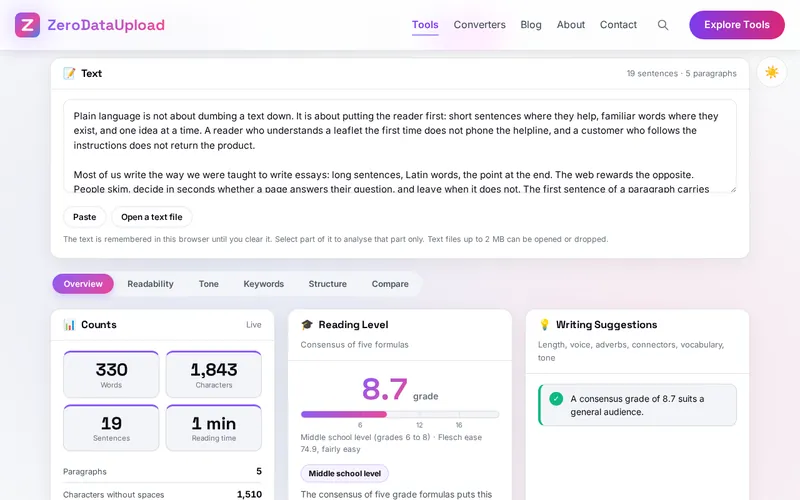
- Put the text in - Type or paste into the Text box, press Paste, drop or open a text file, or press Sample text. The analysis runs as you type; select a passage and press Analyse the selection to look at it alone.
- Start with the Overview - Counts, reading level on a scale, writing suggestions, reading time by paragraph and the baseline comparison.
- Check the readability - Six formulas with their notes, then the five grades side by side; agreeing formulas mean a reliable estimate.
- Read the tone and the keywords - The tone scale with the counted words; keywords with density, repeated phrases and the word cloud.
- Look at the structure - Sentence lengths, passive voice, connectors, adverbs, highlighted long sentences, the difficulty line, typical targets and plain-English alternatives.
- Compare, save and export - Set a baseline, compare two drafts, save a snapshot, export a report or print the page.
Readability, Tone and Keywords
- What the formulas measure - All six were fitted to sentence length and word length. Flesch Reading Ease gives a score out of 100; the other five give a U.S. school grade, from sentence and word length (Flesch-Kincaid, Automated Readability), from the share of long words (Gunning Fog, SMOG) or from letters per word (Coleman-Liau). None of them reads meaning, which is why the consensus and the highlighted sentences matter more than any single score.
- What a lexicon sentiment score can do - It counts words from two lists, flips a word after a negation and reports positive minus negative over their total. It catches drift in tone and fails on sarcasm and context, so the counted words are shown.
- Keywords and density - A frequency count with about 230 function words removed; one to three percent marks a topic word, above three percent reads as repetition. Two-word phrases catch the terms a single-word count breaks apart.
Frequently Asked Questions
The questions people ask most about TextAnalyzer Pro are answered on the tool page, just below the tool. The full list of 35 questions, from storage and privacy to troubleshooting, is in the TextAnalyzer Pro FAQ, and the help guide walks through every feature step by step.
Privacy & Security
A manuscript nobody has read, a contract, a cover letter, a patient leaflet before it is approved: TextAnalyzer Pro has no upload step, no account and no server-side storage. The analysis runs on the page, the text is kept in your browser's storage until you clear it, and the only copies that leave are the files you download yourself.
The tool asks for no permissions except the clipboard when you paste or copy, and loads nothing from outside the site. Like every page on ZeroDataUpload, the tool page shows ads through Google AdSense and uses Google Analytics; the Privacy Policy and Cookie Policy explain what those services collect and how the cookie banner controls them. Your text is never part of it.
Ready to try TextAnalyzer Pro? It's free, private, and runs entirely in your browser.
Open TextAnalyzer Pro →Related

Last Updated: October 7, 2026