
PaletteSnape
Pull a colour palette out of any picture or build one from a base colour, check it for contrast and colour blindness, and export it as CSS, SCSS, Tailwind, design tokens or PNG, with every picture and palette kept in your browser where nobody else can see it
Guide reviewed 7 October 2026 by Milan Salvi. How we write and correct guides.
Open PaletteSnape →Step-by-step help guide and questions and answers for this tool.
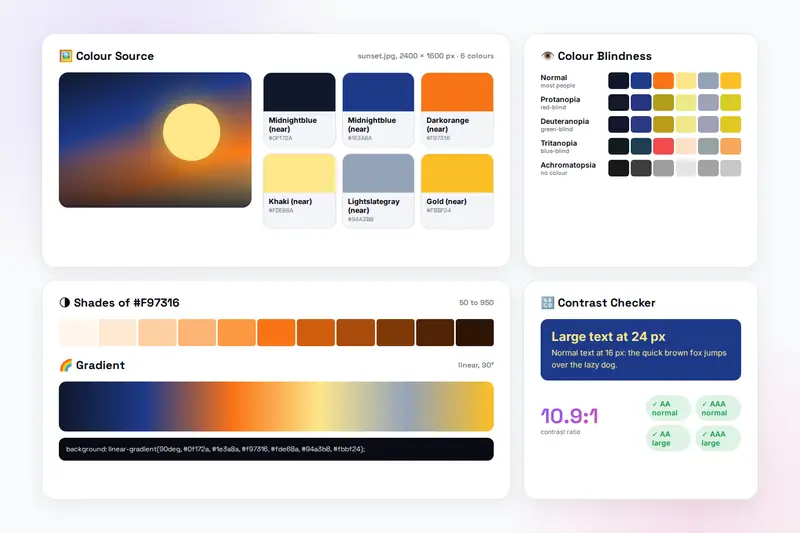
Table of Contents
Overview
PaletteSnape is a colour palette tool that runs entirely in your browser. Drop a photo, screenshot or logo on it, or paste one from the clipboard, and it counts the picture's colours and hands you its four to ten dominant ones as a palette. Or start from a single colour: pick it, type its hex or find one of the 148 named colours, then build a scheme around it with one of six harmonies, from the quiet analogous to the bold complementary. Lock the colours you like and press Random palette or Generate scheme until the rest fits.
Each colour shows its hex, nearest name, RGB and HSL values. Click one and the Shades card lays out eleven tints and shades named 50 to 950 as design systems name them. The Gradient card draws the palette as a linear, radial or conic gradient and gives you the CSS line. The Contrast Checker reports the ratio between any two colours against all four accessibility levels, and the Colour Blindness Preview shows the palette as people with four kinds of colour vision see it. When the palette is right, export it as CSS variables, SCSS variables, a Tailwind config, JSON design tokens or a PNG strip, and save it in the browser with a name.
Nothing is uploaded: the picture is read in your browser, drawn on a hidden canvas to count its colours and discarded when the page closes, and saved palettes live in your browser's storage with a backup file you export yourself. There is no account and no server.
Key Features
Colours From a Picture
Drop, choose or paste a picture and get its four to ten dominant colours, kept clearly apart from each other.
Six Harmonies
Complementary, analogous, triadic, split-complementary, tetradic and monochromatic schemes from any base colour.
148 Named Colours
Search the colour names every browser understands by name or hex, and see the nearest name on every palette card.
Locks and Random
Lock the colours you like; Random palette and Generate scheme replace only the rest.
Shades and Gradients
Eleven shades of any colour named 50 to 950, and linear, radial or conic gradients with the CSS to copy.
Contrast Checker
The ratio between a text colour and a background against the AA and AAA levels for normal and large text, with a live sample.
Colour Blindness Preview
The palette as seen with protanopia, deuteranopia, tritanopia and achromatopsia, to catch colours that merge.
Export and Save
CSS variables, SCSS, a Tailwind config, JSON tokens or a PNG strip, plus fifty saved palettes with backup and restore.
How to Use
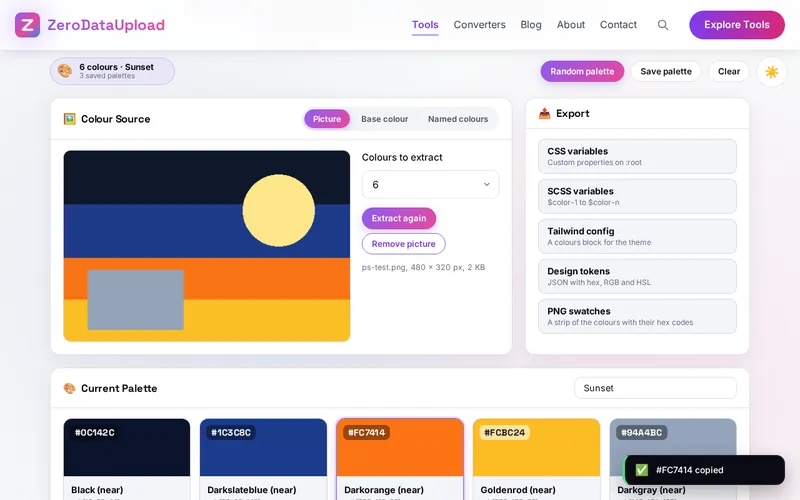
- Start from a picture - Drop it on the Picture panel, click to choose it or paste it; the six dominant colours fill the palette. Choose four to ten and Extract again.
- Or start from a colour - Pick a base colour or type its hex, Add to palette, or choose a harmony and Generate scheme. Named colours finds any of the 148 by name or hex.
- Shape the palette - Lock what you like, remove what you do not, and press Random palette until the rest fits. Up to ten colours.
- Shades and gradients - Click a colour for its eleven shades; set the gradient type and angle and copy the CSS.
- Check it can be read - Send colours to the Contrast Checker from their cards and read the four levels; look at the Colour Blindness Preview for colours that merge.
- Export and save - CSS, SCSS, Tailwind, tokens or PNG from the Export card; Save palette keeps it in the browser, and the saved list exports to a file.
Harmonies, Contrast and Colour Vision
- Harmonies - Colours sit on a wheel by hue. Complementary pairs the base with its opposite; analogous takes the neighbours at 30 and 60 degrees; triadic spaces three colours 120 degrees apart; split-complementary takes the two beside the complement; tetradic takes four at right angles; monochromatic keeps the hue and varies the lightness.
- Contrast - The ratio compares relative luminance from 1:1 to 21:1. The guidelines ask for 4.5:1 (normal text) and 3:1 (large text) at level AA, 7:1 and 4.5:1 at AAA. Lightness decides it, not hue.
- Colour vision - About one man in twelve has a red-green form of colour blindness. The preview applies a fixed channel mix for each kind, an approximation of the full form; never let colour be the only difference between two things that matter.
Frequently Asked Questions
The questions people ask most about PaletteSnape are answered on the tool page, just below the tool. The full list of 25 questions, from storage and privacy to troubleshooting, is in the PaletteSnape FAQ, and the help guide walks through every feature step by step.
Privacy & Security
Unreleased artwork, a client's photo, a private screenshot: PaletteSnape has no upload step, no account and no server-side storage. The picture is read in your browser, drawn on a hidden canvas to count its colours and discarded when the page closes; saved palettes live in your browser's storage, and the only copies that leave it are the files you export yourself.
The tool asks for no permissions except the clipboard when you copy, and loads nothing from outside the site. Like every page on ZeroDataUpload, the tool page shows ads through Google AdSense and uses Google Analytics; the Privacy Policy and Cookie Policy explain what those services collect and how the cookie banner controls them. Your pictures and palettes are never part of it.
Ready to try PaletteSnape? It's free, private, and runs entirely in your browser.
Open PaletteSnape →Related

Last Updated: October 7, 2026