
WebLab: an Online HTML, CSS and JavaScript Editor with a Minifier
Write code with a live page beside it, then make it smaller or easier to read
Guide reviewed 11 November 2026 by Milan Salvi. How we write and correct guides.
Open WebLab →Step-by-step help guide and questions and answers for this tool.
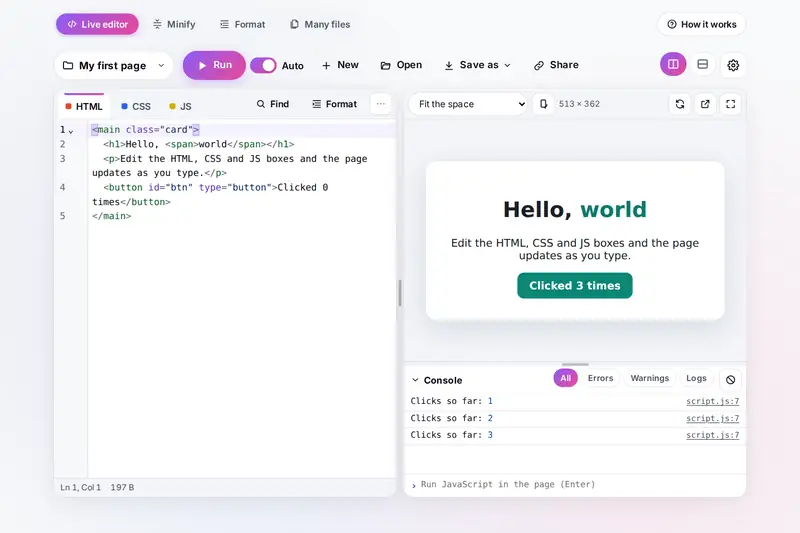
Table of Contents
Overview
Trying out an idea for a web page should not need a project folder, a local server and a browser window on the side. WebLab gives you three boxes for HTML, CSS and JavaScript and runs the page right beside them, updating as you type. Under the page, a console shows what your code logs and every error with the line it came from, so a mistake is one click away from being fixed.
The page can be shown at the size of a 360 or 412 pixel phone, a tablet, a laptop, a full HD screen or a size of your own, turned sideways or on its own. A loop that never ends is stopped after two seconds instead of freezing the tab, and your work is kept in this browser as projects that you can save as one HTML file or a zip, or share as a link.
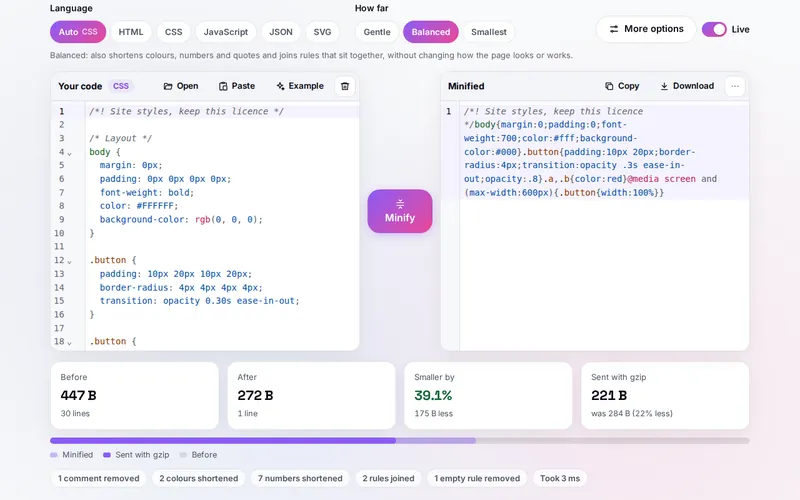
When the code is ready, WebLab also makes it ready to publish. Minify removes what browsers do not need from HTML, CSS, JavaScript, JSON and SVG and shows the size before and after, including the gzip size a server would send; Format turns minified or untidy code back into something readable. Many files does the same for a whole website folder or zip at once and gives you the site back as one zip.
Key Features
Live Page
The page runs beside your code and updates as you type; CSS changes show at once without a reload.
Device Sizes
Phones, tablets, a laptop, full HD or your own size, scaled to fit, turned sideways or on its own.
A Real Console
Logs, tables, groups and errors that jump to their line, and JavaScript typed straight into the page.
Loop Protection
A loop that runs longer than two seconds is stopped and named, and a frozen page has a Stop button.
Projects and Templates
Eight starting templates, projects kept in the browser, one-file or zip downloads and share links.
Minify Three Ways
Gentle, Balanced or Smallest for HTML, CSS, JavaScript, JSON and SVG, with gzip sizes and source maps.
Format Nine Languages
HTML, CSS, SCSS, Less, JavaScript, JSX, TypeScript, JSON and Vue, with your indent and line length.
Whole Websites
Drop a folder or a zip of up to 5,000 files and get it back minified or formatted, folders kept.
How to Use
- Write or open your code - Type into the HTML, CSS and JS boxes, start from a template, or open files, a folder or a zip.
- Watch the page - It updates beside the code; pick a phone, tablet or laptop size above it.
- Fix what the console shows - Click an error's line to jump to it, and type JavaScript at the bottom to try things in the page.
- Keep or share it - Your project is kept once you change it; Save as gives a file or a zip, Share a link.
- Minify or format - Paste or open code in Minify or Format, choose the level or indent, and copy or download the result.
- Do a whole site - In Many files, drop a folder or zip and download everything as one zip.
How the Tool Works It Out
- The live page - The HTML box becomes the page, with the CSS placed in its head and the JavaScript at the end of its body (or a complete page you pasted is used as it is). The page runs in a frame of its own, and the console reads it through messages; errors are traced back to the line of the box they came from.
- Endless loops - Before the page runs, every for, while and do loop gets a check at the start of its body, without changing line numbers. When one loop has kept going for more than two seconds, it stops as if it had reached break and the console names its line.
- Minifying CSS - The stylesheet is read token by token the way a browser reads it. Comments and spaces go, colours change only to an exactly equal shorter form, zero units are kept where browsers need them, and rules are joined only when they sit next to each other, so the cascade is unchanged.
- Minifying HTML - Comments and the spaces a browser would collapse anyway are removed, text inside pre and textarea is left alone, quotes go where they are not needed, and the CSS and JavaScript inside the page are minified too. Smallest also drops closing tags that HTML allows you to leave out.
- JavaScript and formatting - JavaScript is minified by a widely used open-source minifier and code is formatted by a widely used open-source formatter, both kept with the tool and run in the background so typing never stalls. The gzip size is measured with the browser's own compression.
- Checked before publishing - We compared the tool with references made separately: 80,533 cases in 14 groups: CSS from six well-known stylesheets and thousands of generated ones minified at every level and read back by the browser, which had to see the same rules, properties and values; HTML pages, among them this site's own, minified and compared with the original as the browser builds and shows them; the JavaScript minifier and the formatter compared with their published versions on the same code, and minified programs run to give the same results; JSON, SVG, zip files, share links, file names, the endless-loop check and the page built from the three boxes checked against separate references; saved data made to break the tool checked value by value; and very large and broken code finished within a time limit. The original version kept the page frozen for over an hour on a loop inside an endless loop, showed JSON errors without their line, removed the space next to a hidden element or a line break hidden by a stylesheet, could drop a style when a later value of it was invalid, and took minutes or crashed on very deeply nested or broken code; that is fixed.
Safe to Run, Safe to Publish
Code you paste from somewhere else can do anything a web page can do, so WebLab runs your page in a closed-off frame that does not share this site's address. It cannot read this site's storage or cookies, the data other tools keep, or anything outside its own frame. A page that uses localStorage gets a separate one, kept with the project. Files your own code links to, such as a font or a script from another website, load inside that frame only because you wrote the link; the tool itself adds none.
Minified code is for publishing, not for editing. Keep your original files, and use Format when you need to read a minified file again. Smallest is the most compact level, but code made with it may no longer pass a validator; Balanced is the usual choice for a website.
CodeForge, the site's code and data converter, sounds similar: it turns data from one format into another, such as JSON into CSV, XML or YAML, and can give JSON pretty or minified as part of that. WebLab is for web pages: you write and run HTML, CSS and JavaScript, and it minifies or formats them, one file or a whole folder.
Frequently Asked Questions
The questions people ask most are answered on the tool page, just below the tool. The full list of 30 questions, from the live page, the console and endless loops to projects, share links, minifying, formatting and whole websites, is on the WebLab FAQ page, and every part of the tool is explained step by step in the help guide.
Privacy & Security
This tool has no upload step, no account and no server-side storage. Your code is run, minified and formatted by this browser, and the files and zips are made on your device. Your projects and settings are kept only in this browser on this device, once you change something.
The tool asks no outside service for anything: the code editor, the minifier and the formatter are open-source software stored with the tool. Like every page on ZeroDataUpload, the tool page shows ads through Google AdSense and counts visits with Google Analytics; the Privacy Policy explains both.
Ready to write your page? It's free, private, and runs entirely in your browser.
Open WebLab →Related

Last Updated: November 3, 2026